AI credit consumption
The AI credit consumption analytics segment lets you track how AI consumers in your organization are spending AI credits.
Sources of credit consumption data
The data in this analytics segment comes from a specific set of products, tools, and AI agents. For details about what the metrics do and don't include, see the following sections.
Data included in the metrics
This analytics segment tracks spending information for the use of agents and models through the following products and tools:
AI Assistant in JetBrains IDEs, either when using a supported agent or in Chat mode.
JetBrains Central CLI, when using a supported agent wired through the CLI.
JetBrains Air, when using a supported agent in the desktop or web version of JetBrains Air.
The following AI agents are currently supported for data collection:
Junie, an AI coding agent developed by JetBrains. Data is also collected when Junie is used through its dedicated tool window.
Claude Agent, a third-party coding agent by Anthropic.
Pi, a minimal, open-source agent harness.
GitHub Copilot, a third-party coding agent by GitHub.
The charts may also show data labeled as Uncategorized, which includes consumption of AI credits by new or less common tools that don't have a dedicated categorization.
Data excluded from the metrics
The metrics in this analytics segment exclude the following usage of products and tools as they don't consume AI credits:
Using in-editor features such as Next edit suggestions and Code completion.
Using models from a centrally configured third-party AI provider. An organization administrator can configure connections to third-party AI providers and make models from the provider available to users in the organization. The use of such models is charged by the third-party provider directly and is not included in the metrics.
Using models from third-party AI providers configured locally in AI Assistant. When you provide your own API key from a supported AI provider directly in AI Assistant, the usage is also charged directly by the third-party provider and doesn't consume AI credits.
Using agents in AI Assistant with provider accounts or provider-specific authentication methods.
AI credit consumption report
The AI credit consumption report table is broken down by AI consumer and can be filtered by the following criteria:
In the time range filter, select one of the predefined filters that show the last specified period, or select a custom date range. The data includes both the first and the last day of the selected period.
In the tool filter, which displays All tools by default, show only the data that originates from the selected tools. In addition to JetBrains IDEs, the dropdown includes the following tools:
JetBrains Air, the agentic development environment (ADE) by JetBrains.
JetBrains Central CLI, which is a local command-line proxy rather than a development environment. Select it to show the data that comes from the coding agents that it routes.
In the agent filter, which displays All agents by default, show consumption data only for the selected AI agents. When no agent is selected, the table shows consumption for all agents, split by agent.
In the principal filter, which displays All principals by default, search for and select users, service accounts, or groups. Selecting a group includes all of its members and members of its subgroups. Expand a group to select its subgroups.
Filters of different types are combined with a logical AND. For example, data will match both the selected date range and the user the data is attributed to.
Multiple selections of the same filter are combined with a logical OR. For example, selecting a group along with an individual user shows data for that user and all members of the group.
Filter selections are preserved across analytics segments. The filters that you set in one segment are automatically preselected when you switch to another segment.
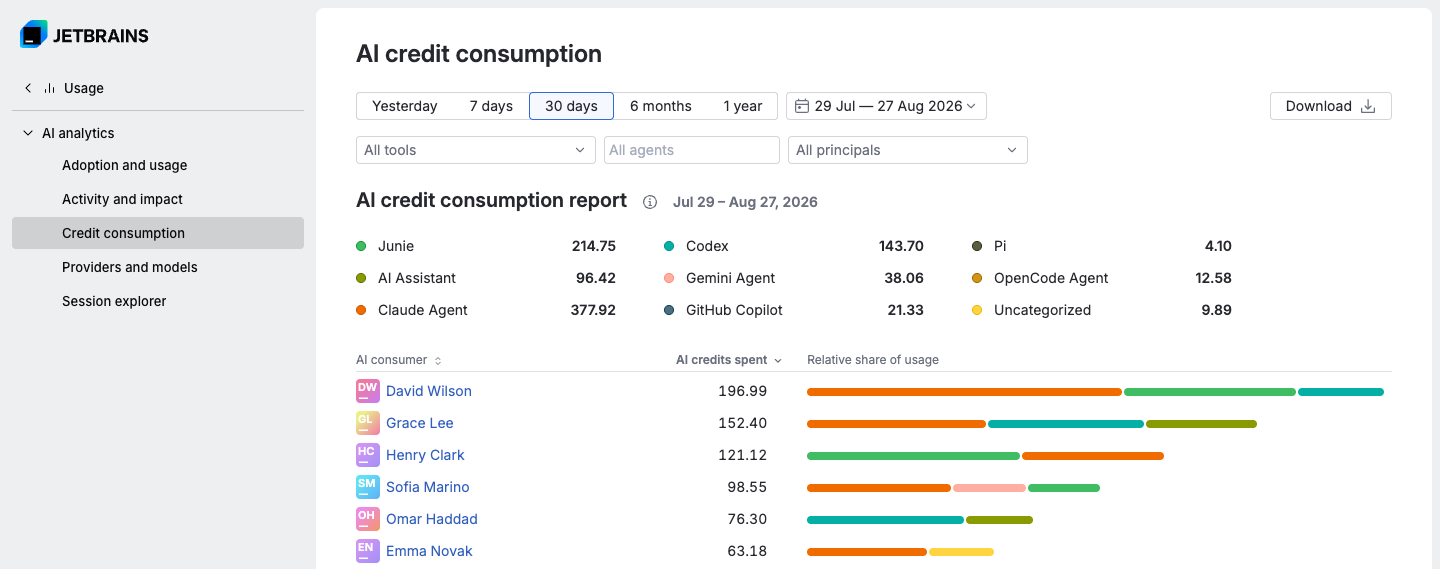
To change how data is sorted, click the column header.
For more information on how to download data and the data format, see Downloading data.