TeamCity Configuration and Maintenance
To change the server configuration, go to Administration | Global Settings. The following blocks of settings are available:
TeamCity Configuration
Setting | Description |
|---|---|
Database | The database used by the running TeamCity server. |
Data Directory | The \< TeamCity Data Directory \> path with the ability to browse the directory. |
Artifact directories | The list of the root directories used by the TeamCity server to store Build Artifact, build logs and other build data. The default location is The list can be changed by specifying a new-line delimited list of paths. Absolute and relative (to TeamCity Data Directory) paths are supported. All the specified directories use the same structure. When looking for build artifacts, the specified locations are searched for the directory corresponding to the build. The search is done in the order the root directories are specified. The first found build artifacts directory is used as the source of artifacts of this build. Artifacts for the newly starting builds are placed under the first directory in the list. |
Caches directory | The directory containing TeamCity internal caches (of the VCS repository contents, search index, other). You can manually delete files from this directory to clear caches. |
Server URL | The configurable URL of the running TeamCity server. |
Build Settings
Setting | Description |
|---|---|
Maximum build artifact file size | Maximum size in bytes. KB, MB, GB or TB suffixes are allowed. |
Maximum number of artifacts per build | Limits the number of artifacts published per build. |
Default build execution timeout | Maximum time for a build. Can be overridden when defining build failure conditions. |
Version Control Settings
Setting | Description |
|---|---|
Default VCS changes check interval | Set to 60 seconds by default. Specifies how often TeamCity polls the VCS repository for VCS changes. Can be overridden when configuring VCS roots. Additionally, you can enforce the interval of VCS changes check as a minimum polling interval for all VCS roots on the server. This way, Project Administrators will only be able to set intervals that are larger than the default one. This helps restrict the frequency of polling requests thus offloading the server. |
Default VCS trigger quiet period | Set to 60 seconds by default. Specifies a period (in seconds) that TeamCity maintains between the moment the last VCS change is detected and a build is added into the queue. Can be overridden when configuring VCS triggers. |
Encryption Settings
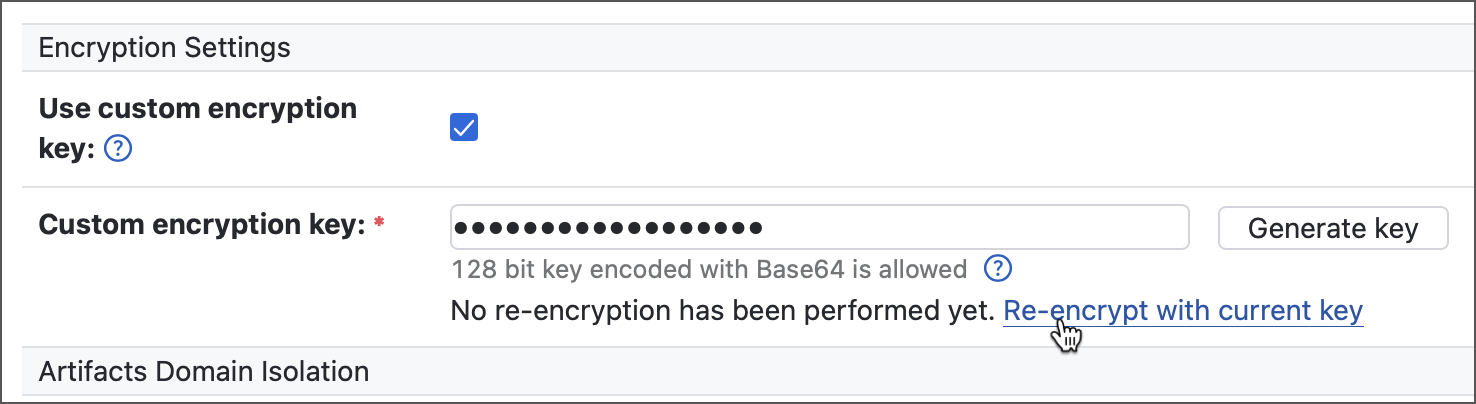
TeamCity protects all sensitive data stored in configuration files (secret values, SSH keys, licence product keys, and more) using a default encryption key, unique for each TeamCity installation. The Encryption Settings section lets you define a custom encryption key that will be used instead. The custom encryption key can be set via a TeamCity UI or (recommended) imported from an environment variable.
- In TeamCity UI
Enter a 128-bit key encoded with Base64 in the Custom encryption key field. You can click a corresponding action to let TeamCity generate a valid key.
Keys specified in TeamCity UI are stored in the
TeamCity Data Directory/config/encryption-config.xmlfile.Generating or entering a new encryption key forces TeamCity to use this key for newly encrypted objects. The previous keys are still in use for existing objects and are stored in the
encryption-config.xmlfile.<?xml version="1.0" encoding="UTF-8"?> <encryption-settings> <key value="oldKey1" /> <key value="oldKey2" /> ... <key value="currentKey" default="true" /> </encryption-settings>- Import from the environment variable
If a TeamCity server detects the non-empty
TEAMCITY_ENCRYPTION_KEYSenvironment variable when starting, it imports encryption key(s) from this variable and locks the Custom encryption key field in the UI.This is a more secure option since encryption keys are not stored in the
encryption-config.xmlfile, making theData directory/configfolder more suitable for being stored in a remote VCS repository.The
TEAMCITY_ENCRYPTION_KEYSvariable stores the currently used and previous encryption keys using a colon as a separator, with the current key being the first:currentKey:oldKey1:oldKey2:oldKey3...The Generate key option does not automatically write the generated key to the
TEAMCITY_ENCRYPTION_KEYSvariable, you need to do that manually.
You can switch from one mode to another at any time. If your server stores keys in the encryption-config.xml file, export them to a variable as shown below.
Similarly, if your server uses the TEAMCITY_ENCRYPTION_KEYS variable, move its key values as separate <key value="key_value"/> entries to the encryption-config.xml file, adding default="true" for the currently used key.
Switching the active encryption key does not automatically re-encrypt existing encrypted values. To re-encrypt them, click Re-encrypt with current key in the global server settings. This process may take several hours, depending on the number of encrypted entities. If the server is restarted during re-encryption, TeamCity will automatically continue from the last processed item once it’s back online.
Missing Encryption Keys
TeamCity encrypts many types of sensitive data, from product license keys to SSH keys used in individual projects. If any encryption key is lost, TeamCity can no longer decrypt the associated data, making those values permanently inaccessible.
To prevent this, TeamCity tracks all active encryption keys and detects when any are missing. It stores key hash codes in the TeamCity Data Directory/config/encryption-config.xml file. When the server starts, TeamCity compares the hashes of available keys with those stored in this file. If they do not match, a startup error screen appears, blocking the server from loading.
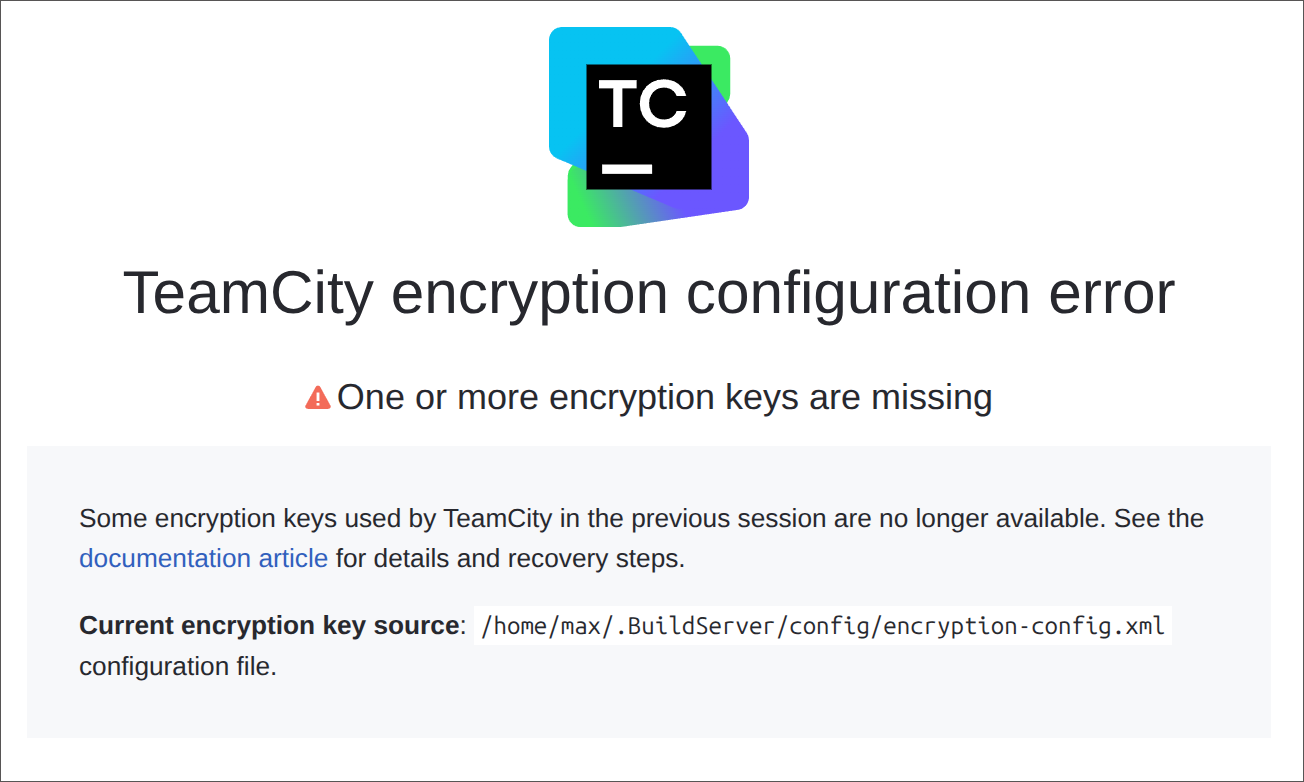
To resolve this issue and start the server:
(Recommended) Restore the missing encryption keys either in the
encryption-config.xmlfile or theTEAMCITY_ENCRYPTION_KEYSenvironment variable.Alternatively, remove the
encryptionKeysHashesattribute fromencryption-config.xmlto clear the list of known keys. Note that any data encrypted with the missing keys will become unavailable, and users will need to re-enter related values (such as SSH keys or parameter-based passwords).
Special Notes
TeamCity encrypts only configuration files. Other sensitive data (for example, database credentials) should be secured separately.
If your encryption key was leaked, changing the TeamCity encryption key alone may be insufficient, as the attacker could use the compromised key to decrypt sensitive data. We recommend rotating all credentials in addition to updating the encryption key.
Artifacts' Domain Isolation
Setting | Description |
|---|---|
Enable isolation protection | If enabled, build artifacts will be loaded from a separate domain and any potential malicious content will not be able to communicate with the TeamCity server on behalf of the user viewing this content. This mitigates the risk of XSS attacks through artifacts and of other related vulnerabilities. Note that this mode requires configuring a dedicated domain for TeamCity. To continue using artifacts for displaying some build results (for example, custom reports), you need to specify this domain's URL below. |
Artifacts' URL | Specify a URL to serve build artifacts from. Note the URLs for artifacts isolation and the TeamCity server must have different hostnames. Using different ports of the same hostname for both resources may lead to various problems, including failed builds and issues with signing in to TeamCity. On receiving a request for a content of some artifact, TeamCity will redirect your browser to a temporary URL that uses this artifacts' URL as a base. The temporary URL expires after some time to prevent unauthorized access to the artifact. Upon accessing the expired URL, a regular authentication will be performed and a new URL will be generated. For a personal TeamCity installation, which is accessible via localhost only, a URL like For a TeamCity server used by an organization, a new DNS name, or a Note: as this is a special URL which exists for serving artifacts only, users will not be able to sign in to the TeamCity interface via it. |