Working with Build Queue
In TeamCity, build queue is a list of builds that were triggered, or launched manually, and are waiting to be started. TeamCity distributes them to compatible build agents as soon as they become idle. A queued build is assigned to an agent at the moment it is started on the agent; no preassignment is made while the build is waiting in the build queue.
Queue Page
Access the Queue page from the top navigation bar. This page shows the list of builds waiting to be run and displays the following information for each build:
The position in the queue, which also serves as a link to the Build Results page.
The source branch name (if available).
A linkable path in the hierarchy: all parent subprojects and the build configuration.
Time to start: the estimated wait duration. Hovering over the estimated time value shows a tooltip with the following information:
Expected start/finish time.
The link to the planned agent.
If the current build is a part of a build chain and the builds it depends on are not finished yet, a corresponding note will be displayed. For some builds, like the builds that have never been run before, TeamCity cannot estimate possible duration, so the respective message will be displayed in the tooltip.
A brief description of the event that triggered the build.
The number of agents compatible with this build configuration. You can click an agent's name link to open the Agents page, or use the down arrow to quickly view the list of compatible agents in the pop-up menu.
Build Duration Estimates
TeamCity estimates the duration of queued and running builds from finished builds of the same build configuration. These estimates are used to calculate expected start and finish times, show the remaining time for running builds, detect hanging builds, optimize and order the build queue, and select the fastest agent.
When a build configuration runs with different effective settings, TeamCity looks for recent builds with the same settings. Effective settings include custom parameter values specified in the Run Custom Build dialog, as well as other build configuration settings that can affect the workload.
If TeamCity finds enough matching builds with consistent durations (five builds by default), it uses this matching history for the estimate. Otherwise, it falls back to the recent history of the entire build configuration. As a result, a new or rarely used combination of settings still receives a general estimate, while recurring variants gradually receive estimates based on their own history.
Only finished, non-personal, and non-canceled builds are considered. When TeamCity compares compatible agents, it also uses the history relevant to each agent. Cloud agents started from the same cloud image share this history, so a newly started agent can reuse duration data collected by previous agents from that image.
Build Queue Optimization by TeamCity
By default, TeamCity optimizes the build queue as follows:
If a similar build exists in the queue, a new build (on the same change set and with the same custom properties) will not be added.
If an automatically triggered build chain has more changes than a build chain that is already queued, the latter will be replaced with the automatically triggered build chain, if such replacement will not delay obtaining the build chain results (based on the estimated duration).
While a build chain is in the queue, TeamCity tries to replace the queued builds with equivalent started builds.
Builds that have been staying in a queue for longer than 15 days are canceled automatically (for example, if there are no compatible agents).
Agent Selection for Queued Build
When there are several idle agents that can run a queued build, TeamCity tries to select the fastest one as follows:
If no builds have previously run on agents, the CPU rank is used to select an agent.
If builds have previously run on agents, TeamCity compares compatible agents by their estimated build durations using history relevant to each agent. Cloud agents started from the same cloud image share this history. If the estimates are identical, TeamCity uses their CPU ranks.
Ordering Build Queue
TeamCity users can manage queued builds as follows:
Users with the "Reorder builds in queue" permission (included in the default "Project developer" role) can drag-and-drop queued builds to reorder them, as well as move their builds to the top of the queue.
Stop regular and personal builds to remove them from the queue. Project administrators can additionally stop personal builds triggered by other users due to the "Stop / remove from queue any personal build" permission.
Reordering Queued Builds
To reorder builds in the build queue, drag them to the desired position on the Queue page. To promote a specific build to the top spot in the queue, do one of the following:
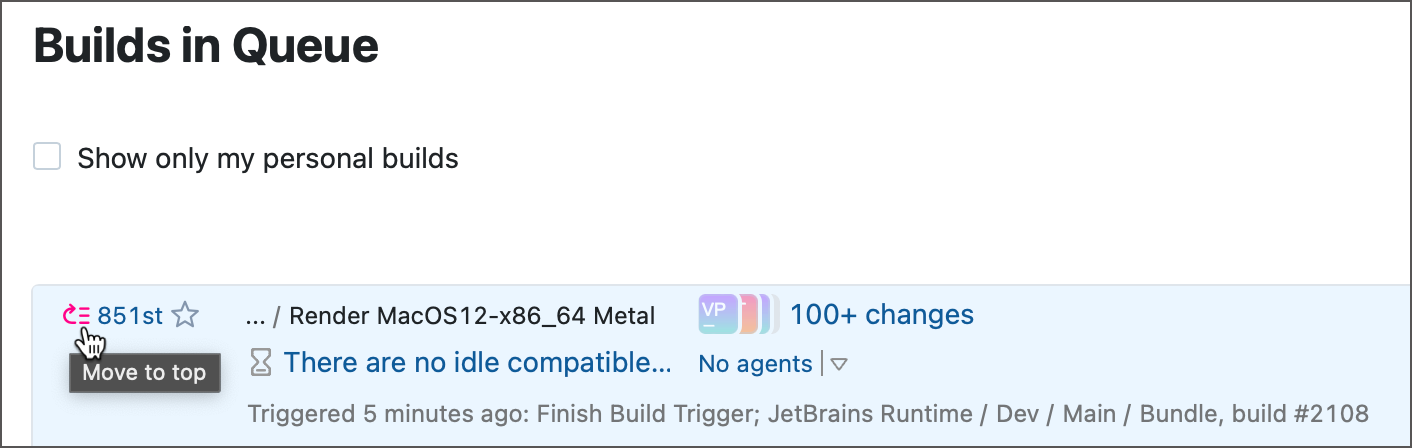
Click the arrow button next to the build order number on the Queue page.
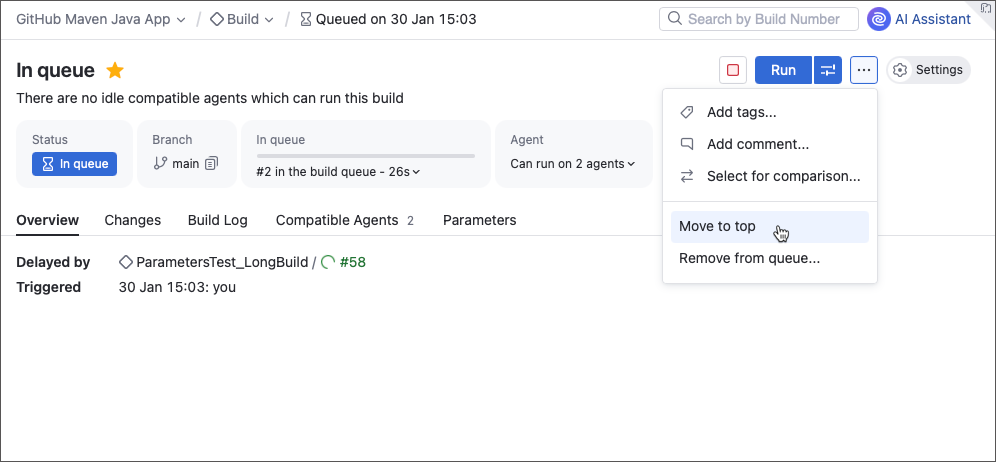
Click Actions | Move to top on the queued build's Overview page.
Moving a composite build to the top of the queue promotes the entire build chain. If a running composite build has dependency builds that have not yet started, you can explicitly move them to the queue top by clicking Move queued dependencies to top item in the composite build's Actions menu.
Removing Builds from Build Queue
To remove build(s) from the queue, check the Remove box next to the selected build and confirm the deletion. If a build to be removed from the queue is a part of a build chain, TeamCity shows the corresponding message below the comment field. Refer to the Run Build Chains article for details.
Additionally, you can:
Remove all your personal builds from the queue at once from the Actions menu.
Remove several builds of paused build configurations from the queue.
Pausing and Resuming Build Queue
The build queue can be paused manually or automatically. In this case, the builds are still going to be added to the queue, but they will not be assigned to agents until the queue is unpaused.
Users with the Enable/disable agent permission (included in the Agent Manager role by default) can manually pause/resume the build queue (since pausing the queue is equivalent to disabling all agents on the server). This action is available in the upper right corner of the Queue page.
When the queue is paused, every page in TeamCity will contain a message with information on the reasons for pausing.