Pass Data in a Chain
Members of a build chain can exchange two kinds of data:
Files — through artifact dependencies. An upstream build publishes files; a downstream build downloads them before it starts.
Values — through output parameters. A name-value pair set in one object is read by another further down the chain.
Both mechanisms flow in the direction of the chain: data moves from upstream to downstream, never the reverse.
Artifact dependencies
An artifact dependency reuses the output (artifacts) of one build in another. When configured, TeamCity downloads the required files to the agent before the downstream build starts.
Artifacts can be taken from:
A build of an upstream object in the same chain.
A build of a configuration that is not part of the chain.
A previous build of the same configuration.
Configuring artifact dependencies
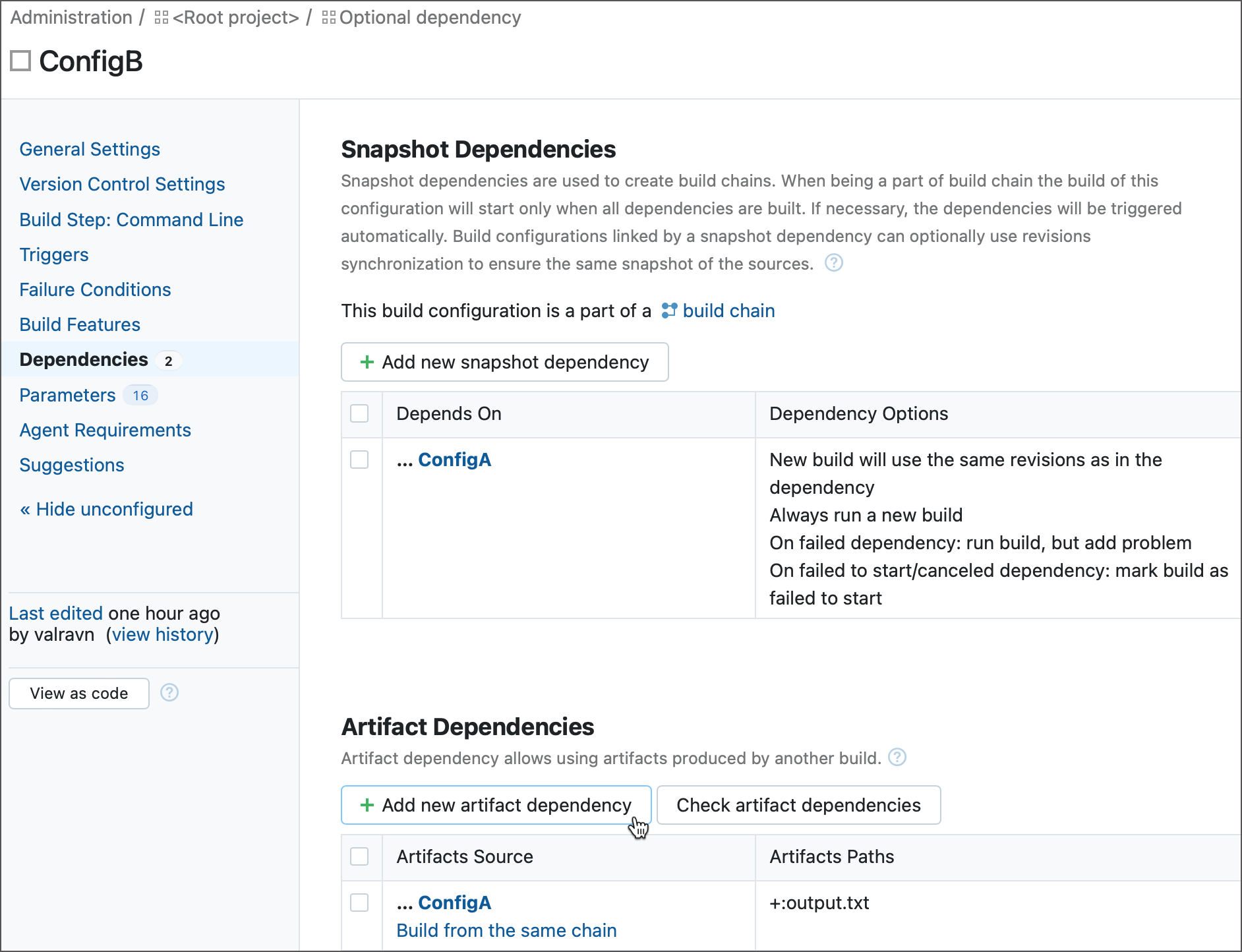
For build configurations, add an artifact dependency on the Dependencies page of configuration settings.
The dialog has the following key settings:
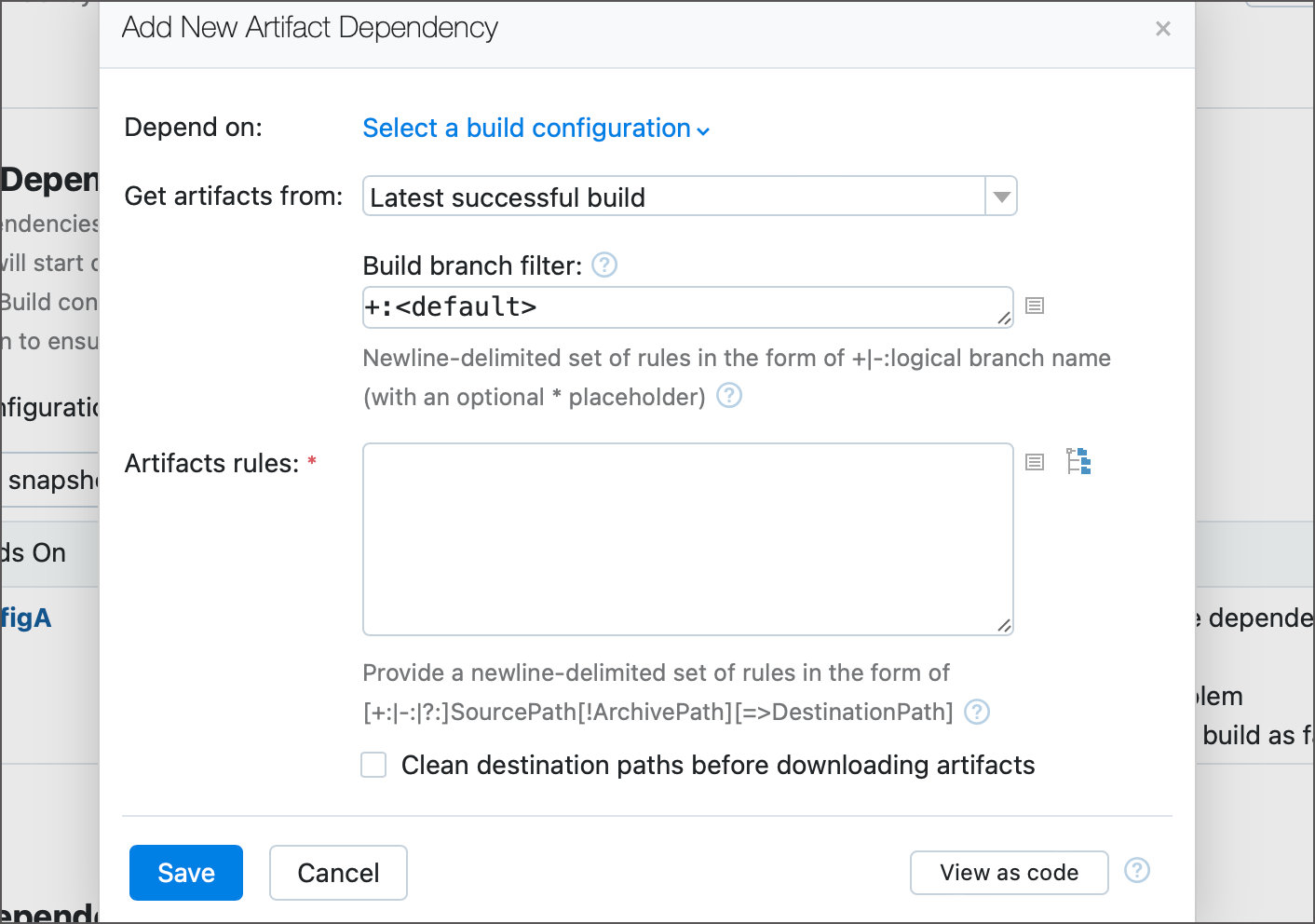
- Depend on
The configuration whose artifacts you want to use.
- Get artifacts from
Which build of the source configuration to take artifacts from:
Latest successful build/Latest pinned build/Latest finished build — the most recent matching build.
Build from the same chain — the same-chain build. Use this together with a snapshot dependency. If the source is outside the chain, the build fails.
Build from the same chain or last finished — same as above, but falls back to the latest finished build when the source is not in the chain.
Build with specified build number/Latest finished build with specified tag — a specific build, identified by number or tag.
- Artifact rules
Which files to download and where to place them. See Artifact rules below.
- Clean destination paths before downloading artifacts
Deletes the contents of the destination directories before downloading, applied to all inclusive rules.
In pipelines, artifact dependencies are configured in YAML. This involves two separate pipelines, each with its own configuration file.
First, a job in the upstream pipeline publishes the file via a files-publication block:
Then a job in the downstream pipeline imports it via a download-artifacts block, referencing the upstream pipeline declared in its dependencies:
Artifact rules
An artifact rule specifies which artifacts to download and where to store them. Each rule goes on its own line and uses the following syntax:
- Prefix
+:— include (default;mylib.dlland+:mylib.dllare identical).-:— exclude a file or pattern from the download.?:— optional include. If the file is missing, the build continues with a warning instead of failing.
- SourcePath
Path relative to the source build's artifacts directory. Accepts a file, a directory, or Ant-like wildcards. The source directory structure is preserved starting from the first wildcard.
- ArchivePath
Extracts files from a downloaded archive (
zip,7z,jar,tar,tar.gz, and more). For example,release.zip!*.dllextracts the.dllfiles from the archive root.- DestinationPath
Target directory on the agent, relative to the build checkout directory. If omitted, artifacts go to the checkout root. Ignored for
-:rules.
Examples:
The ?: prefix is especially useful in partial chains: if an upstream build that normally provides a file is skipped, an optional rule keeps the downstream build from failing.
Parameters
Chain members exchange values through build parameters. This section is a quick overview — for the full syntax, examples, and edge cases, see Use Parameters in Build Chains.
A value is shared down the chain by declaring it as an output parameter in the upstream object. Input parameters stay private to their owner; output parameters are visible to downstream objects.
- Read an upstream value
A downstream object reads an upstream output parameter via
dep.<upstream-ID>.<param-name>.- Read another job's value
Within a single pipeline, a job reads a preceding job's parameter via
job.<job-ID>.<param-name>.- Override an upstream value
A downstream object writes back to an upstream input parameter via
override.dep.<upstream-ID>.<param-name>. This is the only case where data flows against the chain direction, and it is resolved before the upstream build starts.
Output parameters are designed to be read by other objects, not by the one that declares them. If a configuration or pipeline references its own output parameter, the reference does not resolve: TeamCity treats the unresolved %...% as an implicit agent requirement, and the build fails to start with a "no compatible agents" error. The snippet below demonstrates this.
For build configurations, the equivalent declaration uses params and outputParams blocks. See Use Parameters in Build Chains for complete examples of all three patterns above, the * wildcard for overriding multiple objects at once, and conflict resolution rules.
Advanced concepts
Build-level authentication
The system properties system.teamcity.auth.userId and system.teamcity.auth.password store automatically generated build-unique values which can be used to authenticate on TeamCity server. The values are valid only during the time the build is running. This generated user has limited permissions which allow build-related operations. The primary intent for the user is to use the authentication to download artifacts from other TeamCity builds within the build script.
Using the properties is preferable to using real user credentials since it allows the server to track the artifacts downloaded by your build. If the artifacts were downloaded by the build configuration artifact dependencies or using the supplied properties, the specific artifacts used by the build will be displayed at the Dependencies tab on the Build Results page. In addition, the builds which were used to get the artifacts from, can be configured to have different clean-up logic.
Configuring artifact dependencies using Ant build script
This section describes how to download TeamCity build artifacts inside the build script. These instructions can also be used to download artifacts from outside of TeamCity.
To handle artifact dependencies between builds, this solution is more complicated than configuring dependencies in the TeamCity UI but allows for greater flexibility. For example, managing dependencies this way will allow you to start a personal build and verify that your build is still compatible with dependencies.
To configure dependencies via Ant build script:
Download Ivy.
Add Ivy to the classpath of your build.
Create the
ivyconf.xmlfile that contains some meta information about TeamCity repository. This file is to have the following content:<ivysettings> <property name='ivy.checksums' value=''/> <caches defaultCache="${teamcity.build.tempDir}/.ivy/cache"/> <statuses> <status name='integration' integration='true'/> </statuses> <resolvers> <url name='teamcity-rep' alwaysCheckExactRevision='yes' checkmodified='true'> <ivy pattern='http://YOUR_TEAMCITY_HOST_NAME/httpAuth/repository/download/[module]/[revision]/teamcity-ivy.xml' /> <artifact pattern='http://YOUR_TEAMCITY_HOST_NAME/httpAuth/repository/download/[module]/[revision]/[artifact](.[ext])' /> </url> </resolvers> <modules> <module organisation='.*' name='.*' matcher='regexp' resolver='teamcity-rep' /> </modules> </ivysettings>Replace
YOUR_TEAMCITY_HOST_NAMEwith the host name of your TeamCity server.Place
ivyconf.xmlin the directory where yourbuild.xmlwill be running.In the same directory create the
ivy.xmlfile defining which artifacts to download and where to put them, for example:<ivy-module version="1.3"> <info organisation="YOUR_ORGANIZATION" module="YOUR_MODULE"/> <dependencies> <dependency org="org" name="BUILD_TYPE_EXT_ID" rev="BUILD_REVISION"> <include name="ARTIFACT_FILE_NAME_WITHOUT_EXTENSION" ext="ARTIFACT_FILE_NAME_EXTENSION" matcher="exactOrRegexp"/> </dependency> </dependencies> </ivy-module>where:
YOUR_ORGANIZATIONreplace with the name of your organization.YOUR_MODULEreplace with the name of your project or module where artifacts will be used.BUILD_TYPE_EXT_IDreplace with the external ID of the build configuration whose artifacts are downloaded.BUILD_REVISIONcan be either a build number or one of the following strings:* latest.lastFinishedlatest.lastSuccessfullatest.lastPinned
TAG_NAME.tcbuildtag- last build tagged with the TAG_NAME tag
ARTIFACT_FILE_NAME_WITHOUT_EXTENSIONfilename or regular expression of the artifact without the extension part.ARTIFACT_FILE_NAME_EXTENSIONthe extension part of the artifact filename.
Modify your
build.xmlfile and add tasks for downloading artifacts, for example (applicable for Ant 1.6 and later):<target name="fetchArtifacts" description="Retrieves artifacts for TeamCity" xmlns:ivy="antlib:org.apache.ivy.ant"> <taskdef uri="antlib:org.apache.ivy.ant" resource="org/apache/ivy/ant/antlib.xml"/> <classpath> <pathelement location="${basedir}/lib/ivy-2.0.jar"/> <pathelement location="${basedir}/lib/commons-httpclient-3.0.1.jar"/> <pathelement location="${basedir}/lib/commons-logging.jar"/> <pathelement location="${basedir}/lib/commons-codec-1.3.jar"/> </classpath> </taskdef> <ivy:configure file="${basedir}/ivyconf.xml" /> <ivy:cleancache /> <ivy:retrieve pattern="${basedir}/[artifact].[ext]"/> </target>
Artifacts repository is protected by a basic authentication. To access the artifacts, you need to provide credentials to the <ivy:configure/> task. For example:
where TEAMCITY_HOST is hostname or IP address of your TeamCity server (without port and servlet context).
As USER_ID/PASSWORD you can use either username/password of a regular TeamCity user (the user should have corresponding permissions to access artifacts of the source build configuration) or system properties system.teamcity.auth.userId/system.teamcity.auth.password.