Extract Method refactoring
This refactoring allows you to create a new method or a local function based on the selected code fragment. ReSharper analyzes the selected statements and detects variables that can be converted into method parameters or represent its return value.
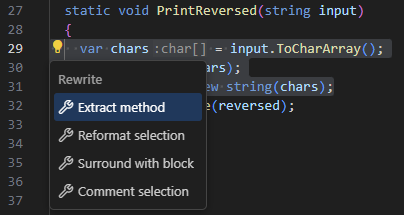
Consider the following example. The method PrintReversed() actually does two things: it reverses the string and prints it. We can select the reversing logic, which is all statements except Console.WriteLine(reversed);, and use this refactoring to move that logic to a new method.
Extract a method from selected statements
In the editor, select one or more statements that you want to convert into a method.
Right-click and choose Refactor | Extract Method from the context menu.
In the popup that opens, select Extract Method.
Extract local function from selected statements
In the editor, select one or more statements that you want to convert into a local function.
Right-click and choose Refactor | Extract Method from the context menu.
In the popup that opens, select Extract Local Function.