ReSharper Plugins
Looking at the big picture, there's more to ReSharper than its own extensive set of features: ReSharper API offers a rich platform for developing intelligent plugins.
ReSharper plugins can provide new code inspections and quick-fixes, support additional unit testing frameworks, implement special-purpose refactorings, validate naming conventions, and perform many more tasks which any .NET developer will find useful.
How to Create ReSharper Plugins
如果您要开发ReSharper插件或者想要开始开发,请下载ReSharper SDK并阅读ReSharper插件开发文档。在插件就绪后,将它上传至 JetBrains Marketplace,以便您支持的 ReSharper 版本的所有用户都可以使用。
How to Install ReSharper Plugins
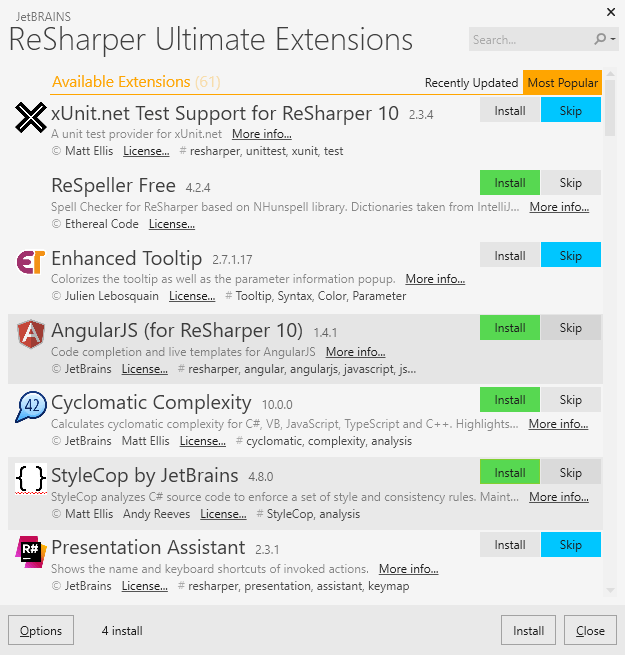
Since version 8.0, ReSharper contains Extension Manager ( in Visual Studio) that helps discover and get additional information on plugins, install and uninstall them.
Users of ReSharper 8.0 and above working with Visual Studio 2010, 2012, 2013, 2015, 2017 or 2019 should use the Extension Manager to select and install plugins.
If you're using ReSharper 7 or earlier, or if you work in Visual Studio 2005 or 2008, you should find, install and uninstall plugins manually. 请转到旧ReSharper插件目录,然后从中选择适用的插件。