外部注解
运作方式
如果您使用的是外部库,并且无法获取其源代码,那么在其中使用属性来指定代码注解似乎不可行。
在这种情况下,您可以使用 外部注解 ,它允许您为已编译的实体补充由 JetBrains Rider 的代码分析引擎识别的属性。 外部注解让您可以“欺骗”引擎,使其看到在库编译时未声明的属性(针对方法、参数和其他声明)。
外部注解在 XML 文件中指定。 加载解决方案时,JetBrains Rider 会在特定位置查找特定命名的 XML 文件,并从中读取注解。 这些 XML 文件的结构类似于 XmlDoc。 例如,要为 .NET Framework 4.0 的程序集 System.Xml 中的方法 XmlReader.Create(Stream input) 添加 NotNull 契约注解,XML 文件将如下所示:
JetBrains 外部注解
上述方法被用于为 .NET Framework 类库以及其他常用库中的大量符号添加注解。 这些库的外部注解随 JetBrains Rider 一起安装,以确保更好的代码分析。 某些功能(例如 ASP.NET MVC 支持)也依赖于外部注解。
JetBrains 外部注解的源代码在 GitHub 上以 MIT 许可证提供: https://github.com/JetBrains/ExternalAnnotations。 欢迎您为此代码库做出贡献,或将其用作创建您自己的外部注解的示例。
创建外部注解
您可以创建外部注解,为任何已编译的程序集指定契约。 为了确保 JetBrains Rider 能识别带有外部注解的 XML 文件,该文件应命名为 [Assembly.Name].ExternalAnnotations.xml 。 根据您打算如何使用带注解的二进制文件,您可以在以下位置创建注解文件:
如果您打算发布一些二进制文件(例如,通过 NuGet),请将注解 [Assembly.Name].ExternalAnnotations.xml 文件放在带注解的 [Assembly.Name].dll 文件所在的同一文件夹中。
如果您想为项目中包含的一些二进制文件添加注解,请将每个程序集的注解文件放在项目或解决方案文件旁边的 ExternalAnnotations 文件夹中。
当您将注解文件放在此文件夹中时,该文件应以程序集名称命名,即 [Assembly.Name].xml 。 它也可以位于 ExternalAnnotations 的子文件夹中,但该文件夹必须以程序集名称命名,即 ExternalAnnotations/[Assembly.Name]/[AnyName].xml 。
通过这种方式,您还可以将注解 保存在 VCS 中 ,以便您的团队能够从中受益。
为了说明如何创建外部注解,假设您使用了一个 TestLib 程序集,其中包含 MyTestClass 类和 public static string ReverseString(String inputString) 方法。 假设从程序集文档中,您知道该方法是纯净的,且从不返回 null,并且其参数也不应为 null。
最初,JetBrains Rider 并不知道 ReverseString 的工作原理,因此它在以下代码中未发现任何问题:

为已编译的程序集创建外部注解
在您的文件系统中找到 TestLib.dll ,并创建一个名为 TestLib.ExternalAnnotations.xml 的文件,放在同一文件夹中,或放在项目或解决方案文件旁边的 ExternalAnnotations 文件夹中,其中引用了 TestLib.dll 。
打开 TestLib.ExternalAnnotations.xml 进行编辑,并输入以下内容:
<assembly name="TestLib"> <member name="M:TestLib.MyTestClass.ReverseString(System.String)"> <attribute ctor="M:JetBrains.Annotations.NotNullAttribute.#ctor" /> <attribute ctor="M:JetBrains.Annotations.PureAttribute.#ctor" /> <parameter name="inputString"> <attribute ctor="M:JetBrains.Annotations.NotNullAttribute.#ctor" /> </parameter> </member> </assembly>重新加载您的解决方案。 现在 JetBrains Rider 检测到
ReverseString的错误用法,并突出显示了 null 参数的问题:
...以及对返回值的不必要检查:
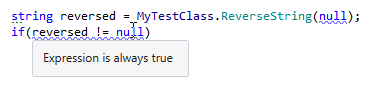
要查看哪些外部注解应用于库符号,您可以使用 快速文档功能。 只需按下 Ctrl+Q 查看符号的属性。 在我们的例子中,我们可以看到
ReverseString带有[NotNull]和[Pure]属性注解,参数带有[NotNull]注解:
分发外部注解
使用外部注解的另一种情况是为您分发的库或您喜欢的任何库发布外部注解。 在这种情况下,使用 ReSharper、Rider 或 Fleet 的库用户将获得更多建议和修复。
库的外部注解可以作为 NuGet 包发布和安装。 有关打包外部注解的更多信息,请参阅 ReSharper 插件开发指南。