提取常量
提取常量重构使您的源代码更易于阅读和维护。 它还可以帮助您避免使用没有任何值或用途说明的硬编码常量。
在编辑器中,选择 您想用常量替换的表达式或变量声明。
按 Ctrl+Alt+C 引入常量,或在主菜单中选择 。
或者,在出现的 工具栏 上,点击 提取 并选择 常量。
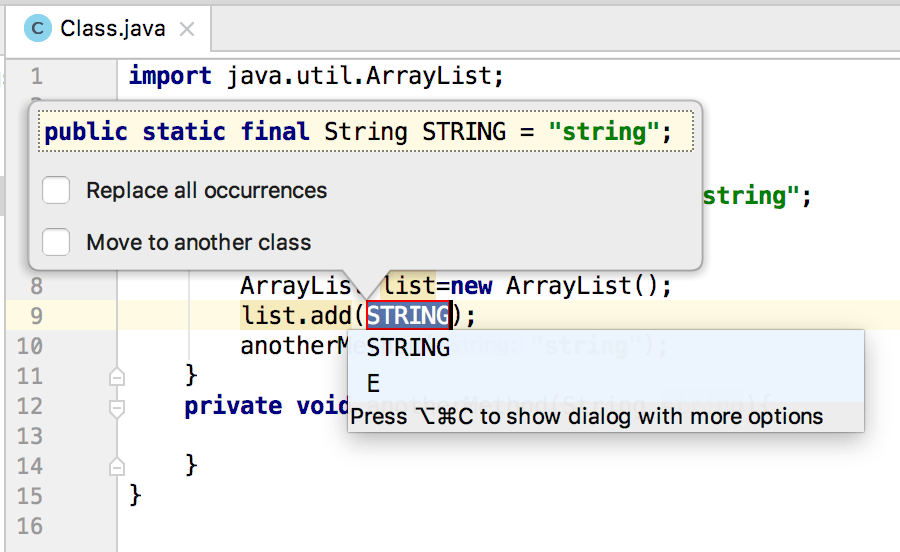
从打开的列表中选择一个名称或输入您自己的名称并按 Enter。
或者,按 Ctrl+Alt+C 两次以打开 Extract Constant 对话框,您可以在其中指定常量的附加选项,例如将其设为
private或public,将常量移动到另一个类等。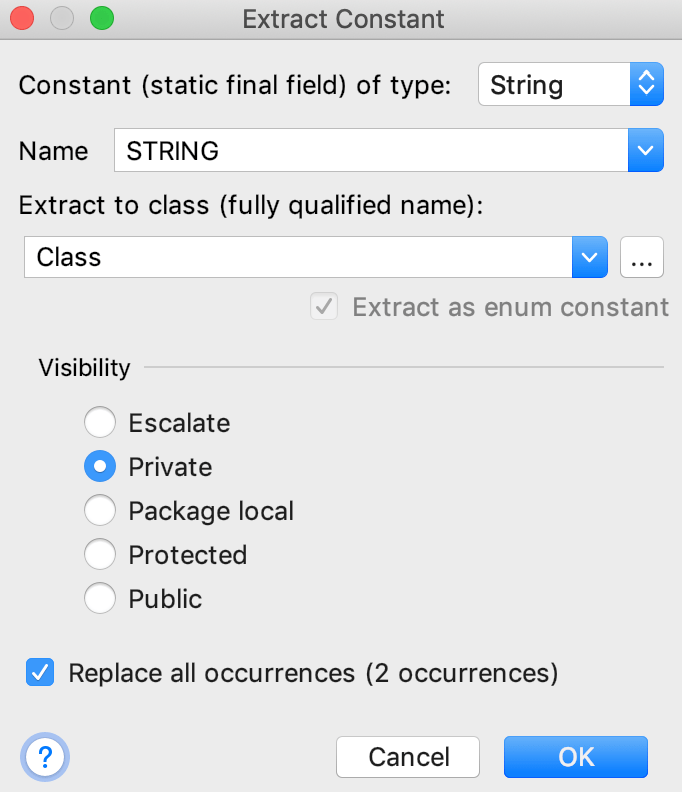
示例
让我们为代码中出现两次的表达式 "string" 引入一个常量。
public class Class {
public void method() {
ArrayList list = new ArrayList();
list.add("string");
anotherMethod("string");
}
private void anotherMethod(String string) {
}
}
IntelliJ IDEA 提取常量,并将表达式替换为常量 STRING。
public class Class {
private static final String STRING = "string";
public void method() {
ArrayList list = new ArrayList();
list.add(STRING);
anotherMethod(STRING);
}
private void anotherMethod(String string) {
}
}
2026年 7月 14日