Code Syntax Style: Implicit/Explicit Typing ('var' Keyword)
Using implicitly typed local variables (also known as var keyword) introduced in C# 3.0 has become quite popular as it improves readability in many scenarios. By default, ReSharper for Visual Studio Code also encourages using of var keyword, but preferences of its usage are flexibly configurable — for example, you can opt for using explicit types in specific cases or everywhere and ReSharper for Visual Studio Code will help you enforce your preferences.
Starting from C# 7.0, you can declare local variables when deconstructing tuples. If you prefer var in such declarations, you can additionally configure a style to use joined or separated notation, that is, for example: var (x, y) = GetTuple(); or (var x, var y) = GetTuple();.
Another C# 7.0 feature is discards, which also allows using var to make sure that there are no conflicts with variables in the scope that may be named _. ReSharper for Visual Studio Code allows you to configure a style to always use var with discards where appropriate.
Enforce preferences of using 'var' keyword
ReSharper for Visual Studio Code checks all local variables for compliance with your preferences and if they do not comply, ReSharper for Visual Studio Code highlights such declarations and suggests the corresponding quick-fix.
By default, ReSharper for Visual Studio Code's preferences say that 'var' keyword is preferred:
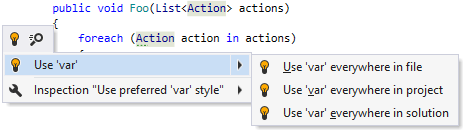
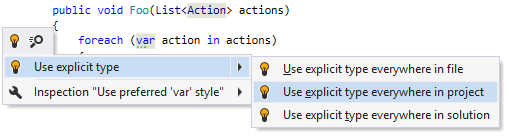
If you change your preference, ReSharper for Visual Studio Code will help you to use explicit types:
Configure preferences for using 'var' keyword
You can configure syntax style settings via EditorConfig. These settings can be stored in .editorconfig files on different levels of your solution hierarchy. The files are normally put under VCS so that settings defined there are shared among the project team.
If you have used ReSharper for Visual Studio or JetBrains Rider on your computer, or have opened the current solution using these tools, ReSharper for Visual Studio Code will read and apply your syntax style settings from .DotSettings files. However, any settings configured via .editorconfig will take precedence.
Configure preferences for 'var' keyword usage using EditorConfig
Open the desired .editorconfig file.
Add the required 'var' keyword usage properties to the file. For example:
for_built_in_types = use_var_when_evident
Use 'var' when evident: what is considered evident?
When configuring preferences of using 'var' keyword vs. explicit type, you can opt for Use 'var' when evident. This option seems self-explanatory but in some cases it might be unclear what is considered 'evident' and what is not.
Apart from that, there are some differences between what is considered evident (apparent) by ReSharper for Visual Studio Code and by Visual Studio when both products suggest using 'var' keyword or explicit type.
The table below shows in which cases initializers that could be declared 'var' are considered evident depending on the state of the Prefer Roslyn (Visual Studio) logic for type evidence property.
Initializer expression | Examples | Off | On |
|---|---|---|---|
Object creation expressions |
| Evident | Evident |
Cast expressions |
| Evident | Evident |
|
| Evident | Evident |
Literal expressions |
| Evident | Evident |
Default expressions |
| Evident | Evident |
Tuple expressions |
| Evident when all component expressions are evident | |
Explicit array creation expressions |
| Evident | Evident |
Implicit array creation expressions |
| Evident when all element initializers (up to 42) are evident | Not evident |
Non-generic factory (creation) methods (static methods declared in some type and returning a value of the same type) |
| Evident when the method name contains a parent type name or one of the following substrings: "Create", "Build", "Construct", "Make", "Generate", "Produce", "New", "Instance" | Evident |
Generic factory (creation) methods (static methods returning a generic type and declared in a class with the same name as the return type) |
| Evident when all method call arguments are evident and the method name contains one of the following substrings or a class name: "Create", "Build", "Construct", "Make", "Generate", "Produce", "New", "Instance" | Evident |
Conversion methods (methods with a name consisting of "To" plus the name of the return type) |
| Evident when the return type is not generic | Evident |
Generic methods with an explicit type argument returning the value of that type argument |
| Evident | Not evident |
Enum members |
| Evident | Not evident |
Singleton fields (static/constant fields returning the value of the type where they are declared) |
| Evident when the field name contains the type name or one of the following substrings: "Empty", "Instance", "Default", "Value" | Not evident |