Code Syntax Style: Null checking pattern
When checking an expression for null with the type-testing 'is' operator, you can choose between two null-checking patterns:
Use the 'not null' pattern that makes the expression more readable.
Use the object pattern syntax `{ }` that makes the expression more flexible, allowing you to declare a local variable after it.
ReSharper helps you enforce style preferences for null-checking patterns in the existing code and takes your preferences into account when it produces new code with code completion and performs refactorings.
Enforce preferences for null-checking patterns
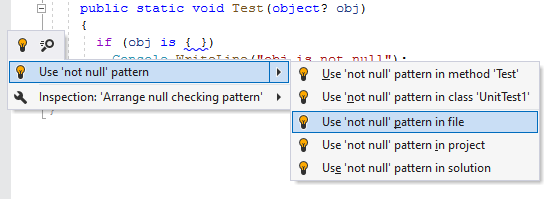
By default, ReSharper highlights object pattern syntax { } in null-checking expressions and suggests replacing them with the not null pattern:
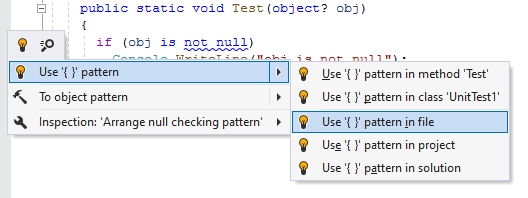
If you prefer to use the { } pattern, you can change the corresponding preferences and ReSharper will help you replace not null patterns accordingly:
Configure preferences for null-checking patterns
You can configure syntax style settings via EditorConfig. These settings can be stored in .editorconfig files on different levels of your solution hierarchy. The files are normally put under VCS so that settings defined there are shared among the project team.
If you have used ReSharper for Visual Studio or JetBrains Rider on your computer, or have opened the current solution using these tools, ReSharper for Visual Studio Code will read and apply your syntax style settings from .DotSettings files. However, any settings configured via .editorconfig will take precedence.
Configure preferences for null-checking pattern using EditorConfig
Open the desired .editorconfig file.
Add the required null-checking pattern properties to the file. For example:
null_checking_pattern_style = empty_recursive_pattern