GoLand 2025.2 Help

使用数据库和网页表单构建 Notes 应用

本教程将指导您使用 Go、SQLite 和基础 HTML/JavaScript 表单来创建一个简单的笔记应用,可用于添加和删除笔记。

先决条件

  • 已在您的计算机上安装 Go(版本 1.16 或更高)

  • GoLand — 大多数版本均可。本教程使用 GoLand 2024.2 创建。 本教程使用 GoLand 2024.2 创建。

  • 可连接互联网以获取 SQLite 依赖项。

步骤

  1. 初始化项目

  2. 设置数据库

  3. 创建 note 结构体

  4. 实现 CRUD 操作

  5. 创建主函数

  6. 创建 HTML 表单

  7. 运行应用程序

步骤 1:初始化项目

创建一个新目录作为您的项目目录,并初始化一个 Go 模块。

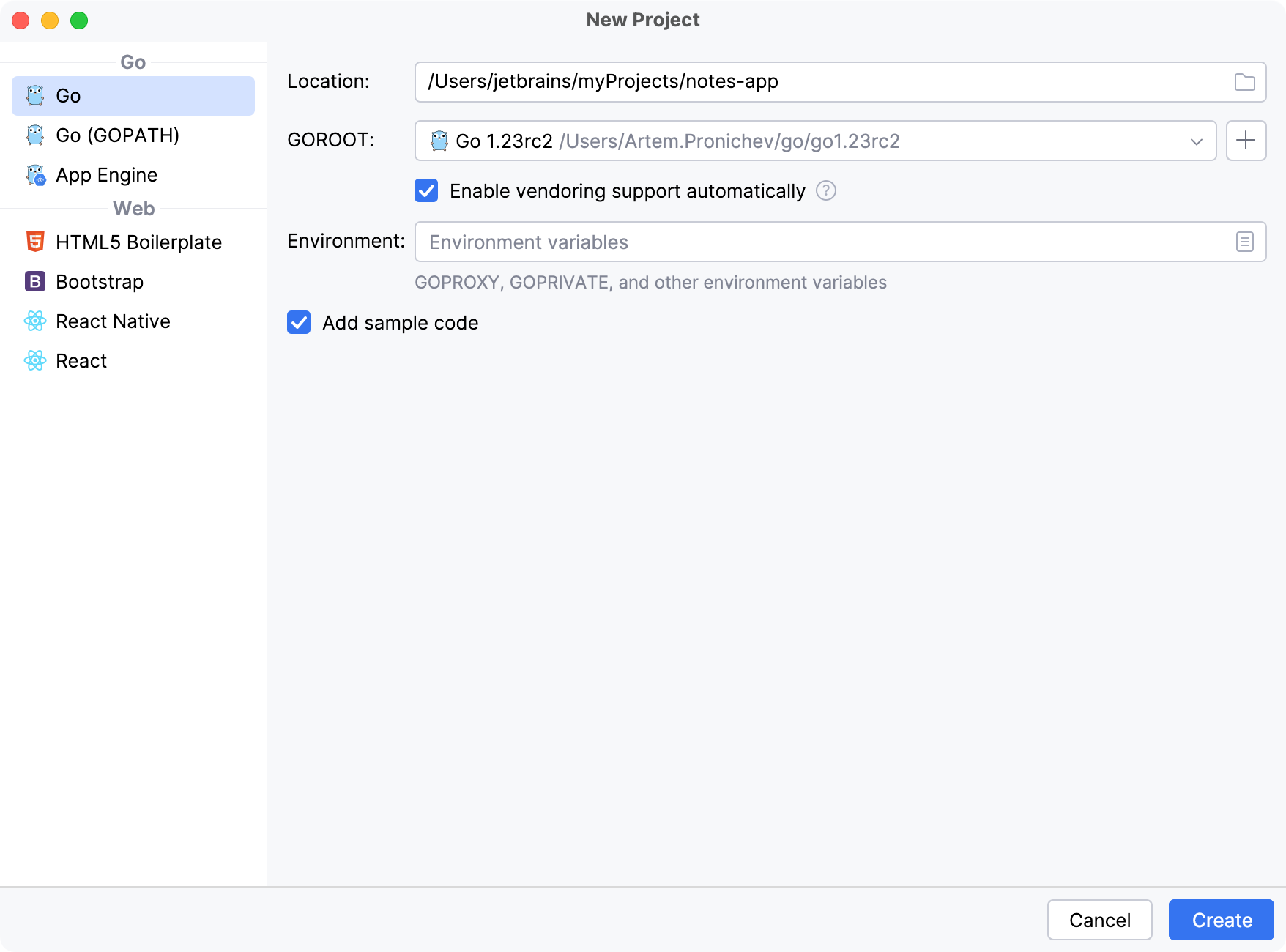
  1. 单击 文件(F) | 新建(N) | 项目(P)…

    或者,在 欢迎访问GoLand 界面中,单击 新建项目

  2. 新建项目 对话框中,选择 Go

  3. 位置 字段中,输入或导航到您希望存储项目的位置。

  4. GOROOT 字段中,指定您的 Go 安装路径。 GoLand 通常会自动识别该位置。

    要更改或安装新的 Go SDK 版本,请单击 添加 SDK添加 SDK 图标 ),然后选择下列选项之一:

    • 本地 :使用本地系统中已有的 SDK。

    • 下载 :从官方仓库下载 Go SDK 版本。

  5. 取消选中 添加示例代码 复选框。 如果您希望在开始之前查看一些入门提示,可以保留该复选框选中状态。

  6. 单击 创建

    GoLand 将创建项目文件夹并初始化项目,自动执行以下 Bash 操作:

    mkdir notes-app cd notes-app go mod init notes-app
    初始化项目

步骤 2:设置数据库

现在,我们创建一个名为 database.go 的新文件。 在该文件中,我们将设置 SQLite 数据库连接。 整体配置包含创建数据库文件( notes.db )以及 notes 表,用于存储信息。

在项目的根目录中创建 database.go ,内容如下:

package main import ( "database/sql" "log" // Import the SQLite driver anonymously to initialize it // without directly referencing _ "github.com/mattn/go-sqlite3" ) // Declare a global variable to hold the database connection pool var db *sql.DB // initDB initializes the database connection and creates // the 'notes' table if it doesn't exist func initDB() { var err error // Open a connection to the SQLite database file named "notes.db" db, err = sql.Open("sqlite3", "./notes.db") if err != nil { // Log any error that occurs and terminate the program log.Fatal(err) } // SQL statement to create the notes table if it doesn't exist createTable := ` CREATE TABLE IF NOT EXISTS notes ( id INTEGER PRIMARY KEY AUTOINCREMENT, title TEXT, content TEXT );` // Execute the SQL statement to create the table _, err = db.Exec(createTable) if err != nil { // Log any error that occurs while executing the SQL statement // and terminate the program log.Fatal(err) } }

以下步骤将指导您完成文件创建过程。

创建 Go 文件

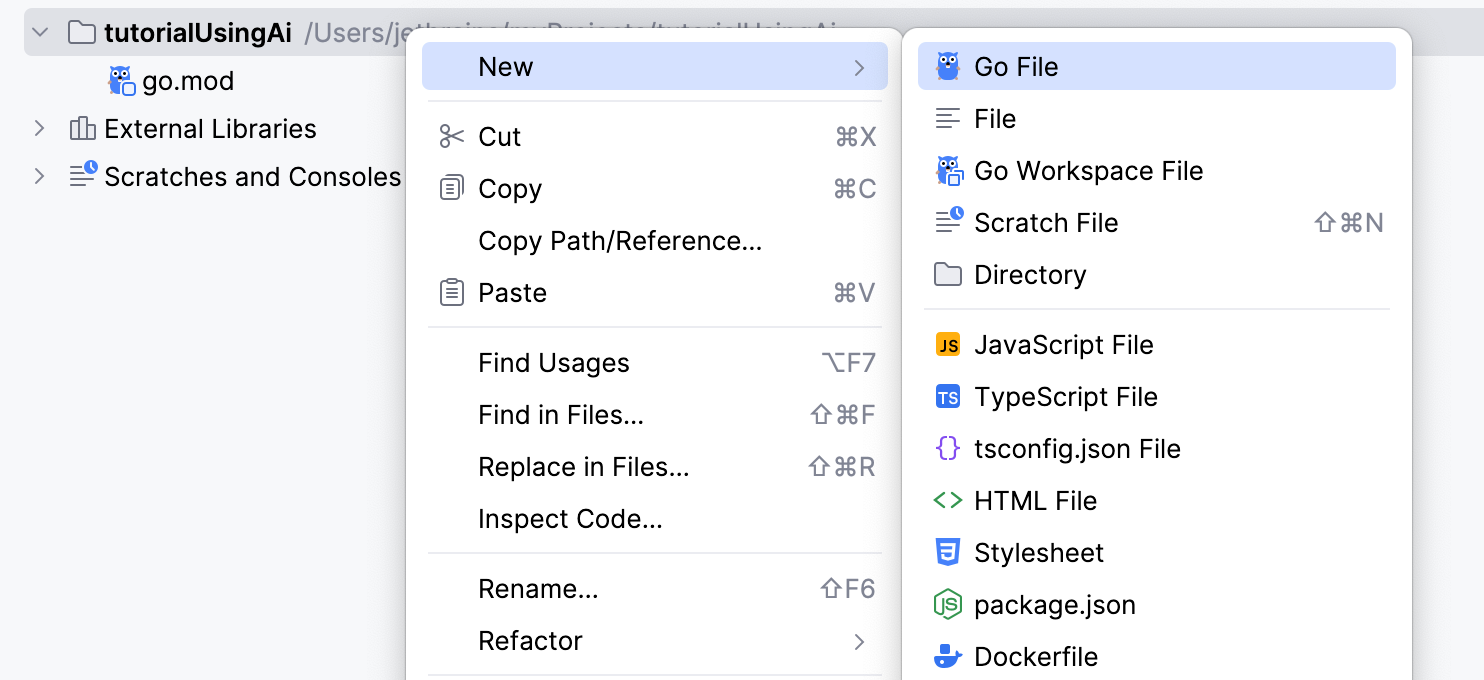
  1. 创建 Go 文件,可选择以下任一方式:

    • 项目 工具窗口中,右键点击您项目的父文件夹并选择 新建(N) | Go 文件 Go 文件

    • 点击您项目的父文件夹,按下 Alt+Insert ,再选择 Go 文件

    • 点击您项目的父文件夹,然后转到 文件(F) | 新建(N) | Go 文件

  2. 新建Go 文件 对话框中,输入文件名并选择文件类型:

    • 空文件 — 创建空的 Go 文件。

    • 简单应用程序 — 创建包含预定义 main 函数的 Go 文件。

    创建 Go 文件

步骤 3:创建 Note 结构体

创建一个名为 note.go新文件 ,并定义 Note 结构体。

Note 结构体定义了一个 note 的结构,包括 ID、标题和内容。 该结构体为在应用中表示 note 提供了一种清晰有序的方式。

package main type Note struct { ID int Title string Content string }

此外,在与数据库交互时,拥有结构化的数据处理方式非常重要。 Note 结构体可以将数据库行映射为 Go 对象,反之亦然。 例如,在从数据库中读取 note 时,您可以将每一行扫描进一个 Note 结构体中。

步骤 4:实现 CRUD 操作

让我们在 note.go 中添加 CRUD 操作。 CRUD 操作是与数据库或持久化存储交互所必需的基本功能。 CRUD 是 Create、Read、Update 和 Delete 的缩写。

创建 操作用于向数据库添加新的记录或数据项。 在 SQL 中,通常使用 INSERT 语句来实现此操作。

func CreateNote(title, content string) { query := `INSERT INTO notes (title, content) VALUES (?, ?)` _, err := db.Exec(query, title, content) if err != nil { log.Fatal(err) } }

读取 操作用于从数据库中检索现有记录或数据。 在 SQL 中,通常使用 SELECT 语句来实现此操作。

func GetNotes() ([]Note, error) { rows, err := db.Query("SELECT id, title, content FROM notes") if err != nil { return nil, err } defer rows.Close() var notes []Note for rows.Next() { var note Note err = rows.Scan(&note.ID, &note.Title, &note.Content) if err != nil { return nil, err } notes = append(notes, note) } return notes, nil }

更新 操作用于修改数据库中的现有记录或数据。 在 SQL 中,通常使用 UPDATE 语句来实现此操作。

func UpdateNote(id int, title, content string) { query := `UPDATE notes SET title = ?, content = ? WHERE id = ?` _, err := db.Exec(query, title, content, id) if err != nil { log.Fatal(err) } }

删除 操作用于从数据库中删除现有记录或数据。 在 SQL 中,通常使用 DELETE 语句来实现此操作。

func DeleteNote(id int) { query := `DELETE FROM notes WHERE id = ?` _, err := db.Exec(query, id) if err != nil { log.Fatal(err) } }
package main import ( "log" ) type Note struct { ID int Title string Content string } // CreateNote adds a new note to the database func CreateNote(title, content string) { query := `INSERT INTO notes (title, content) VALUES (?, ?)` _, err := db.Exec(query, title, content) if err != nil { log.Fatal(err) } } // GetNotes retrieves all notes from the database func GetNotes() ([]Note, error) { rows, err := db.Query("SELECT id, title, content FROM notes") if err != nil { return nil, err } defer rows.Close() var notes []Note for rows.Next() { var note Note err = rows.Scan(&note.ID, &note.Title, &note.Content) if err != nil { return nil, err } notes = append(notes, note) } return notes, nil } // DeleteNote removes a note from the database func DeleteNote(id int) { query := `DELETE FROM notes WHERE id = ?` _, err := db.Exec(query, id) if err != nil { log.Fatal(err) } }

步骤 5:创建主函数

现在我们来修改 main.go ,并在其中添加 main 函数。 main.go 中的代码将设置一个基本的 Web 服务器,并配置路由以显示、添加和删除笔记。 它使用 SQLite 数据库来存储笔记,并处理 HTTP 请求以执行 CRUD 操作。

为了处理 HTTP 请求,我们将使用处理器。 Go 中的 HTTP 处理器是用于处理 HTTP 请求的函数。 它们是使用 Go 创建 Web 服务器的构建模块。 HTTP 处理器接收 HTTP 请求,对其进行处理,并生成 HTTP 响应。 在 Go 中,这些处理器是满足 http.Handler 接口的函数或方法,或者直接传递给类似 http.HandleFunc 的函数。

我们将从 main 函数开始。

函数:main

main 函数将执行以下功能:

  • 数据库初始化:调用 initDB() 来建立数据库连接。 defer db.Close() 语句可确保在程序退出时关闭数据库连接。

  • HTTP 处理器: http.HandleFunc 函数设置了路由及其对应的处理函数:

    • /indexHandler 处理。

    • /addaddHandler 处理。

    • /delete 由 deleteHandler 处理。

当我们运行程序时,代码将启动服务器:服务器在端口 8080 上启动,任何错误都会被记录并终止程序。

func main() { // Initialize the database initDB() // Ensure the database connection is closed when the main function exits defer db.Close() // Set up HTTP handlers for different routes http.HandleFunc("/", indexHandler) // Route for the homepage http.HandleFunc("/add", addHandler) // Route for adding a new note http.HandleFunc("/delete", deleteHandler) // Route for deleting a note // Log the server start and listen on port 8080 log.Println("Server started at :8080") log.Fatal(http.ListenAndServe(":8080", nil)) }

函数:index handler

index 处理器执行多个功能:

  • 检索笔记:调用 GetNotes() 从数据库中获取所有笔记。 如果发生错误,将返回内部服务器错误响应。

  • 解析模板:解析 index.html 模板文件。 如果解析模板时发生错误,将返回内部服务器错误响应。

  • 执行模板:使用检索到的笔记执行模板,并将 HTML 渲染到响应写入器 w 中。

func indexHandler(w http.ResponseWriter, r *http.Request) { // Retrieve all notes from the database notes, err := GetNotes() if err != nil { // Send an internal server error response if something goes wrong http.Error(w, err.Error(), http.StatusInternalServerError) return } // Parse the HTML template file tmpl, err := template.ParseFiles("index.html") if err != nil { // Send an internal server error response if the template cannot be parsed http.Error(w, err.Error(), http.StatusInternalServerError) return } // Execute the template with the notes data tmpl.Execute(w, notes) }

函数:add handler

add 处理器确保笔记将被添加到数据库中。 处理器包括以下功能:

  • 检查请求方法:确保仅处理 POST 请求。

  • 获取表单值:从表单中获取标题和内容值。

  • 创建笔记:调用 CreateNote 将新笔记添加到数据库中。

  • 重定向:在添加笔记后将用户重定向回主页。

func addHandler(w http.ResponseWriter, r *http.Request) { // Only handle POST requests if r.Method == "POST" { // Get the title and content from the form values title := r.FormValue("title") content := r.FormValue("content") // Create a new note with the provided title and content CreateNote(title, content) } // Redirect the user back to the homepage after adding the note http.Redirect(w, r, "/", http.StatusSeeOther) }

函数:delete handler

delete 处理器会从数据库中删除笔记。 该处理器执行以下操作:

  • 转换 ID:将表单中的 id 值转换为整数。 如果转换失败,则返回错误请求响应。

  • 删除笔记:调用 DeleteNote 从数据库中删除指定 ID 的笔记。

  • 重定向:在删除笔记后将用户重定向回主页。

func deleteHandler(w http.ResponseWriter, r *http.Request) { // Convert the ID from the form value to an integer id, err := strconv.Atoi(r.FormValue("id")) if err != nil { // Send a bad request response if the ID is not valid http.Error(w, "Invalid ID", http.StatusBadRequest) return } // Delete the note with the given ID DeleteNote(id) // Redirect the user back to the homepage after deleting the note http.Redirect(w, r, "/", http.StatusSeeOther) }
package main import ( "encoding/json" "fmt" "html/template" "log" "net/http" "strconv" ) // main function is the entry point of the program func main() { // Initialize the database initDB() // Ensure the database connection is closed when the main function exits defer db.Close() // Set up HTTP handlers for different routes http.HandleFunc("/", indexHandler) // Route for the homepage http.HandleFunc("/add", addHandler) // Route for adding a new note http.HandleFunc("/delete", deleteHandler) // Route for deleting a note // Log the server start and listen on port 8080 log.Println("Server started at :8080") log.Fatal(http.ListenAndServe(":8080", nil)) } // indexHandler handles the requests to the homepage func indexHandler(w http.ResponseWriter, r *http.Request) { // Retrieve all notes from the database notes, err := GetNotes() if err != nil { // Send an internal server error response if something goes // wrong http.Error(w, err.Error(), http.StatusInternalServerError) return } // Parse the HTML template file tmpl, err := template.ParseFiles("index.html") if err != nil { // Send an internal server error response if the template // cannot be parsed http.Error(w, err.Error(), http.StatusInternalServerError) return } // Execute the template with the notes data tmpl.Execute(w, notes) } // addHandler handles the requests to add a new note func addHandler(w http.ResponseWriter, r *http.Request) { // Only handle POST requests if r.Method == "POST" { // Get the title and content from the form values title := r.FormValue("title") content := r.FormValue("content") // Create a new note with the provided title and content CreateNote(title, content) } // Redirect the user back to the homepage after adding the note http.Redirect(w, r, "/", http.StatusSeeOther) } // deleteHandler handles the requests to delete a note func deleteHandler(w http.ResponseWriter, r *http.Request) { // Convert the ID from the form value to an integer id, err := strconv.Atoi(r.FormValue("id")) if err != nil { // Send a bad request response if the ID is not valid http.Error(w, "Invalid ID", http.StatusBadRequest) return } // Delete the note with the given ID DeleteNote(id) // Redirect the user back to the homepage after deleting the note http.Redirect(w, r, "/", http.StatusSeeOther) }

步骤 6:创建 HTML 表单

现在我们来创建一个名为 index.html 的新文件,包含用于添加和删除笔记的表单。 此文件将使用 html/template 包。 Go 中的 html/template 包提供了解析和执行模板的功能。 类似 {{range .}}{{.Title}} 的占位符是 Go 模板语法的一部分,可将动态内容插入到 HTML 中。

以下是我们 HTML 模板中使用语法的简要说明:

  • {{range .}} :开始循环遍历传递给模板的数据集合。 在此情况下, . 表示传递给模板的数据,是一个由 Note 结构体组成的切片。

  • {{range .}} 遍历集合中的每个元素。

  • {{.Title}} :在 {{range .}} 块中, . 表示当前迭代的元素。 {{.Title}} 访问当前 Note 结构体的 Title 字段。

  • {{else}} :如果 range 没有遍历任何元素(例如集合为空),则提供用于显示的替代内容。

  • {{end}}:标记 range 块的结束。

<!DOCTYPE html> <html lang="en"> <head> <meta charset="UTF-8"> <meta name="viewport" content="width=device-width, initial-scale=1.0"> <title>Notes App</title> </head> <body> <h1>Notes</h1> <form action="/add" method="post"> <label for="title">Title:</label> <input type="text" id="title" name="title" required><br> <label for="content">Content:</label> <textarea id="content" name="content" required></textarea><br> <button type="submit">Add Note</button> </form> <h2>Existing Notes</h2> {{range .}} <div> <h3>{{.Title}}</h3> <p>{{.Content}}</p> <form action="/delete" method="post" style="display:inline;"> <input type="hidden" name="id" value="{{.ID}}"> <button type="submit">Delete</button> </form> </div> {{else}} <p>No notes available.</p> {{end}} </body> </html>

与 Go 代码的连接

在 Go 代码中的 indexHandler 函数中,您从数据库中检索笔记并将其传递给模板。

在以下代码片段中, template.ParseFiles("index.html") 会读取并解析 index.html 文件。

tmpl.Execute(w, notes) 执行模板,并将 notes 作为数据传递。 这个由 Note 结构体组成的 notes 切片就是 {{range .}} 所遍历的对象。

// Parse the HTML template file tmpl, err := template.ParseFiles("index.html") if err != nil { // Send an internal server error response if the template cannot be parsed http.Error(w, err.Error(), http.StatusInternalServerError) return } // Execute the template with the notes data tmpl.Execute(w, notes)

步骤 7:运行应用程序

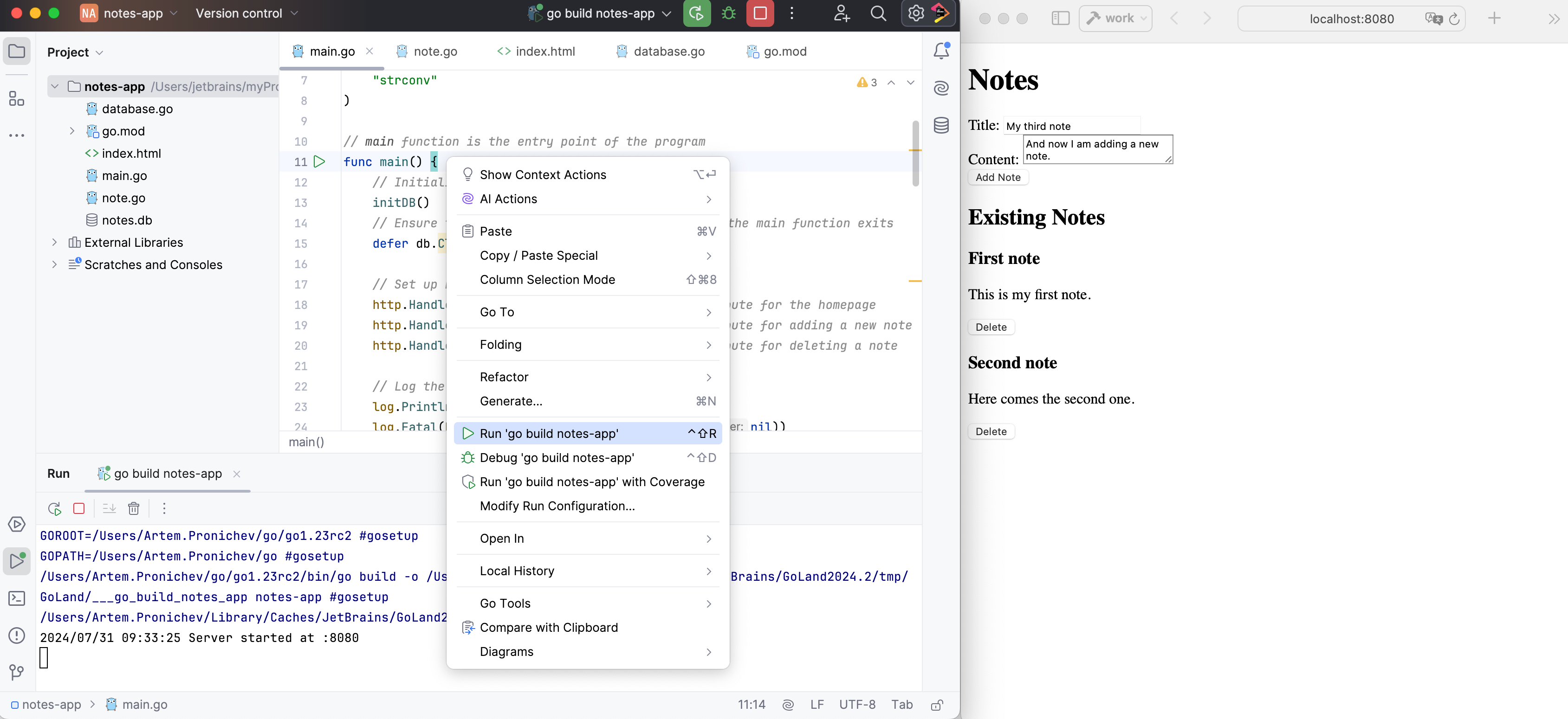
GoLand 提供了多种运行应用程序的方式。 最简单的方法是直接从编辑器运行。

从编辑器中运行

如果您不会向程序传递任何参数,且程序在启动前不需要执行特定操作,您可以直接从编辑器运行该程序。

  • 点击 ,位置在 gutter 中靠近 main 函数附近,并选择 运行

  • 要运行脚本,请在编辑器中打开它或在 项目 工具窗口中选择它,然后在上下文菜单中选择 运行 <script file name>

在后台,GoLand 运行 go run main.go 并在 运行 工具窗口中显示输出。

现在,您只需打开网页浏览器并访问 http://localhost:8080。 您应该会看到一个用于添加笔记的表单和一个包含删除选项的现有笔记列表。

运行应用程序
最后修改日期: 2025年 9月 26日