What's New in PyCharm 2025.3
This release marks the migration of Community users to the unified PyCharm and brings full support for Jupyter notebooks in remote development, uv as the default environment manager, proactive data exploration, support for Ruff, Pyrefly, Pyright, and Ty via LSP tools, the introduction of Claude Agent, and over 300 bug fixes.
Community user migration to the unified PyCharm

As announced earlier, PyCharm 2025.2 was the last major release of the Community Edition. With PyCharm 2025.3, we’re introducing a smooth migration path for Community users to the unified PyCharm. The unified version brings everything together in a single product – Community users can continue using PyCharm for free and now also benefit from built-in support for Jupyter notebooks. With a one-click option to start a free Pro trial, it’s easier than ever to explore PyCharm’s advanced features for data science, AI/ML, and web development.
For those who prefer to build their own version from source, PyCharm’s open-source components remain available on GitHub and GitHub Actions. Check the repository for detailed instructions.
Jupyter notebooks
Remote development support Pro
Jupyter notebooks are now fully supported in remote development. You can open, edit, and run notebooks directly on a remote machine without copying them to your local environment.
Enjoy all core notebook capabilities, including:
- Editor parity: The same code insight, inspections, refactorings, and shortcuts as in local notebooks.
- Interactive outputs: Dynamic tables, plots, and widgets render directly in the IDE.
- Environment management: Create, select, and manage remote Python environments with the same control as local ones.
You can also use interactive tables to filter, sort, and explore data inline, or open large datasets in the Data View tool window.
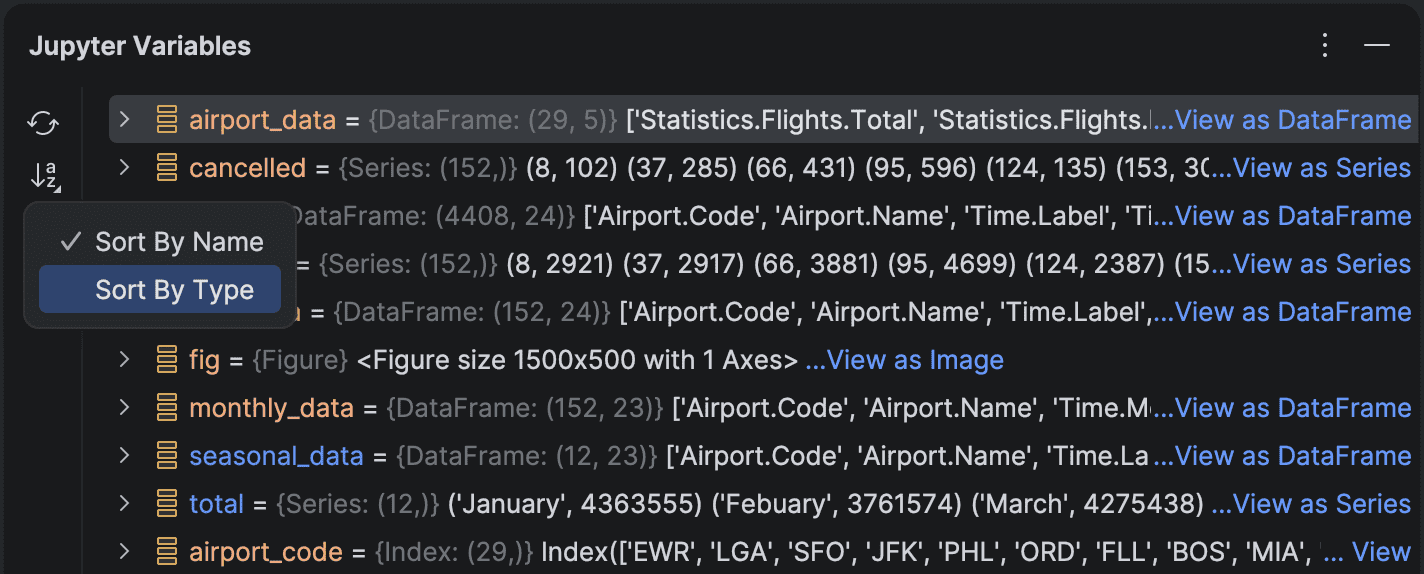
New sorting options in the Variables tool window
The Variables tool window for Jupyter notebooks now supports sorting by name or type, with dataframes always displayed at the top, making it easier to locate and open large tabular data.
uv now the default for new projects
When uv is detected on your system, PyCharm now automatically suggests it as the default environment manager in the New Project wizard.
If you have previously selected a different environment manager (such as venv, Conda, or Poetry), PyCharm will remember that preference and continue using it by default. For projects managed by uv, uv run is also used as the default command for your run configurations.
Additionally, when setting up an environment, you can now simply pick a Python version from the list – uv will either use the corresponding system version or download and manage the right one for you.
Proactive data exploration Pro
PyCharm now automatically analyzes your pandas DataFrames to detect the most common data quality issues.
Whenever you display a DataFrame, for example, using df, df.head(), or slicing expressions, PyCharm scans it for potential problems such as:
- Missing values
- Outliers
- Duplicate rows
- Correlated or redundant columns
If any issues are found, you can review them and use the Fix with AI option to generate code that resolves them automatically in a new cell.
This proactive analysis uses only heuristic and statistical checks, without consuming AI credits. It runs silently in the background and only activates when an issue is detected, ensuring your workflow remains smooth and uninterrupted.
To keep performance optimal, the analysis won't start automatically for very large datasets. In these cases, you can run it manually from the More menu.
The feature is enabled by default and can be managed in Settings | Python | Tables | Run data quality checks after table creation.
More on proactive data exploration.
Support for new LSP tools
PyCharm 2025.3 expands its language server protocol (LSP) integration with new tools from the Astral, Microsoft, and Meta ecosystems.
You can now format your code with Ruff directly in PyCharm, complementing the IDE's existing linting capabilities.
This release also adds support for ty, Astral's fast and lightweight type checker, and introduces integration for Pyright, Microsoft's widely used static type analysis engine.
In addition, PyCharm now supports Meta's Pyrefly, which shows inferred Python types inline as you write code. This lets you see type information instantly without the need for additional inspections or tooltips.
To enable these integrations, go to Settings | Python | Tools, where they can be turned on individually.
More on LSP tools.
AI features
Bring Your Own Key (BYOK) is coming soon to JetBrains AI
BYOK will let you connect your own API keys from OpenAI, Anthropic, or any OpenAI API-compatible local model, giving you more flexibility and control over how you use AI in JetBrains IDEs. You’ll be able to use your favorite AI chat and agents without logging into JetBrains AI, which is perfect for developers who already have API keys and want to work with their preferred provider. The feature is expected to roll out in the upcoming 2025.3.x releases.
Multi-agent experience: Junie and Claude Agent
Work with your preferred AI agent from a single chat: Junie by JetBrains and Claude Agent can now be used directly in the AI interface. Claude Agent has become the first third-party AI agent natively integrated into JetBrains IDEs. With this addition, JetBrains introduces a multi-agent experience that brings even more flexibility and power to your development workflow.
The easiest way to start working with any agent now is to launch it directly from the AI chat; however, the Junie plugin will still be available for you if you prefer it this way. Some features are now only available in the plugin (e.g. alerts for expensive tasks), but the most used features are embedded in the AI chat.
Transparent in-IDE AI quota tracking
Monitoring and managing your AI resources just got a lot easier, as you can now view your remaining AI Credits, renewal date, and top-up balance directly inside PyCharm.
Support for PEP 765
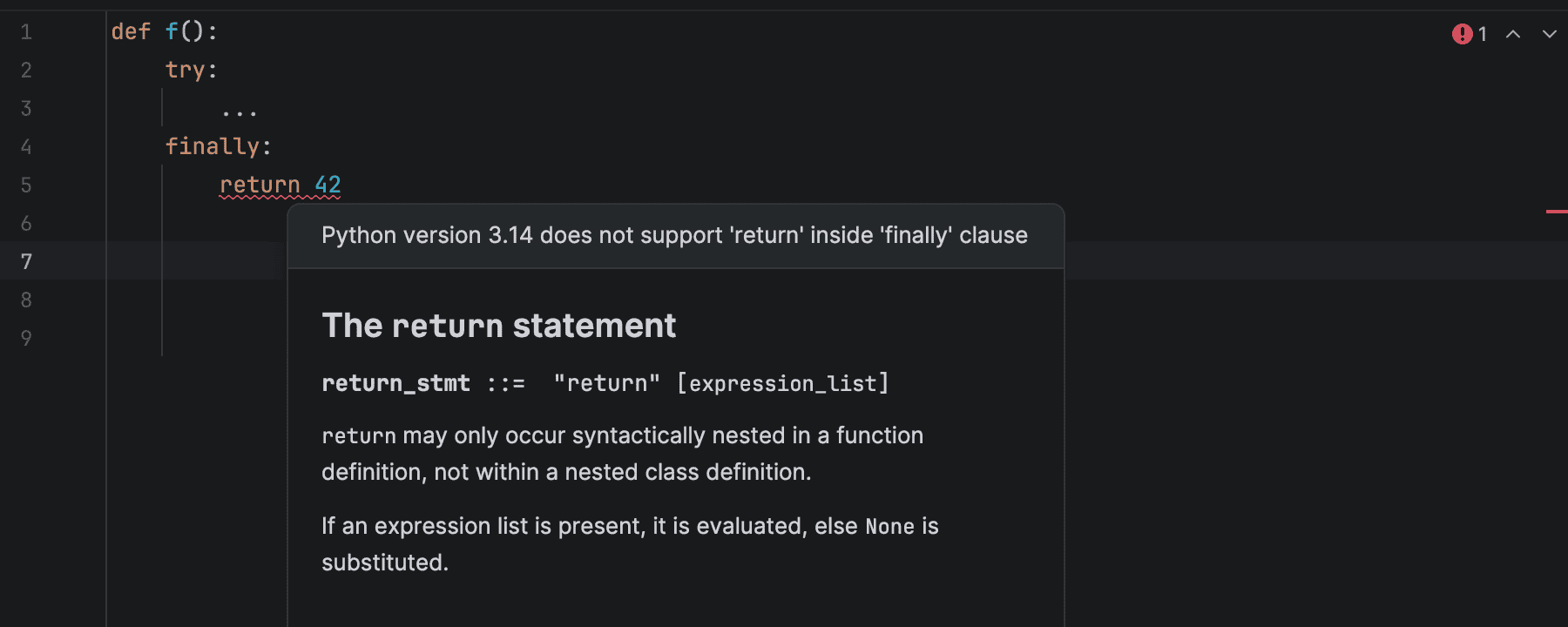
Starting with Python 3.14, using return, break, or continue to exit a finally block is flagged with a SyntaxWarning. This pattern can suppress exceptions or alter control flow in unexpected ways. PyCharm now detects these cases and alerts you early, helping you refactor to a safer structure.
Dedicated Python Process Output tool window
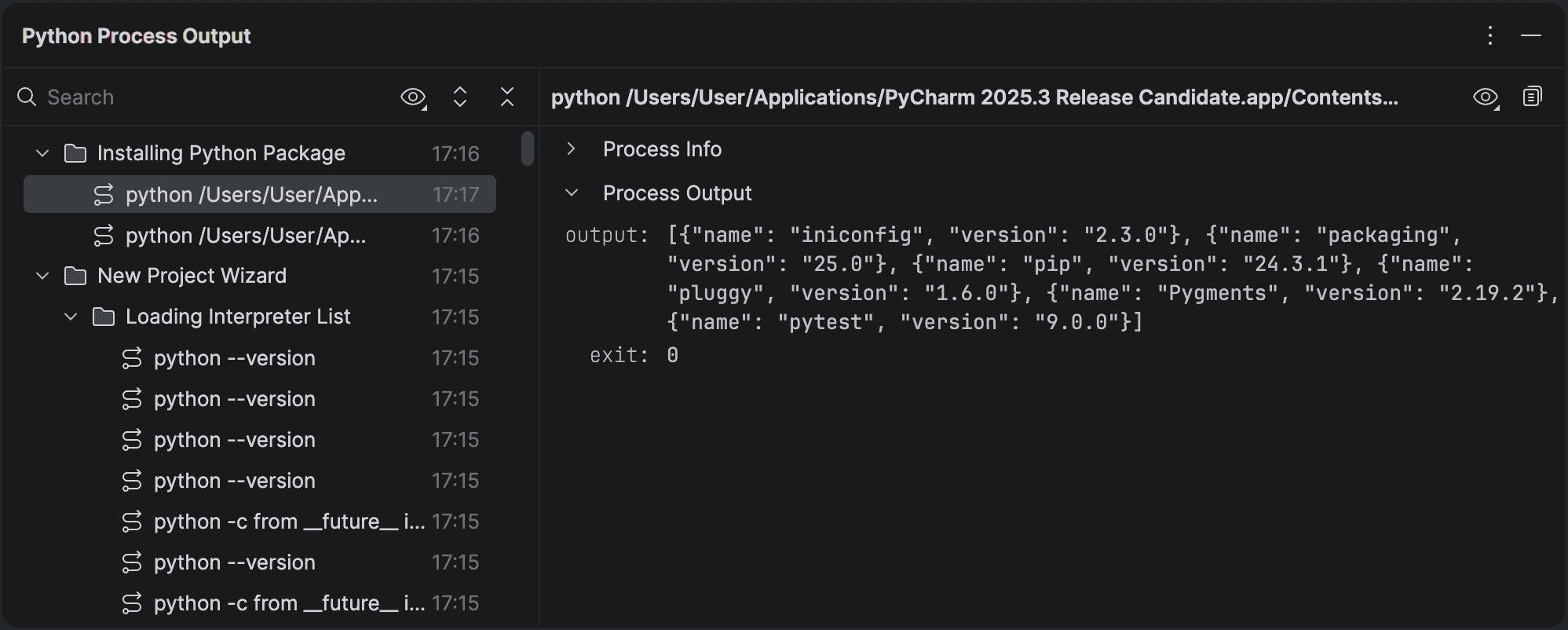
PyCharm now includes a dedicated Python Process Output tool window that displays every command run by the IDE along with its full standard input, output, and error streams.
Commands are grouped by activity type – for example, package management, skeleton generation, or other background tasks – and each entry includes a timestamp. You can expand or collapse long outputs, inspect environment variables, and view the working directory used for each run.
The tool window distinguishes between user-initiated actions and background coroutines, using visual indicators and filters to show or hide non-user processes.
In this initial release, the new tool window replaces modal error dialogs whenever a project is open, ensuring that error information is visible and persistent, rather than being hidden behind popups.
Kubernetes experience improvements Pro
Deploying databases and services just got easier, as you can write, apply, and manage everything directly in your editor.
Stay in context with the cluster and namespace selector at the top, and spot issues fast with live resource status icons. Struggling with missing env variables or failed pods? Fix them instantly with one-click logs and redeploy without leaving your manifest.
Secure your service setup with in-editor secret management. View and copy database credentials directly from your YAML.
Need to connect? Use one-click port forwarding to forward container ports, autoload secrets, and set up an instant connection to your database or service in seconds.
From deployment to debugging to connecting, everything is seamless and in one place – helping you stay focused and work smarter!
asdf support
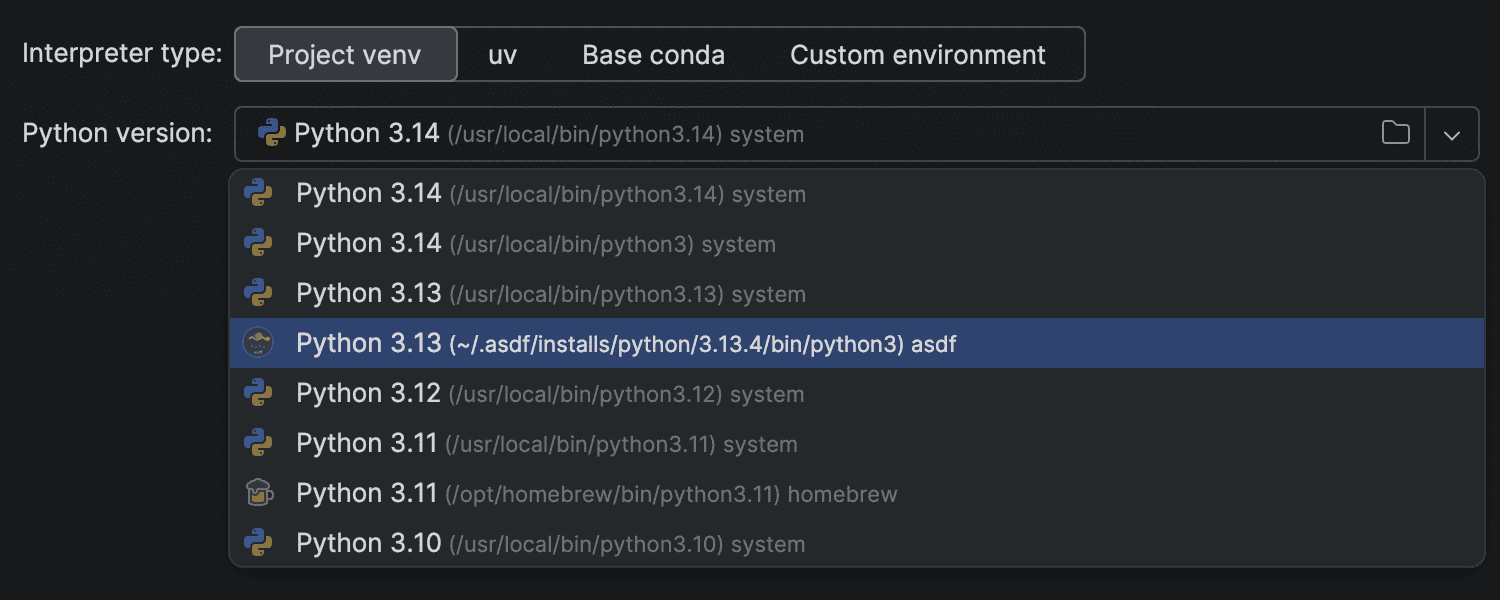
PyCharm now supports asdf, the popular runtime version manager. The IDE automatically detects Python versions managed by asdf, making it easy to select and configure interpreters without additional setup. This simplifies working across projects that use different Python versions or virtual environments.
Database and SQL tools Pro
PyCharm 2025.3 includes the latest updates from the DataGrip 2025.3 engine, bringing new database capabilities and workflow improvements. Highlights include:
- Query files: Query consoles have been replaced with query files, offering a simpler and more consistent way to create, run, and store SQL queries.
- Cloud connectivity: Connect to databases hosted on AWS, Azure, or Google Cloud directly from the IDE.
- AI-powered SQL analysis: Use AI Assistant to explain or optimize execution plans for faster, more efficient queries.
- Redshift introspection levels: Load only the metadata you need for large Redshift databases.
All database features in PyCharm are powered by the DataGrip engine. For full details of all of these, see the DataGrip 2025.3 release notes.
Web technologies Pro
PyCharm 2025.3 also includes all the latest improvements from WebStorm 2025.3 via the bundled JavaScript and TypeScript plugin. Highlights include:
- TypeScript: Gradual rollout of the new service-powered type engine for more accurate type evaluation and smoother performance.
- Monorepos: Improved module resolution and better handling of pnpm and Nx workspaces.
- Remote debugging: Run and debug JavaScript in WSL, Docker, or dev containers directly from PyCharm.
- Vitest 4: Full compatibility with the latest Vitest test runner.
- CSS: Syntax updated to align with WebRef, adding new math and color functions.
- Unified JavaScript Runtime: Configure Node.js, Bun, and Deno interpreters in one place.
For more details, see the WebStorm 2025.3 release notes.
UIX changes
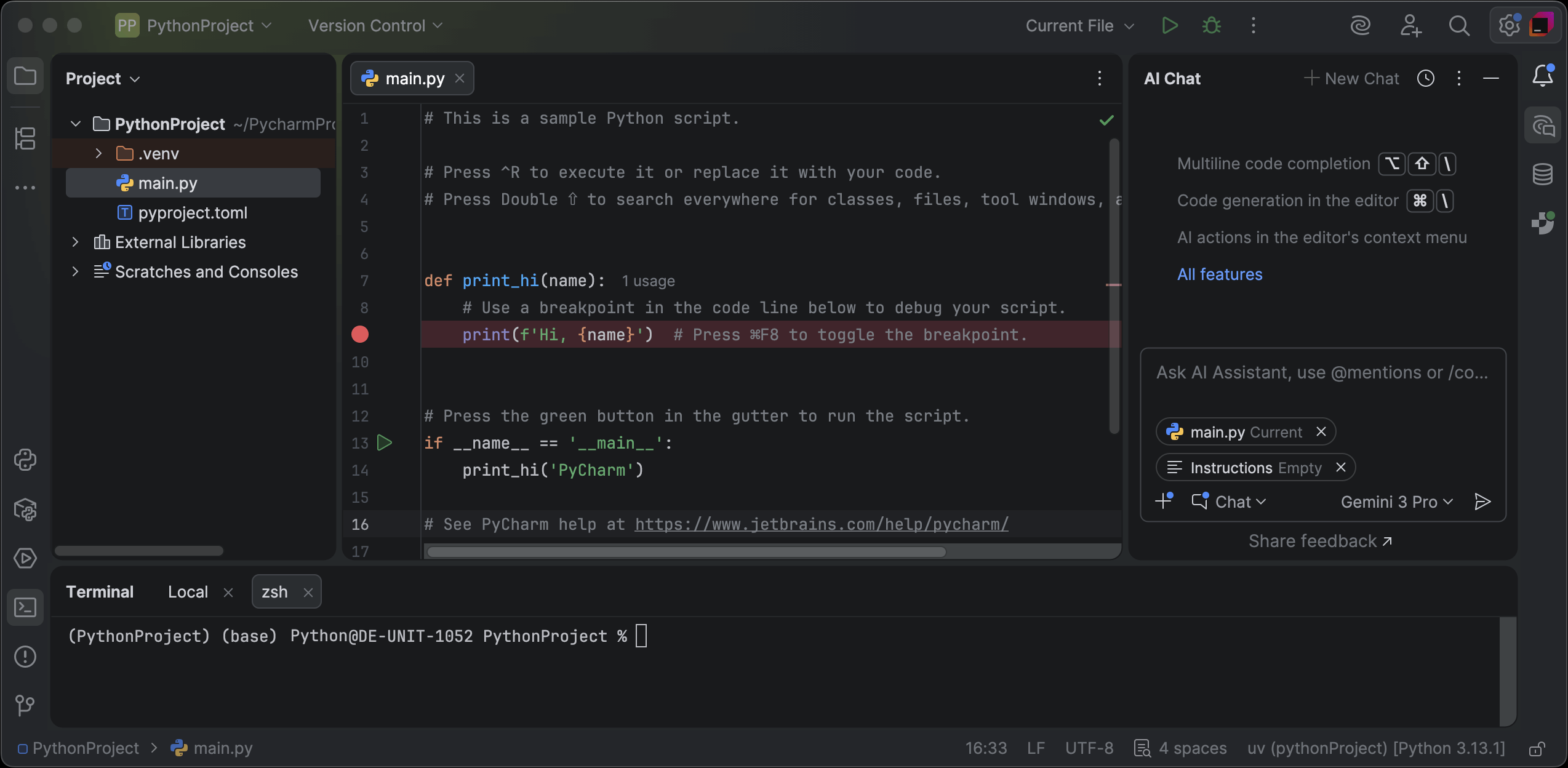
Islands theme
PyCharm gets a visual refresh with the Islands theme, now set as the default for both new and existing users while keeping functionality unchanged. More than just a visual refresh, it reflects our commitment to providing the ultimate comfort throughout your development experience.
Instantly recognizable tabs, improved in-editor contrast, clear separation between working areas, and rounded corners create a soft and balanced environment that was designed around one goal: helping you stay focused and code with ease.
It's available in dark and light modes and can be adjusted in Settings | Appearance & Behavior | Appearance.
New Welcome screen
We've introduced a new non-modal Welcome screen that reduces visual clutter, keeps your most common actions within reach, and provides a smoother start to your workflow.
The Welcome screen now appears as a dedicated tab inside the IDE, where you can:
- Create a new project, script, or notebook.
- Clone a repository or connect to a remote development environment.
- Start with AI to generate your first lines of code.
- Import files into your workspace.
By default, the new welcome screen is enabled only for new users. If you're an existing user and would like to try it, you can enable it in Settings | Advanced Settings | Welcome Screen | Show the Welcome screen in non-modal mode.
Requirements files
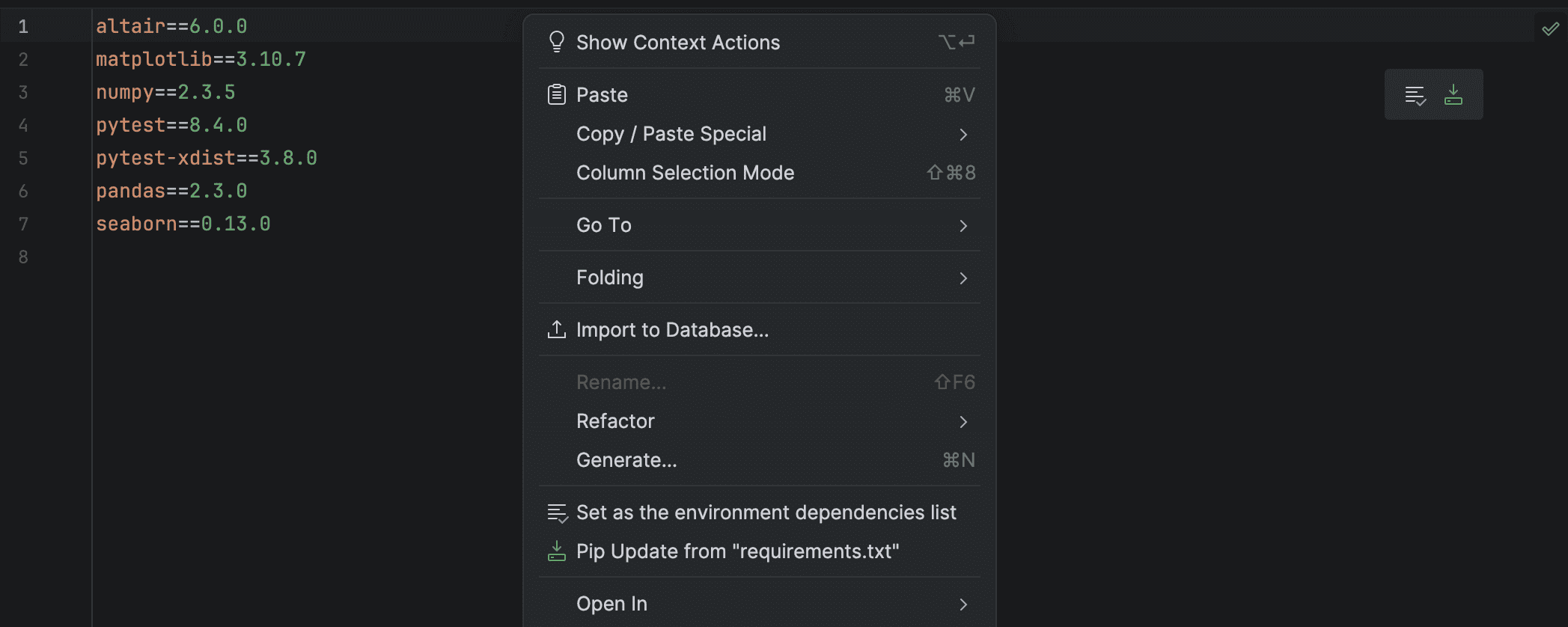
PyCharm now provides package and version completion for any filename that includes "requirements", for example, requirements-dev.txt, requirements_local.txt, or my-requirements.txt. This works regardless of where the file is located in your project.
We've also added a floating toolbar when editing requirements files in projects that use a virtual environment SDK. The toolbar lets you conveniently set a requirements file as the default for the SDK and install packages directly from it.
Quality fixes and improvements
We've been hard at work resolving defects and improving type-checking precision. Here are some of the highlights from over 300 bug fixes included in this release:
- PY-81362 PyCharm now uses IPyKernel instead of the full JupyterLab package, bringing significantly faster startup and reconnection times for a smoother Jupyter Notebook experience.
- PY-76572 Using the Fold All editor action will no longer incorrectly collapse type hints, keeping your function and variable signatures visible.
- PY-62652 The issue with inlay hint settings not being displayed correctly has been resolved.
- PY-83597, PY-83348 Type narrowing now works more reliably when using
andandoroperators within conditional checks. - PY-34200 The false error regarding NumPy arrays when performing equality operations (
==or!=) has been fixed. - PY-54771 Code completion now suggests all available fixtures when using the
@pytest.mark.usefixturesdecorator.