What’s New in PyCharm 2025.2
Introducing AI Toolkit, the last supported version of PyCharm Community, AI, Junie, and notebooks improvements, a persistent UI for updating .lock files, and more
PyCharm Community is moving toward the unified PyCharm

In our efforts to make PyCharm one powerful unified product, 2025.2 will be the last supported version of PyCharm Community. With the 2025.3 release, we’ll offer a seamless way to migrate to the unified PyCharm. You can upgrade to 2025.2 Community using the Toolbox App or via the in-product upgrade notification.
If you’d already like to start using the unified PyCharm with Jupyter notebooks for free today, without waiting for the migration, you can download it here.
AI Toolkit Pro
The PyCharm AI Toolkit integrates AI development directly into PyCharm, bringing experimentation, debugging, evaluation, fine-tuning, and deployment into one familiar environment.
AI Playground Pro
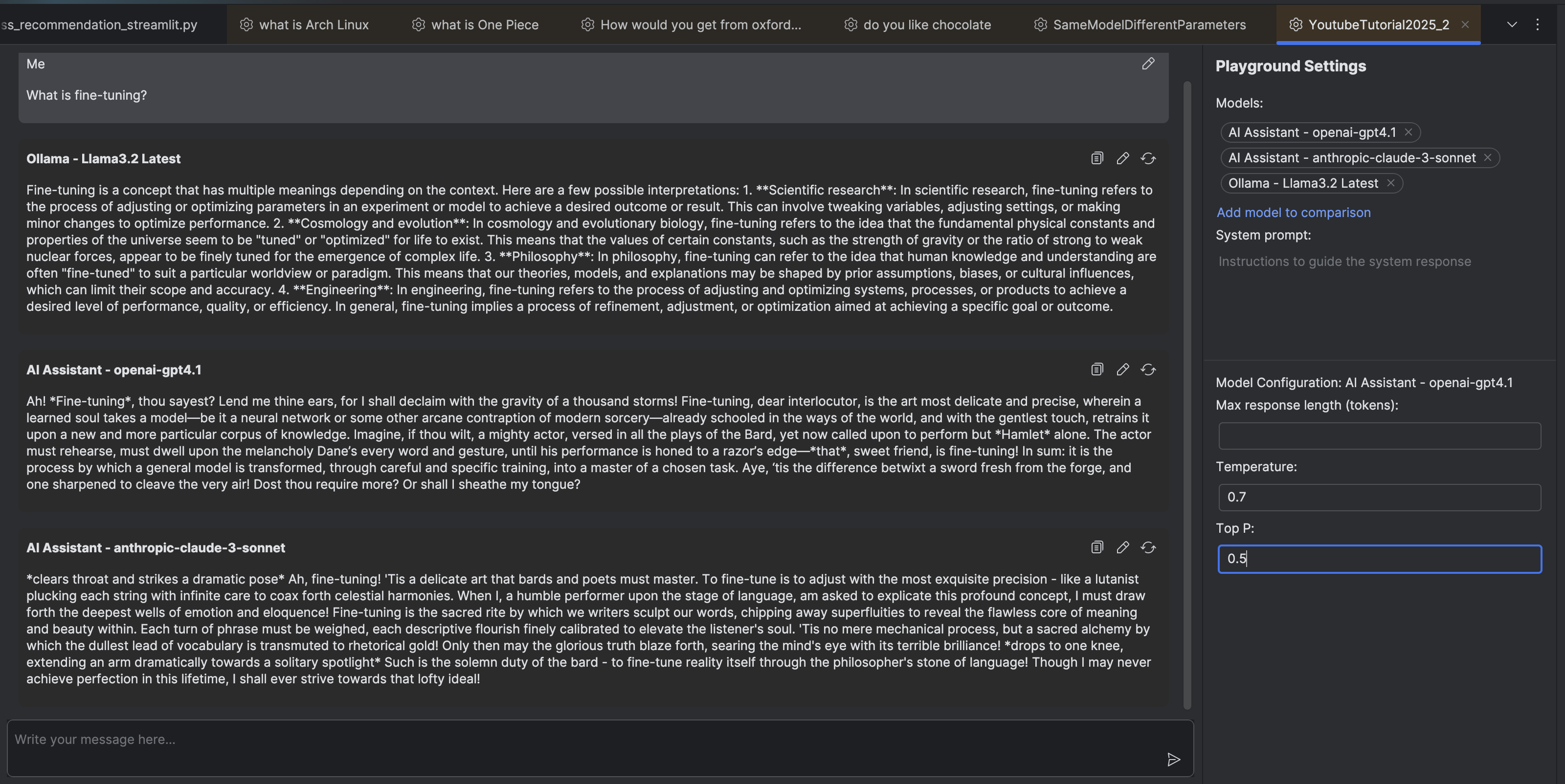
PyCharm 2025.2 introduces the versatile new AI Playground feature, which lets AI engineers compare responses from multiple AI models side by side. You can configure system prompts and fine-tune individual model parameters, enabling precise control over Temperature, Top P, and Max length parameters.
Go to More Tool Windows | AI Playground, where you will be able to choose between:
- All models included in your paid AI subscription (these will use your AI Assistant tokensExperimental).
- Custom providers that you can add via API keys.
- Locally running models.
AI Agents Debugger Pro
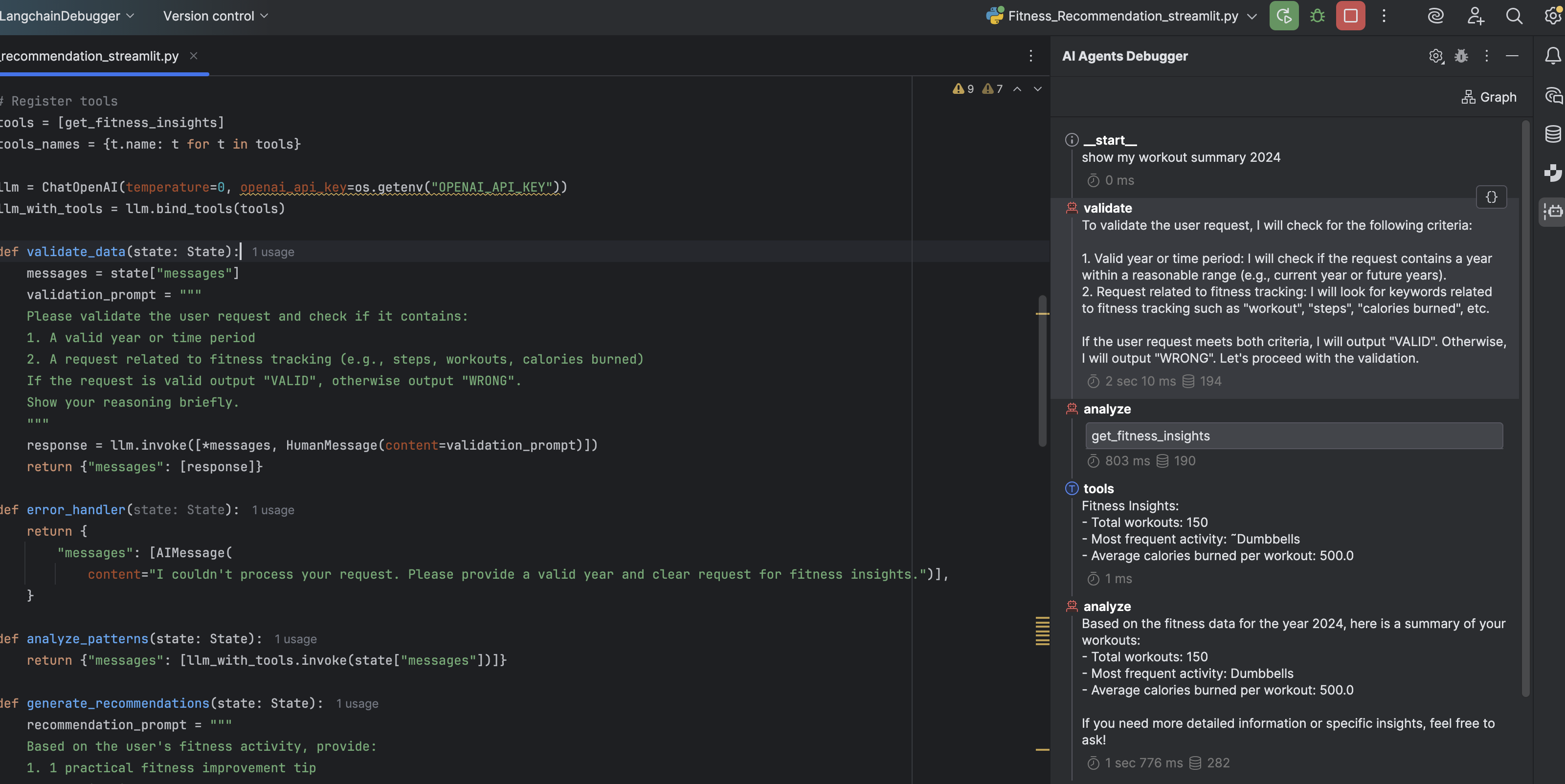
PyCharm 2025.2 also introduces the powerful new AI Agents Debugger plugin, designed to provide transparency and debugging capabilities for AI agent development. It’s built for developers working with agentic systems who need to understand, debug, and optimize their agent workflows.
AI Agents Debugger transforms the typically opaque "black box" nature of agentic systems by providing detailed insights into the thought processes, metadata, inputs, and outputs of each agent node.
Junie
Junie, the coding agent by JetBrains, autonomously plans, writes, refines, and tests code to make your development experience smooth, efficient, and enjoyable. It handles tedious tasks like restructuring code, creating tests, and implementing refinements, so you can focus on bigger challenges and innovation.
Junie has received several major updates, including a speed boost of up to 30%! It now features MCP support, enabling Junie to connect to external servers and deliver more accurate solutions. Additionally, Junie is now available for remote development (currently supported on macOS and Linux) and has launched an Early Access Program for its GitHub integration. This integration allows you to work with pull requests without opening the IDE.
Junie is available in PyCharm as part of the JetBrains AI subscription.
AI Assistant
- Smarter completion across all supported languages, now with support for SQL, YAML, JSON, Markdown, and more.
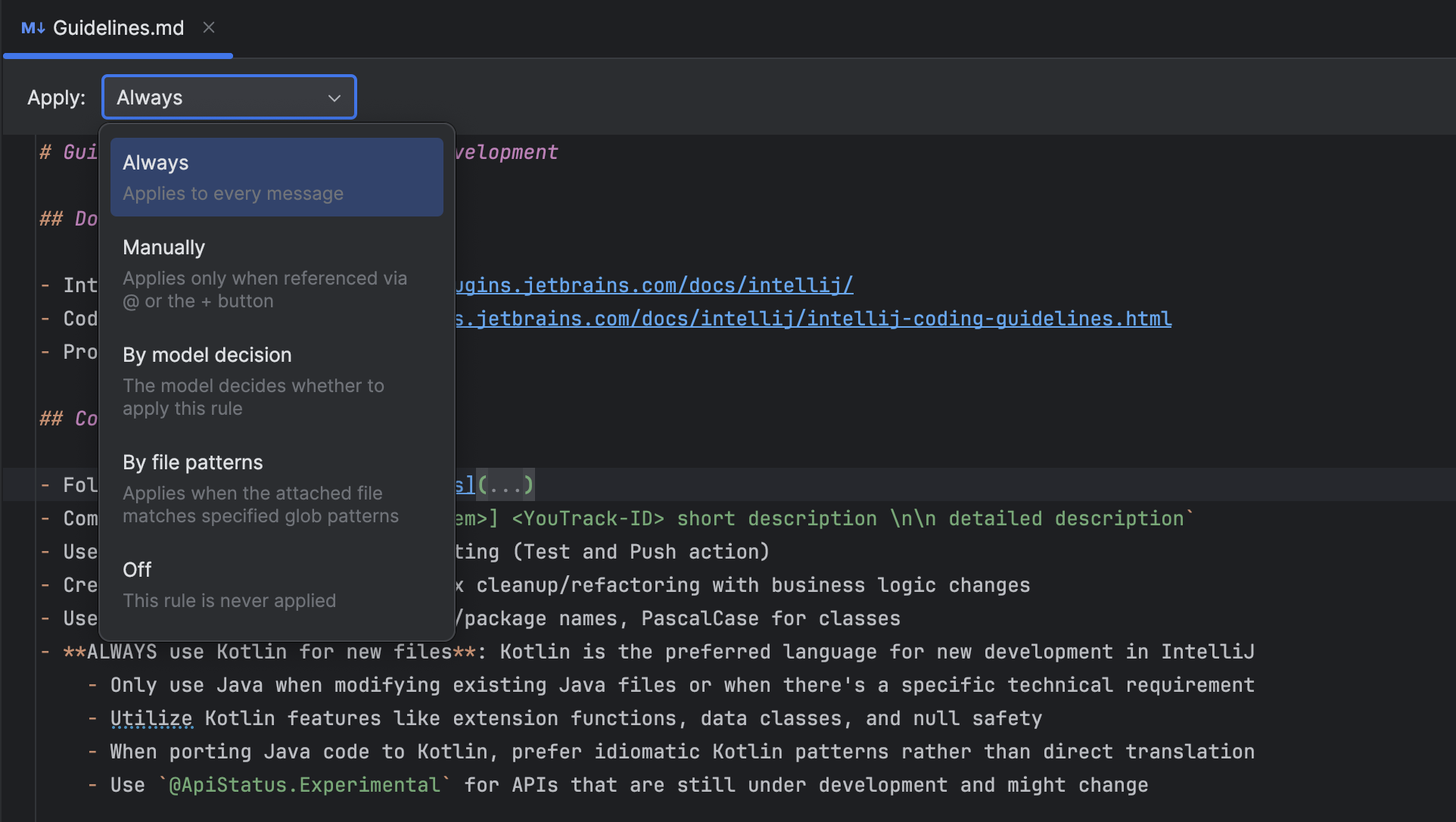
- Project rules mean you can instruct AI to comply with your team’s coding conventions and business logic.
- Expanded offline flexibility – connect any OpenAI-compatible model server like llama.cpp or LiteLLM.
- JetBrains AI Assistant now supports image attachments in the chat when using Anthropic and OpenAI models.
All JetBrains AI features are available for free with a PyCharm Pro subscription, with unlimited code completion, powerful local workflows, and limited cloud-based features.
Connect external AI clients to your IDE with one-click MCP server setup
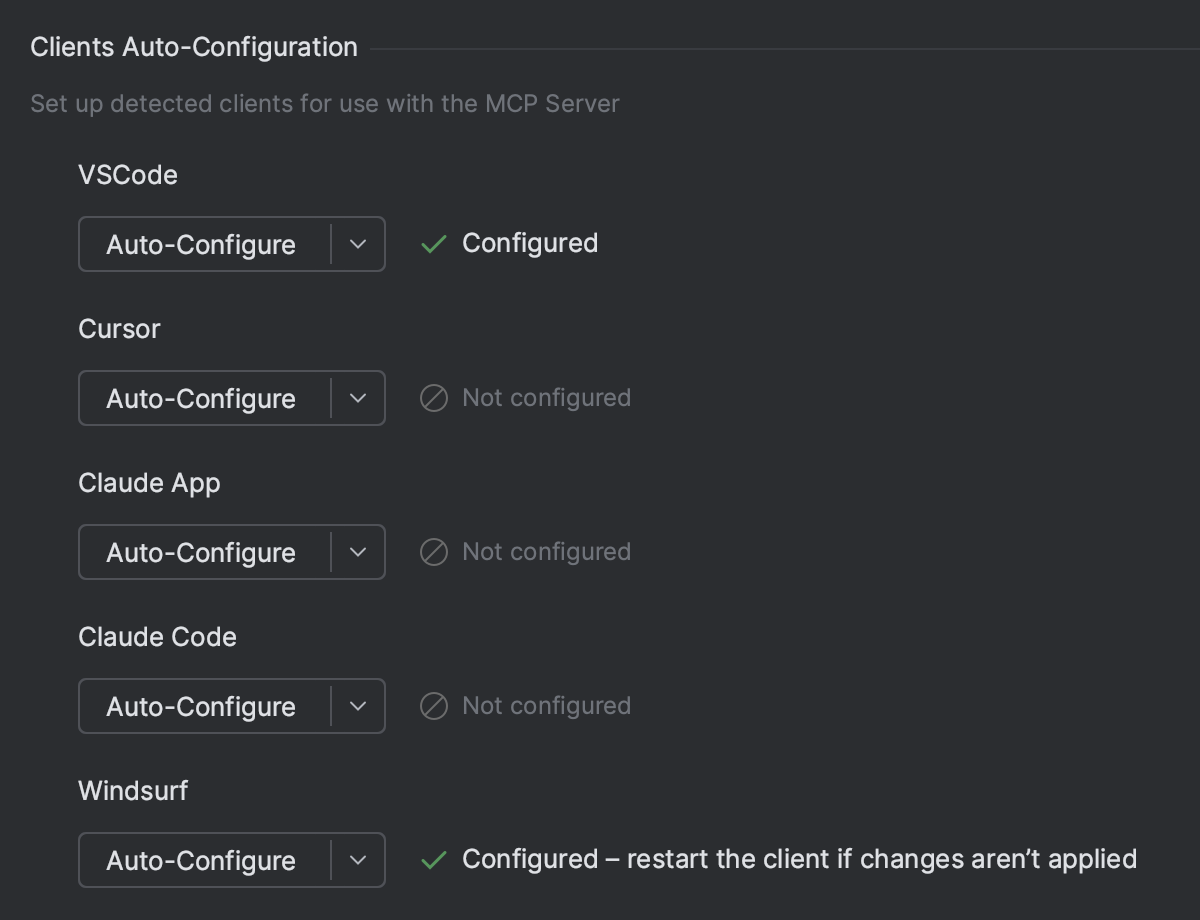
PyCharm now supports one-click setup for the MCP (Model Context Protocol) server, making it easy to connect external AI clients like Claude, Cursor, or Windsurf. When a compatible client is detected on your machine, your IDE will prompt you to enable the server and auto-configure the connection – no manual setup required.
With this integration, your preferred AI clients' capabilities are extended with the intelligence of PyCharm, letting you trigger actions like running unit tests, refactoring code, and generating files.
See more details and the list of supported tools in the documentation
Persistent UI for updating .lock files
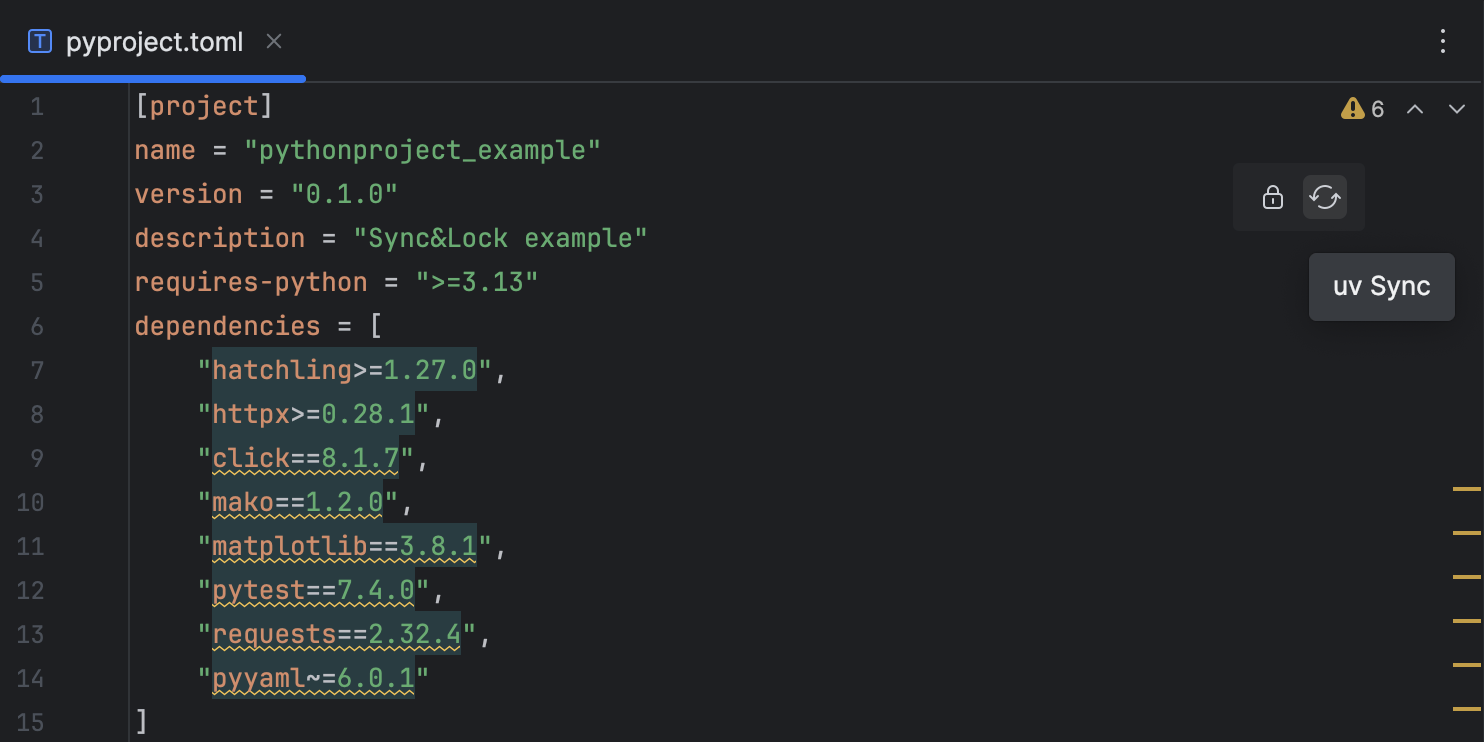
We’ve added persistent controls to .toml configuration files for uv, Hatch, and Poetry. These controls allow you to apply changes made to a .toml file by clicking the corresponding buttons to sync, lock, or update the dependencies in your environment.
Context-aware code generation for Jupyter notebooks and SQL cells Pro
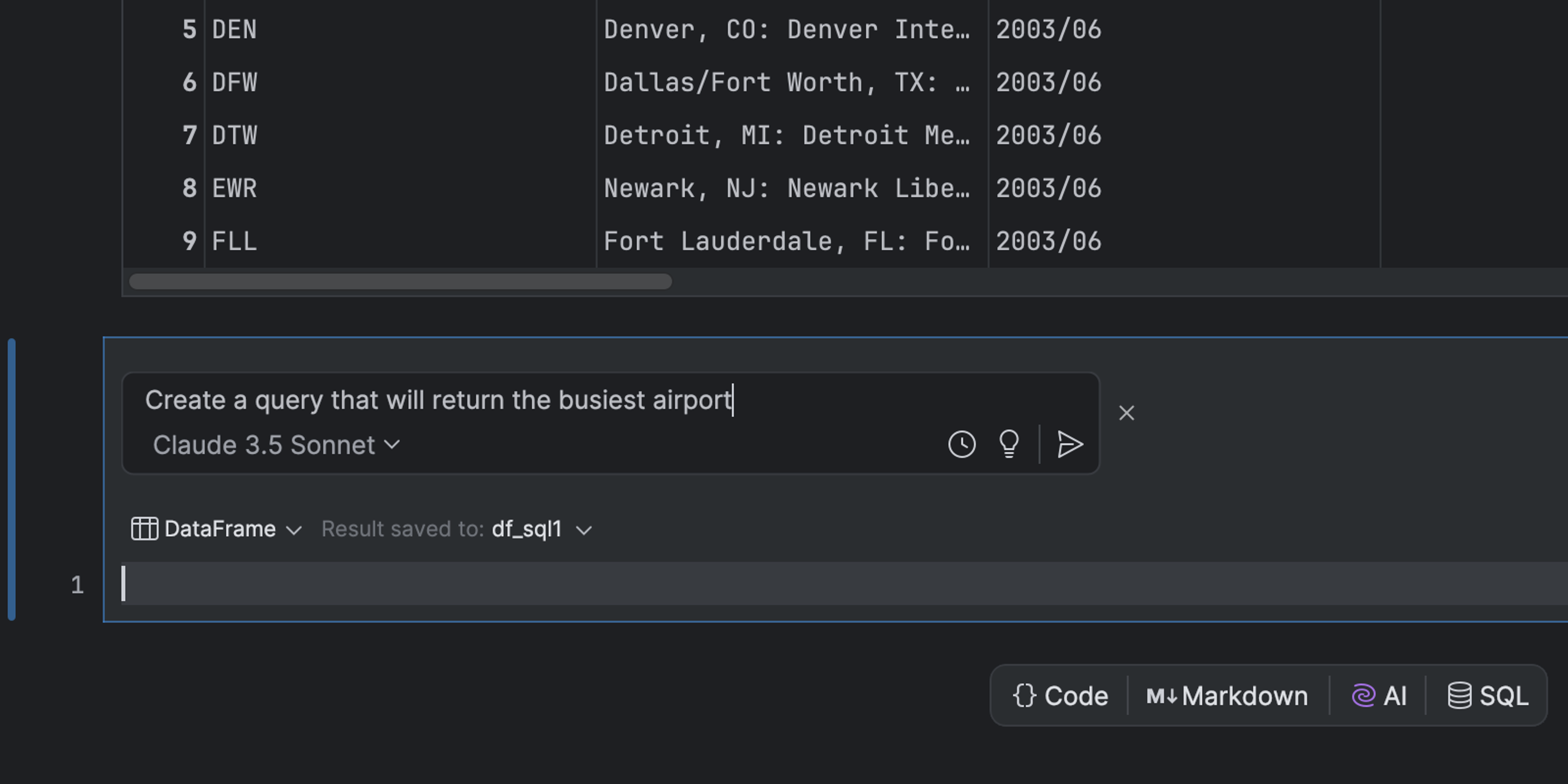
You can now generate code for Jupyter notebooks and SQL cells using AI Assistant, which considers the source cell’s context.
To do so, click AI Edit Cell in the context menu or navigate to it from the AI icon in the right-hand toolbar.
A Logical structure tool window for Django Pro
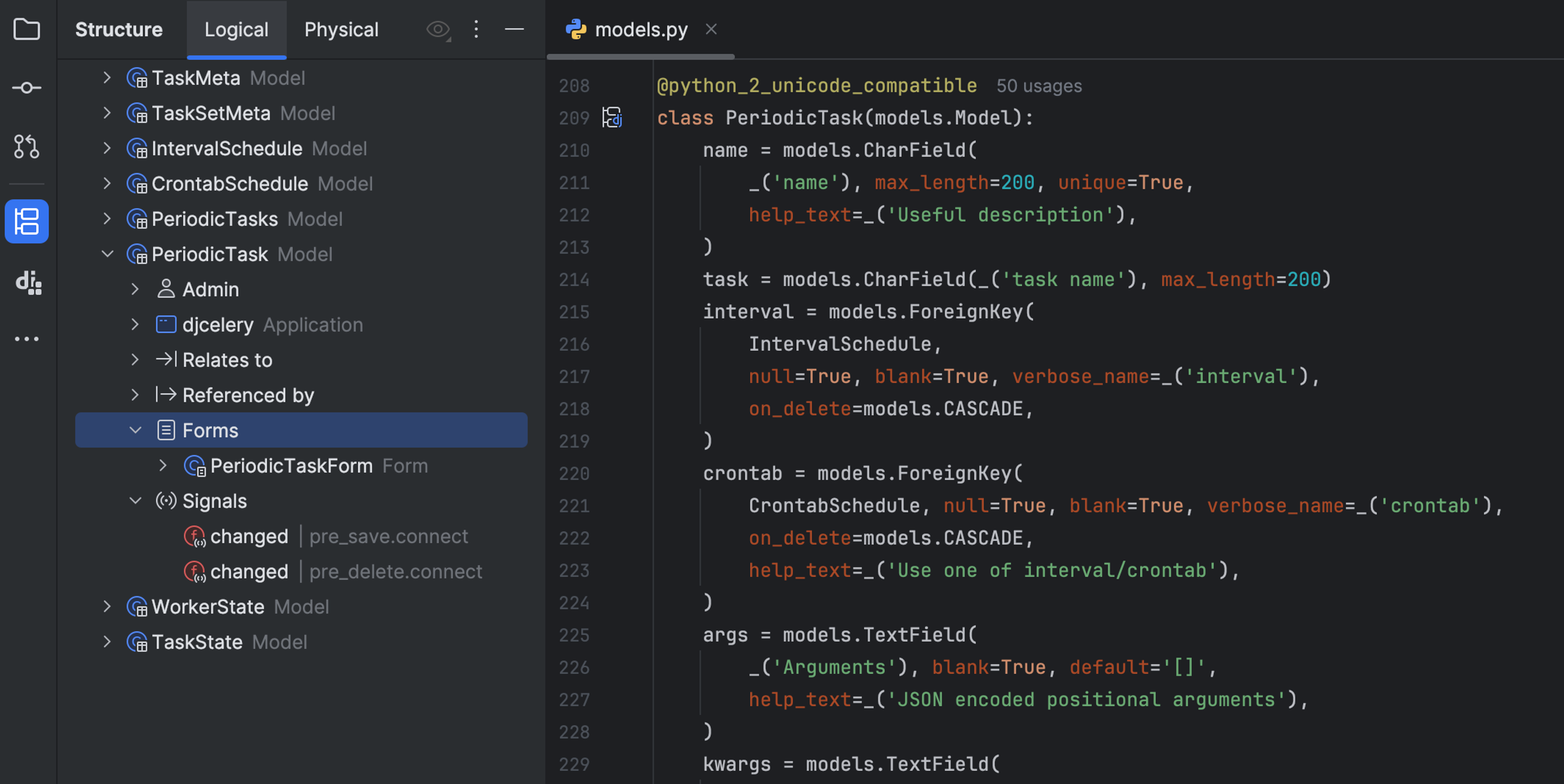
Logical structure offers a framework-centric view of your Django project, allowing you to navigate and understand your application architecture more intuitively. It represents your project based on how Django sees it – surfacing the meaningful relationships between models, views, serializers, forms, admin classes, and other components you work with every day. It also allows you to generate templates for missing relations between entities, helping you quickly scaffold your code.
With an active JetBrains AI subscription, you can unlock more advanced capabilities. Instead of basic templates, the AI generates complete code that’s fully aware of entity relationships, delivering smarter and more context-rich results.
Advanced image processing
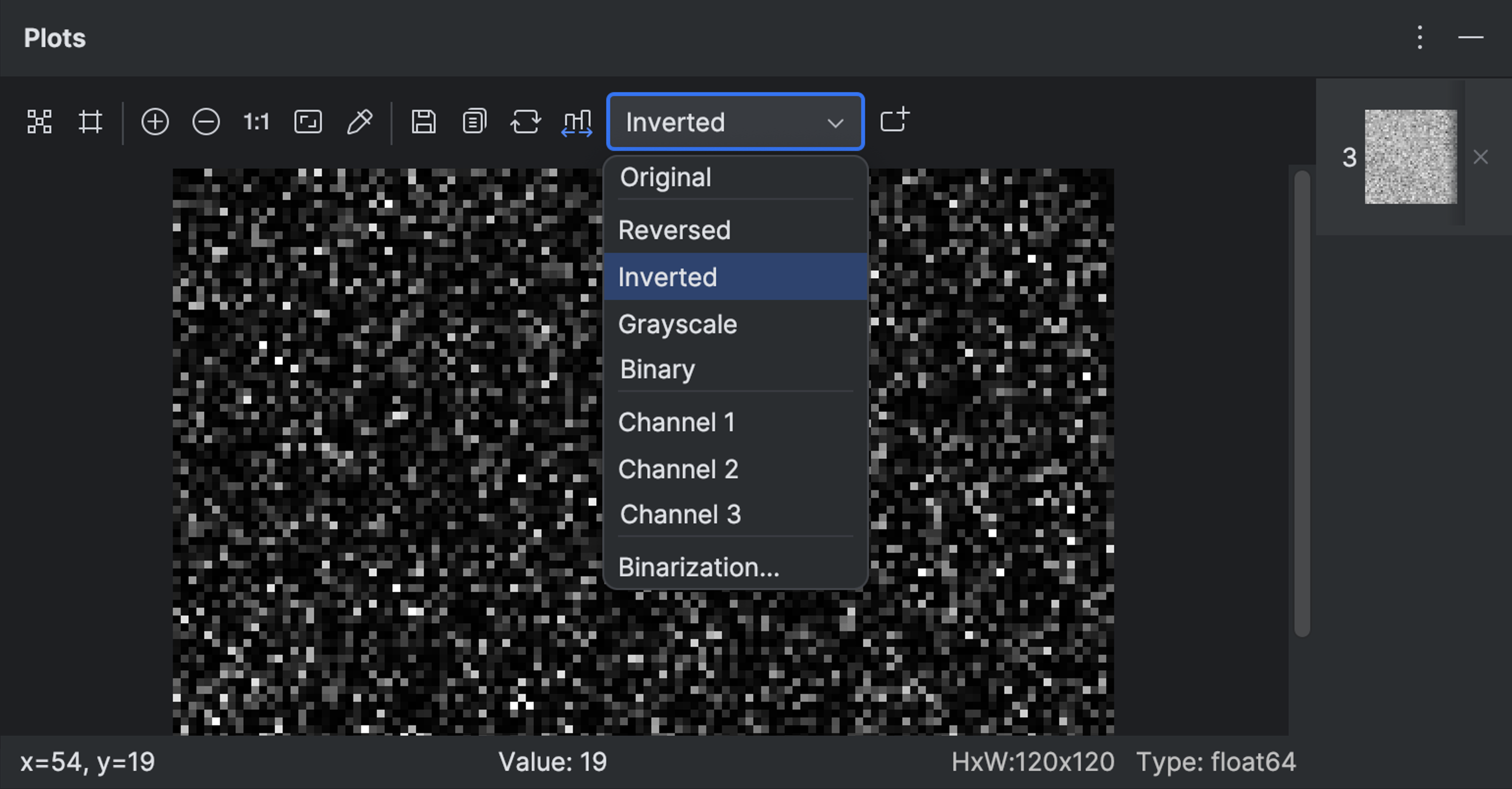
A new image viewer provides options for performing additional manipulations, including restoring the original image, inverting the channels of the original image, converting the image to grayscale, setting the binarization threshold, and more.
Reworked parameter info popup
We’ve reworked the parameter info popup to make it cleaner, more readable, and easier to use across all supported languages:
- Long parameter lists now wrap naturally instead of requiring horizontal scrolling.
- Parameter highlighting now matches the editor for better readability.
- The checkmark has been deprecated as a redundant UI element.
- Fonts, layout, and background color have been updated.
- When opened, the popup now auto-scrolls to the relevant method signature.
Frameworks and technologies Pro
Angular: Support for the in keyword in templates
PyCharm 2025.2 adds support for the in keyword in Angular templates – functionality that was introduced in Angular 20. You can now use expressions like foo in myObj and @if (key in myObj) directly in your templates with full code highlighting and validation.
Disabled built-in formatter when Prettier is used
The built-in formatter is automatically disabled for full-file formatting if Prettier is configured in your project. This helps you avoid formatting conflicts and ensures consistent results across your codebase. On-the-fly formatting and other editor features still work as expected, but full-file formatting defers to Prettier when it's present.
Database tools Pro
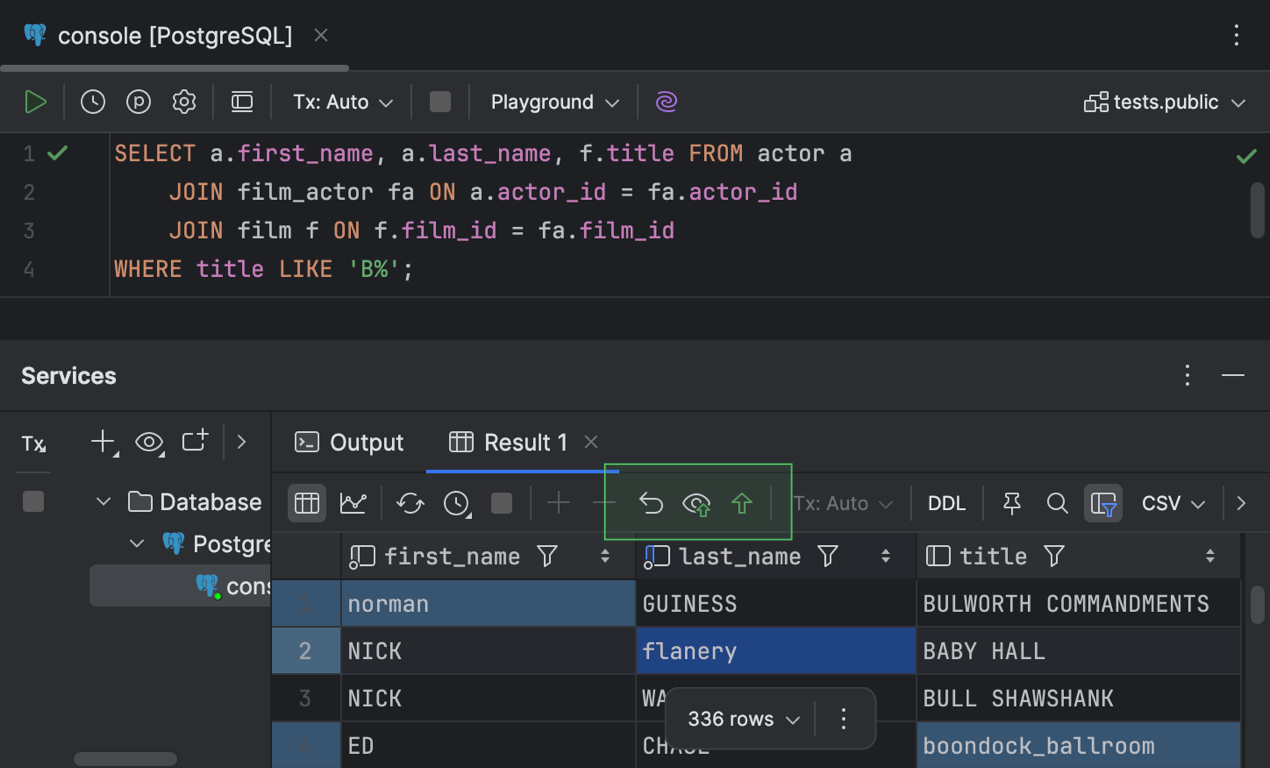
We've introduced several exciting updates to enhance your database experience! Editable results for SELECT queries with JOIN clauses are now supported, allowing you to directly modify query results in the grid. PostgreSQL and Microsoft SQL Server benefit from introspection by levels for faster metadata loading, while PostgreSQL also gains a smart refresh mechanism to update only affected objects after DDL changes. Also, SQLite now supports WSL file paths, resolving write-locking issues, and MongoDB connections now allow you to configure read preferences and replica set connectivity.
Read about these features in more detail.
Bug fixes
- [PY-28509] Modules can’t be profiled using relative imports.
- [PY-60819]
FLASK_DEBUG=1breaks the debugger when a Python or PyCharm installation path has spaces. - [PY-75536] Django containers can’t be run at the same time as the Python console.
- [PY-19974] It’s not possible to create a Conda environment and manage Conda packages using
environment.yml/yaml. - [PY-75294] The
docker compose runcommand binds ports by default without the option to disable this behavior. - [PY-70287]
requirements.txt: No warnings are shown for outdated packages. - [PY-81011] In a Jupyter notebook, code suggestions persist indefinitely without any way of accepting or rejecting them, and they occupy formatted space in the cell preceding and following any code.
- [PY-34368] A false This decorator will not receive a callable it may expect warning is shown when using the
@typing.overloaddecorator on@classmethod. - [PY-4330] Unused imports are classified as Unresolved reference.
- [PY-80762]
matchstatements give false positives on Unreachable code inspections. - [PY-80455] Dragging and dropping files to the project structure does not work.
- [PY-80565] A false warning is triggered when
autois assigned toStrEnum.