What’s New in MPS 2026.1
MPS now uses IntelliJ Platform 2026.1, JDK 25, and Kotlin 2.3. Build Language gains transitive dependencies, migrations are more reproducible, and Java stubs have received a substantial quality update. The bundled Projectional Agent Toolkit plugin enables AI coding agents to read and write MPS models, thus opening up a number of cutting-edge development concepts for MPS developers and language authors.
Explore the full list of changes below.
Projectional Agent Toolkit – AI coding agents can now work directly with MPS models
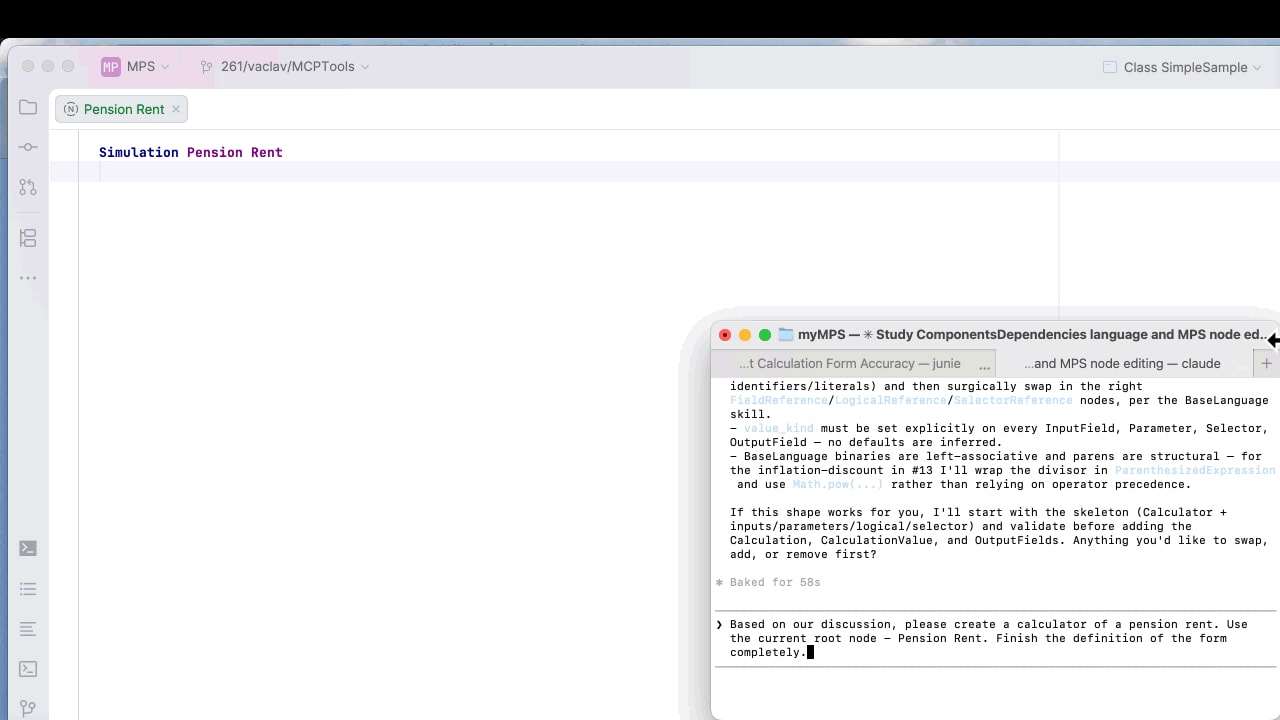
MPS ships with the Projectional Agent Toolkit, a plugin that exposes the MPS projection, model, and language workbench to AI coding agents through the Model Context Protocol. Agents such as Claude Code, OpenAI Codex, JetBrains Junie, and any other MCP-compatible client can connect to a running MPS instance and operate on it the way a developer would – navigating modules and models, reading and editing nodes through the projectional editor, resolving references, inspecting concept hierarchies, generating code, and running configurations. They no longer have to treat .mps files as opaque XML.
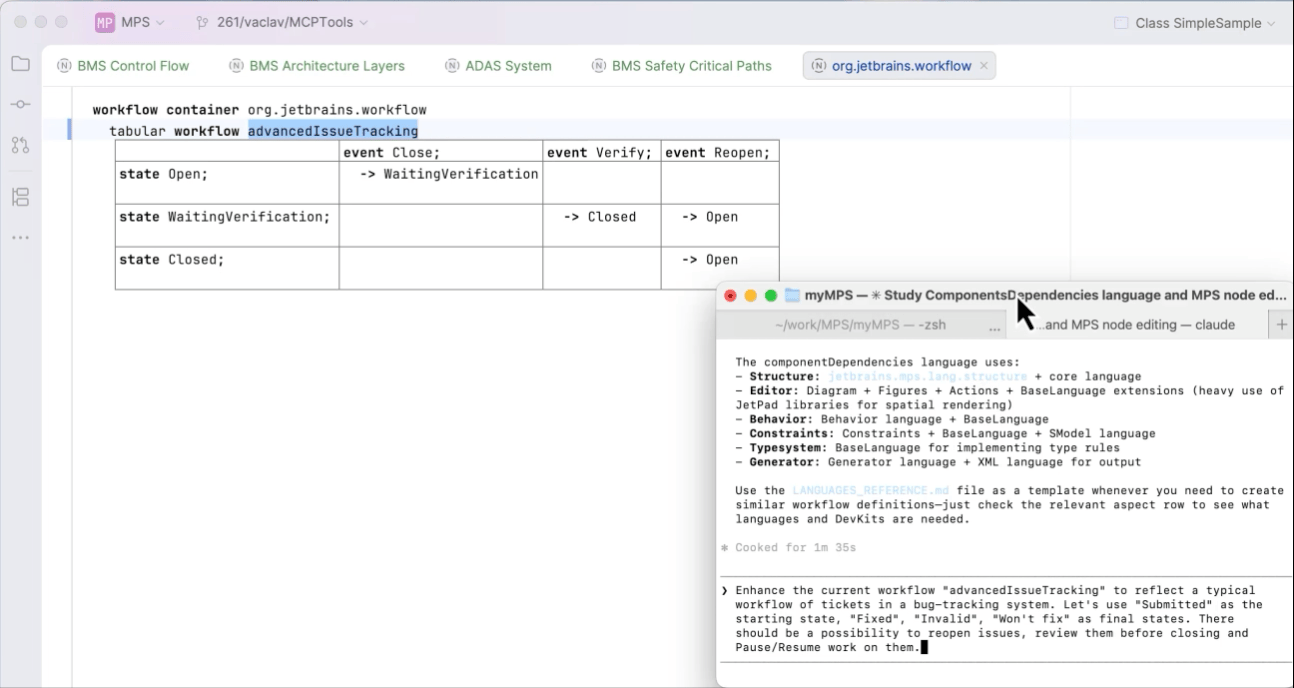
The Projectional Agent Toolkit contributes a dozen toolsets covering the full surface of an MPS project:
- Projects, modules, and models – These make it possible for agents to enumerate solutions, languages, and devkits; open and create models; and resolve dependencies.
- Languages and concepts – These give agents the ability to inspect concept hierarchies, properties, children, references, and inheritance, as well as implement structure concepts from a JSON blueprint.
- Root nodes and nodes – These allow agents to read, create, update, move, and delete nodes through node-aware operations that respect concept constraints rather than text-level edits.
- References and scopes – These enable agents to query assignable targets for a reference link, so the agent picks a valid referent the first time.
- Run configurations – These give agents the ability to list and execute project run configurations to validate changes end to end.
To make sure agents become productive as quickly as possible, the toolkit also bundles a set of skills – focused, model-aware playbooks that ship with the tools. They teach the agent how MPS languages are organized, how to implement structure concepts, how to work with the editor, how to write BaseLanguage as a JSON AST, and how to record DSL-specific memories for future sessions. Skills are discoverable through the same MCP channel, so a freshly connected agent can ask MPS what it should know before it starts editing.
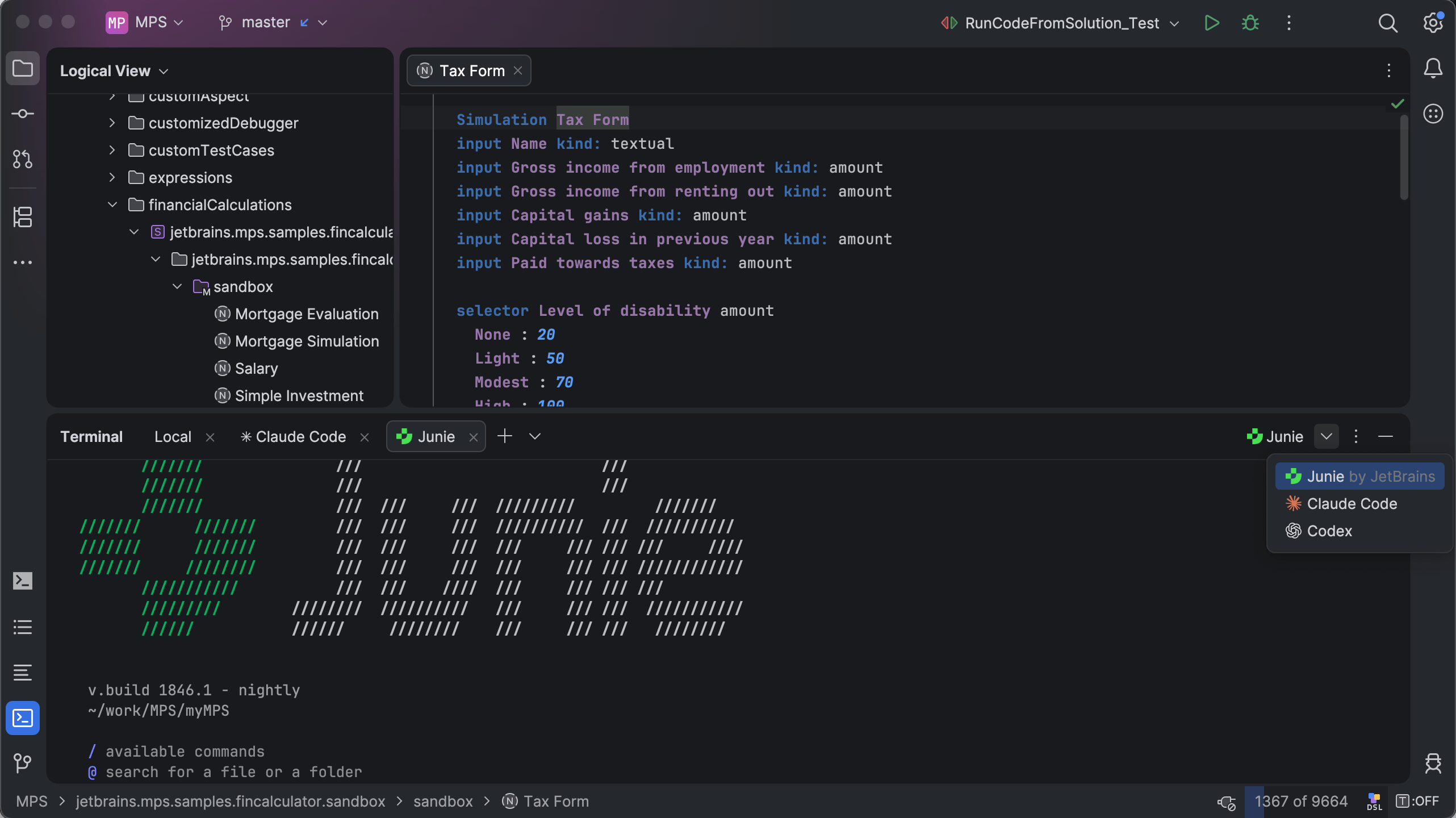
The experience of working with various AI assistants in IntelliJ-based IDEs now extends naturally to language and DSL development: An agent can implement a new concept, wire up its editor and constraints, add behavior methods, create DSL code, regenerate it, and test and run the result – all while staying inside the MPS semantic model. For language designers, this transforms AI assistance from a code-completion convenience into a collaborator that understands projection.
The Projectional Agent Toolkit is an experimental feature and may be subject to API changes in the future. It is bundled and enabled by default. Just start the embedded MCP server and point your MCP-capable agent at the MPS instance; the toolsets and skills appear automatically.
Read the Projectional Agent Toolkit documentation for full details.
Migration to IntelliJ Platform 2026.1, JDK 25, and Kotlin 2.3
MPS 2026.1 completes the jump to the current generation of the IntelliJ Platform. The runtime is JDK 25, and the embedded Kotlin version is 2.3.0. Additionally, MPS now builds and ships its own kotlinx-metadata-klib / kotlin-metadata-jvm artifacts from the Kotlin repository with the matching 2.3.0 tag, restoring the KLib-based Kotlin stubs support that the last public kotlinx-metadata-klib:0.0.6 could no longer provide.
Ability to check ICheckedNamePolicy against specific natural languages
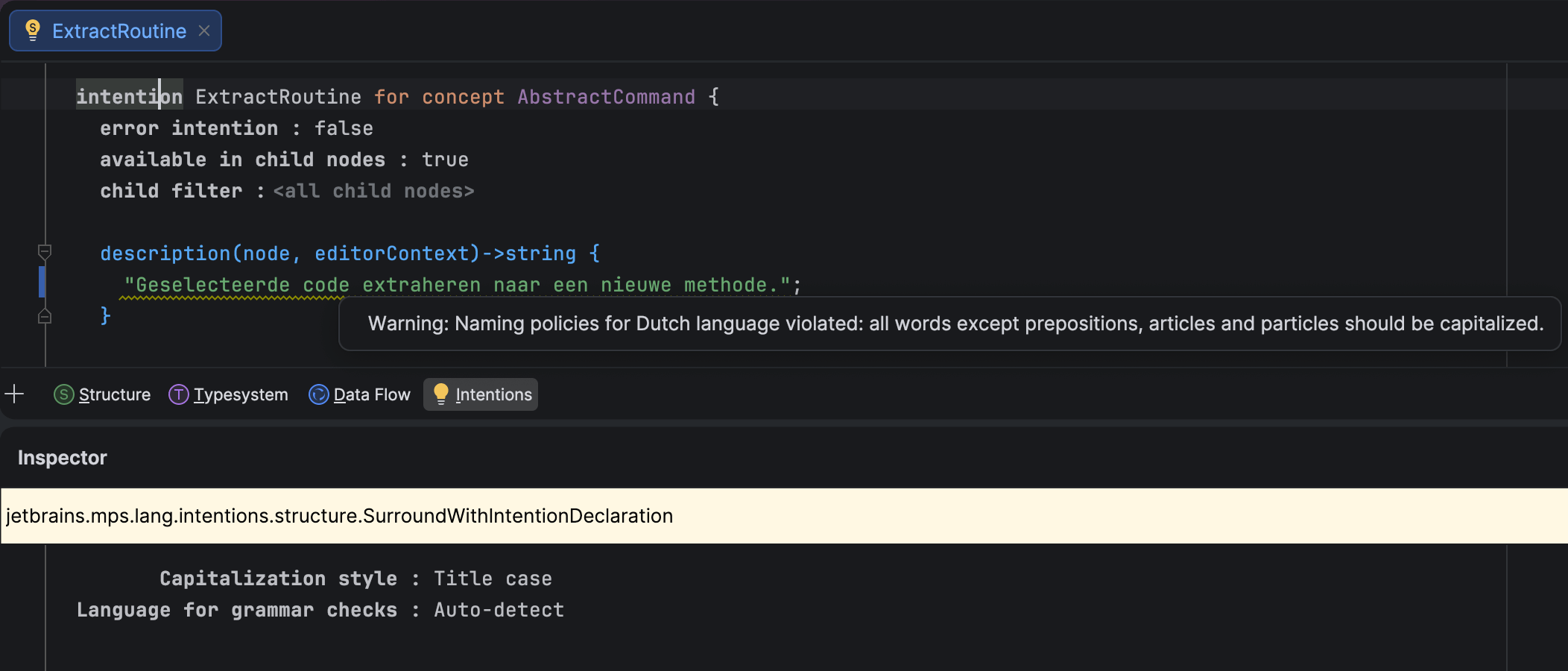
MPS now uses the IntelliJ Platform’s natural language support, provided by Grazie. This means you can check whether string values in instances of ICheckedNamePolicy, such as intentions, actions, or tools, have proper capitalization according to the rules of a specific natural language.
You can now install natural language support for your preferred languages into MPS, and the IDE will detect the language used in strings and verify that individual words are capitalized correctly. You can also bypass the language detection mechanism and specify your desired language explicitly.
In addition to the default Title-case capitalization rules, MPS offers three other options:
- Sentence-case, which follows the IntelliJ Platform’s rules
-
Inherited, which uses the capitalization rules of the closest ancestor
ICheckedNamePolicy - No capitalization rules
Ability to split binary operations into multiple lines
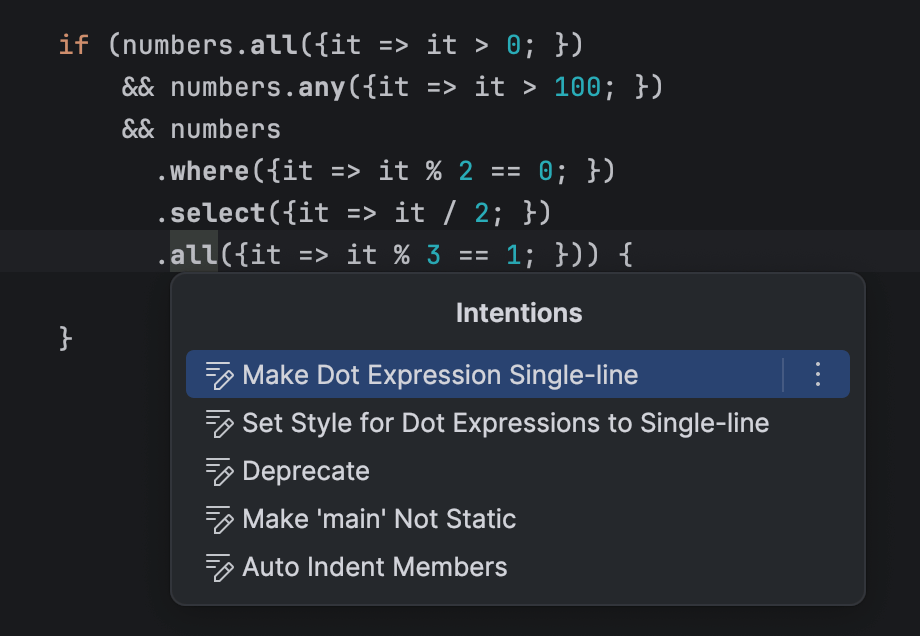
In the editor, you can now split long lines with binary operations. A dedicated intention action lets you toggle between the single-line and multi-line layouts for a given BinaryOperation.
New boolean editor style: read-only-inspector
The new read-only-inspector style applies the read-only property to all editor cells in the inspector. When this style is applied to a cell in the main editor, the inspector becomes read-only for the inspected node when the cell with this style is selected. The new style has the following properties:
- It is disabled by default.
-
The style is inheritable and overridable, just like the
read-onlystyle. - It has no effect on main editor cells.
-
The
read-onlystyle set by this mechanism can be overridden in any cell farther down the inspector’s editor cell tree.
Transitive dependencies in Build Language
Build Language no longer requires every transitively reachable build script to be listed in dependencies. This means that a build script, BuildA, that depends on BuildB can now reach BuildC through BuildB (provided that BuildB depends on BuildC) without having to list BuildC explicitly. The generator emits ${artifacts.BuildC} Ant properties for such cases, and these properties can be supplied from the outer build tool (Gradle, Maven, etc.).
This lets you split large builds into smaller ones without forcing every user to update the dependency lists. For example, a single platform build script can wrap a growing set of external libraries used across sub-projects.
More reliable migrations via recorded dependencies
Migration code previously decided which migrations to apply based on the actual module dependencies and used languages collected at migration time, but it would read versions from the dependency snapshot recorded in the module descriptor. That mismatch could cause migrations to use a different view of the world than the one the module was last modified against.
In version 2026.1, the migration machinery consistently uses the dependencies and used languages recorded in the module descriptor at the moment of last modification, not the currently observable state. The migration checker was refactored accordingly. It now reuses information already collected for the migration process instead of recomputing it on demand.
Improved Java stubs
A cluster of long-standing Java-stubs bugs has been fixed, visibly improving the accuracy of BaseLanguage stubs produced for imported .jar files and Java Sources model roots:
-
MPS-33174 (open since 2021) – Classes with
InnerClassesattributes are now correctly transformed to BaseLanguage stubs. The signature's inner-class information and parameterized owner types are preserved, so fields and methods of inner classes of generic outer classes now show the proper type instead of collapsing to the outer class. -
MPS-39375 – For type variables in generic methods of inner classes, methods referencing type variables of the outer class no longer show
java.lang.Objectin place of the real type variable. - MPS-39007 – The spurious Java imports annotation is present error no longer appears on every root of a Java source stub model.
- MPS-39565 – Java source stub roots no longer disappear when changes are made to the containing module's properties, so references from project code to those roots stay intact when module properties are changed.
Modernized project lifecycle
With MPSProject having moved from a legacy IntelliJ IDEA ProjectComponent to a project service, MPS-aware features need a reliable way to be notified about MPSProject becoming available and going away.
This version introduces a dedicated mechanism for managing MPSProject startup and shutdown activities, giving MPS control over the sequencing, grouping, ordering, and threading of those activities. This was something the platform's ProjectActivity and MPSProjectActivity could not offer.
How it works: Implementors register against the jetbrains.mps.project.lifecycleListener extension point (declared in MPSCore.xml) via a ProjectLifecycleListener.Bean with a listenerClass and an optional integer priority. The LifecycleEventDispatch.java inside MPSProject can fire:
-
projectReady(non-blocking) -
projectDiscarded(blocking) -
asyncProjectClosed(non-blocking)
Wayland by default
MPS now offers Wayland as the default display protocol on supported Linux systems. When running in a Wayland-capable environment, MPS automatically switches to a native Wayland backend instead of relying on X11 compatibility layers, bringing it in line with modern Linux desktop standards.
This transition improves overall integration with the system, providing better stability across Wayland compositors, proper support for input methods and drag-and-drop, and more consistent rendering – especially on HiDPI and fractional scaling setups. While the user experience remains largely familiar, some differences (such as window positioning or decorations) may be noticeable due to Wayland’s architecture.
Numerous bug fixes
MPS 2026.1 includes a wide range of bug fixes. The complete list of resolved issues can be found here.
Platform updates
UI updates
With JetBrains MPS 2026.1, we’ve continued to prioritize ultimate comfort and an ergonomic UI, ensuring your workspace is as accessible and customizable as your code.
The long-awaited ability to sync the IDE theme with the OS is now available to Linux users, bringing parity with macOS and Windows. Enable it in Settings | Appearance & Behavior | Appearance.
Windows users who rely on the keyboard can now bring the IDE’s main menu into focus by pressing the Alt key. This change improves accessibility for screen reader users.
Version control updates
We continue to make small but impactful improvements that reduce friction and support your everyday workflow.
You can now amend any recent commit directly from the Commit tool window – no more ceremonies involving interactive rebase. Simply select the target commit and the necessary changes, then confirm them – the IDE will take care of the rest.
In addition to Git worktrees, we’ve improved branch workflows by introducing the Checkout & Update action, which pulls all remote changes.
Furthermore, fetching changes can now be automated – no need for a separate plugin. Enable Fetch remote changes automatically in Settings | Git.
Terminal updates
-
Stop memorizing commands. Start discovering them. In-terminal completion helps you instantly explore available subcommands and parameters as you type. Whether you're working with complex CLI tools like Git, Docker, or
kubectlor using your own custom scripts, this feature intelligently suggests valid options in real time.Previously introduced for Bash and Zsh shells, it is now also available in PowerShell.
- We fixed the Esc behavior – it is now handled by the shell instead of switching focus to the editor, so it does not break the AI-agent workflow. Additionally, Shift+Enter now inserts a new line, making it easier to write multi-line prompts and commands directly. This behavior can be disabled in Settings | Advanced Settings | Terminal.
Migration guide
For every major release, we prepare instructions on how to migrate from older MPS versions to ensure everything goes smoothly. Please review them carefully in the updated migration guide.