Issue Navigation
An integration feature built into JetBrains IDEs is the ability to recognize issue ID patterns in change lists and commit messages. These patterns are recognized and transformed into direct links to issues in the tracker. When you specify an issue ID in the change list or commit message, the ID is set as a direct link to the issue in YouTrack.
This feature is supported in IntelliJ IDEA, PhpStorm, PyCharm, RubyMine, WebStorm, AppCode, CLion, Rider, and MPS.
When pattern recognition is configured, issue IDs are displayed as links in your IDE.
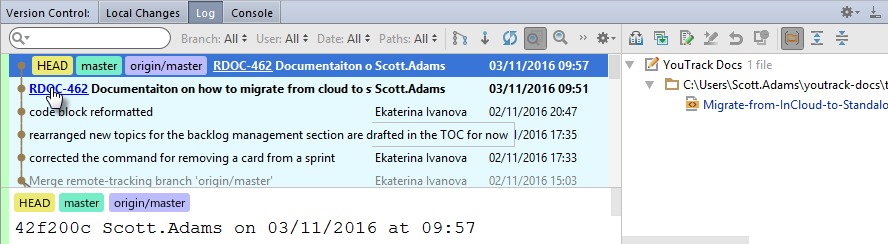
Configure this option on a per-project basis.
To enable YouTrack issue ID recognition:
Open a project in your IDE.
Open the Settings dialog.
Open the settings.
Click the Add YouTrack Pattern button.
In the Add YouTrack Issue Navigation Pattern dialog, enter the URL of your YouTrack server.
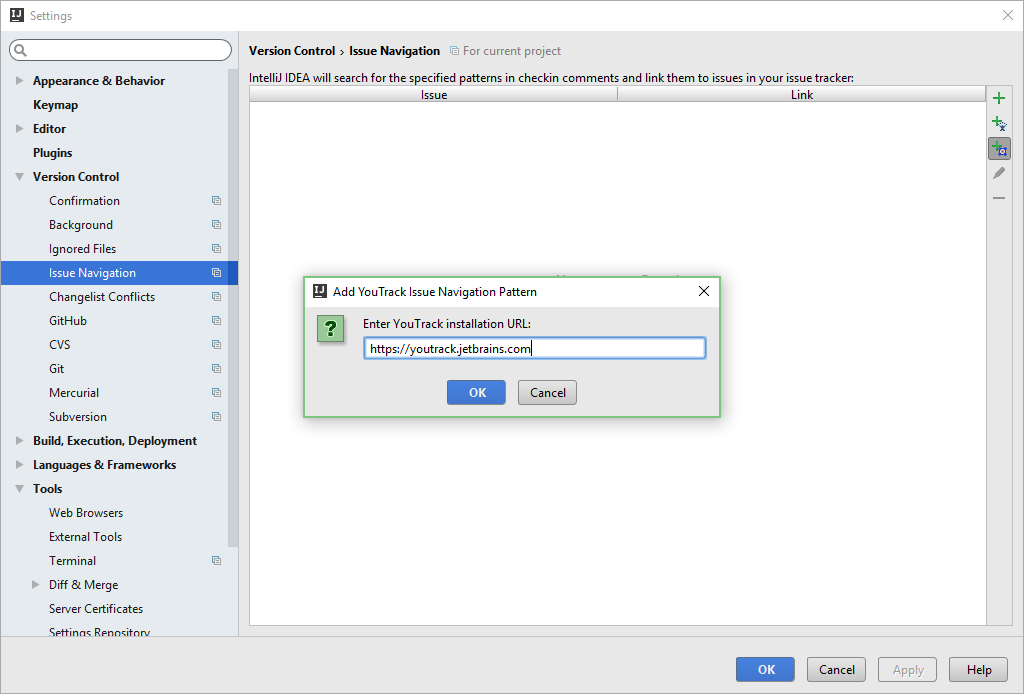
Click the OK button.
The IDE recognizes the pattern for YouTrack issues.
All issue IDs are transformed into links in change lists and commit messages.