Recipe YAML Syntax
This document describes general YAML recipe syntax. To create a custom YAML recipe, write an .yml definition file and upload it to TeamCity (Project Settings | Recipes | Upload private recipe).
Common Recipe Structure
A TeamCity YAML recipe has the following structure:
- name
Mandatory: yes
Type: stringThe unique recipe name. The value must be in the
namespace/recipe-nameformat, wherenamespaceis the name of a JetBrains Marketplace owned by a recipe author. All recipes uploaded by the same user should have identical namespace. See the following Marketplace documentation article to learn more about managing your user namespaces: Uploading TeamCity Recipes.Recipe and namespace names must be 5–30 characters long, using only alphanumeric characters, dashes, or underscores. They cannot start with a dash or underscore, nor contain consecutive dashes or underscores.
If you do not plan to upload a recipe to JetBrains Marketplace and only intend it to use as a private recipe, you can skip the
namespaceportion. When used alone,recipe-namehas a limit of 100 characters (alphanumeric, dashes, and underscores).- title
Mandatory: yes (only for recipes uploaded to the Marketplace)
Type: stringA public recipe name shown in TeamCity UI (on the Add Build Step page, in the build log, and so on).
- version
Mandatory: yes (only for recipes uploaded to the Marketplace)
Type: stringThe numerical recipe version in the
major.minor.patchformat.Minorandpatchportions are optional for private recipes and mandatory for public ones.- description
Mandatory: yes
Type: stringThe recipe public description. Unlimited for private recipes and maximum 1000 characters for public ones.
- container
Mandatory: no
Type: ContainerSettings object or stringA set of properties that specify a Docker or Podman container in which this recipe should be executed.
- inputs
Mandatory: no
Type: List<Input>A set of editors (text fields, checkboxes, combo-boxes, and so on) displayed in TeamCity UI when configuring a recipe.
- steps
Mandatory: yes
Type: List<Step>A list of build steps executed by a recipe when a build runs.
Container Settings
The recipe container field has the following syntax:
If image is the only required field, you can use a compact format instead:
Unless you specify a public DockerHub image name, a build configuration that runs a recipe inside a container must have the Docker Registry connection to access a registry.
- image
Mandatory: yes
Type: stringThe name of Docker/Podman image from which a container is spawned.
- platform
Mandatory: no
Type: string
Supported values:linux|windowsSpecifies the container image platform.
- parameters
Mandatory: no
Type: stringThe list of additional container run parameters.
Input
An input is a variable used by recipe steps and customizable by the user. When a standalone recipe is added directly to a build configuration, inputs can be configured through UI editors based on their type (text box for text inputs, combo box for select, and so on).
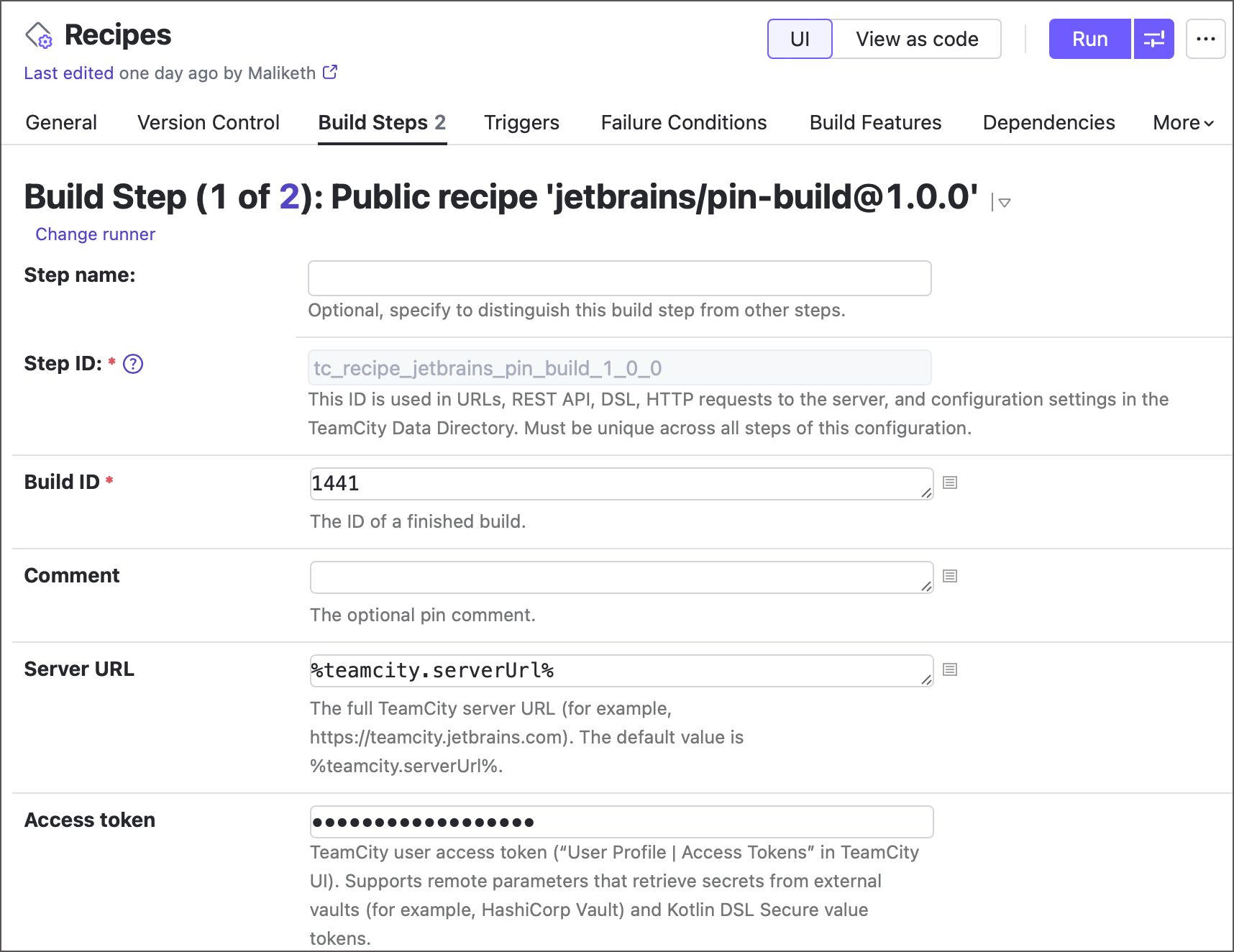
Recipes can also reference other recipes via the uses field. In that case, input values are provided in YAML instead of the TeamCity UI.
Each input has the following format:
In a recipe .yml file, individual input definitions are placed inside the inputs block:
- <input-name>
Mandatory: yes
Type: stringThe name of a build parameter that stores the input value. Declared as a raw value (without the field name).
You can use both environment variables and regular build parameters as input names.
Environment variables (recommended)
Declared with the
env.prefix. For example,env.my-input.Steps can retrieve environment variable values without using parameter references. For example,
INPUT_VAR="$my-input"in Bash script,System.getenv("my-input")in Kotlin script, and so on.Recommended for any input except for those asking for user credentials or other sensitive data. Sensitive values should not be stored in environment variables as they expose these values to all child processes and system tools, which presents a security concern.
Regular build parameters
Declared without any prefix. For example,
my-input.Steps must use parameter references to retrieve their values (for example,
string myVal = "%my-input%";). This syntax can be abused to inject malicious code disguised as an input value. For that reason, regular build parameters are recommended for trusted user inputs only.
- type
Mandatory: yes
Type: string
Supported values:text|boolean|select|passwordThe input type. Specifies what value this input can have, as well as appearance and behavior options for the corresponding editor in TeamCity UI.
text— the default input type. Allows the input to have any value. Displays a text box in recipe settings.boolean— limits the number of available input values to either true or false. TeamCity shows checkboxes in recipe settings for inputs of this type.select— allows you to specify a fixed range of values that users can choose from. In TeamCity UI, rendered as a combo box editor. Requires an additionaloptionsfield that lists available values:inputs: - env.retry_timeout: type: select label: Retry timeout required: false default: 60 options: - 5 - 10 - 30 - 60password— similar totext, but masks the input value with asterisks in both TeamCity UI and build logs.
- label
Mandatory: no
Type: stringThe main input label displayed next to the editor in TeamCity UI. The maximum length for public recipes is 100 characters.
- description
Mandatory: no
Type: stringThe input description displayed below the editor in TeamCity UI. The maximum length for public recipes is 250 characters.
- default
Mandatory: no
Type: stringThe initial/default input value. Steps will use this value if a user did not provide a custom one. If not set, set the
requiredfield to true.- required
Mandatory: no
Type: BooleanReturns true if a user must specify the input value on the TeamCity recipe settings page; otherwise, false. Enable this setting if an input has no
defaultvalue.
Step
A single set of actions performed during a build. While a recipe is a generalized build step that uses custom versions of standard TeamCity build steps, YAML recipes are designed to be universal and compatible with any TeamCity agent regardless of the installed tools. For that reason, recipe steps can currently use only Kotlin Script, Command Line (Script) steps, and other YAML recipes.
A typical step looks like the following:
In a recipe .yml file, individual step definitions are placed inside the steps block:
- name
Mandatory: no
Type: stringThe public step name. Unlimited for private recipes and maximum 100 characters for public ones.
- script
Mandatory: no
Type: stringSpecifies a step that executes a custom script using the TeamCity Command Line (Script) step. The maximum script length for public recipes is 50000 characters. For example, the following step prints "Hello world" to the build log:
name: Script step script: echo "Hello world"- kotlin-script
Mandatory: no
Type: stringSpecifies a step that executes a custom Kotlin script using the TeamCity Kotlin Script step. The maximum script length for public recipes is 50000 characters. For example, the following step prints "Hello world" to the build log:
name: Kotlin script step kotlin-script: print("Hello world")- uses
Mandatory: no
Type: stringReferences another recipe installed on this TeamCity server and available for the same project where the current recipe is used. The field value depends on whether a referenced recipe is a public or a private one:
Public recipe:
uses: namespace/recipe-name@major.minor.patch.Private recipes:
uses: private/recipe-name.
If the referenced recipe has required inputs, you can specify their values in the
inputsblock.The following recipe step executes the
jetbrains/some_reciperecipe of version "1.2.3", and passes foo and bar values tosome_recipeinputs "input1" and "input2" respectively.name: Custom step uses: jetbrains/some_recipe@1.2.3 inputs: input1: foo input2: bar- container
Mandatory: no
Type: ContainerSettings object or stringSpecifies a Docker or Podman container in which this step should be run. Overrides the recipe-wide
containerfield for this step.The recipe step below runs in the "alpine" container for Linux:
name: Container script step container: image: alpine platform: linux script: echo "Hello world"You can use a short format that specifies only image name:
name: Container script step container: alpine script: echo "Hello world"
Example
The following YAML markup declares a single-step recipe with two inputs. The recipe step executes a Kotlin script uses the input_name and input_value input values to craft a setParameter service message. When this service message prints to a build log, TeamCity finds the name parameter and assigns value to it.
This recipe is created by the TeamCity team and is available on the JetBrains Marketplace: jetbrains/set-environment-variable.