AI Assistant
The TeamCity AI Assistant is your 24/7 companion for debugging failed workflows, suggesting optimal configurations, and guiding you through TeamCity’s capabilities.
Key Takeaways
What can TeamCity AI Assistant do?
AI Assistant is equipped with a set of tools for retrieving information about the current TeamCity installation and its builds. It offers general guidance (for example, “How do I configure the TeamCity NuGet feed?” or “How do I set up pull requests?”) and troubleshooting help for specific configurations and builds (for instance, “Why did build #17 in my SampleApp configuration fail?”).
Is it free?
This feature may become a paid option in future releases but will remain free throughout the Early Access Program. The AI Assistant requires an active TeamCity Enterprise license (including those in active trial period). It is not available for Professional licenses or Enterprise licenses with the expired maintenance period. See the Limitations and Special Notes section for more information.
Are there any additional requirements?
AI Assistant requires outbound access to the endpoints of the selected provider to obtain authorization tokens, send user prompts, and receive responses. For the JetBrains AI provider, this includes https://auth.grazie.ai, https://api.jetbrains.ai, and other resources needed to publish usage statistics (if enabled) and more; other providers require access to their own endpoints instead. If your server uses a proxy or firewall, allow outbound access to the endpoints of whichever provider you configure.
What data does the Assistant collect and share?
See the Privacy Policy section.
What model does TeamCity AI Assistant use?
By default, AI Assistant uses JetBrains AI. Starting with version 2026.2, you can also enter your own API key to connect AI Assistant to a third-party AI provider. The exact model used depends on internal TeamCity settings and is shown at the bottom of the Assistant panel. See Providers to learn more.
Initial Setup
AI Assistant ships with all TeamCity installations in a disabled state. To make sure you do not miss this exciting addition to TeamCity, AI Assistant keeps showing its menu item in TeamCity header even when disabled.
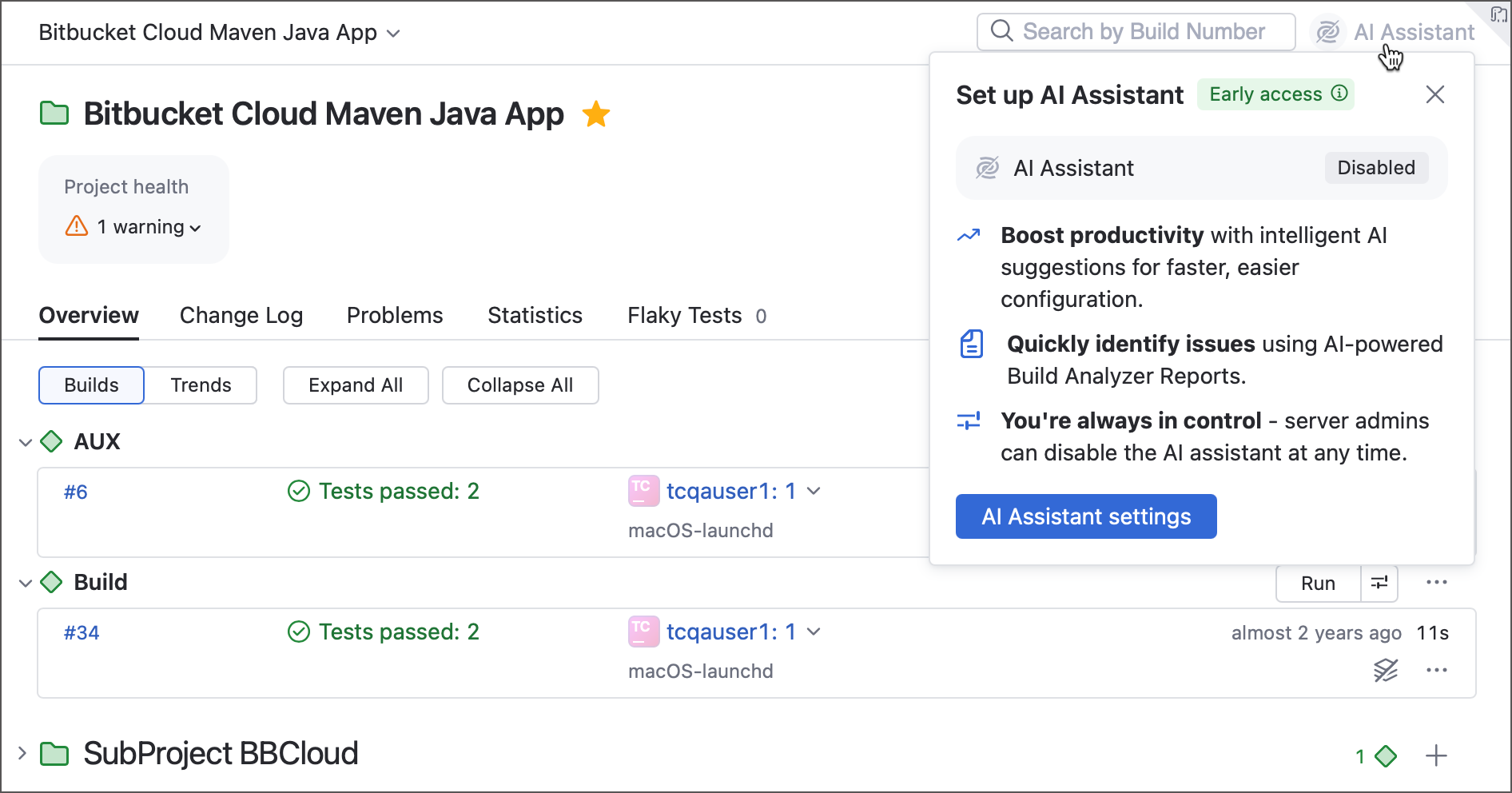
Server administrators can completely hide this element in the Admin | AI Assistant section.
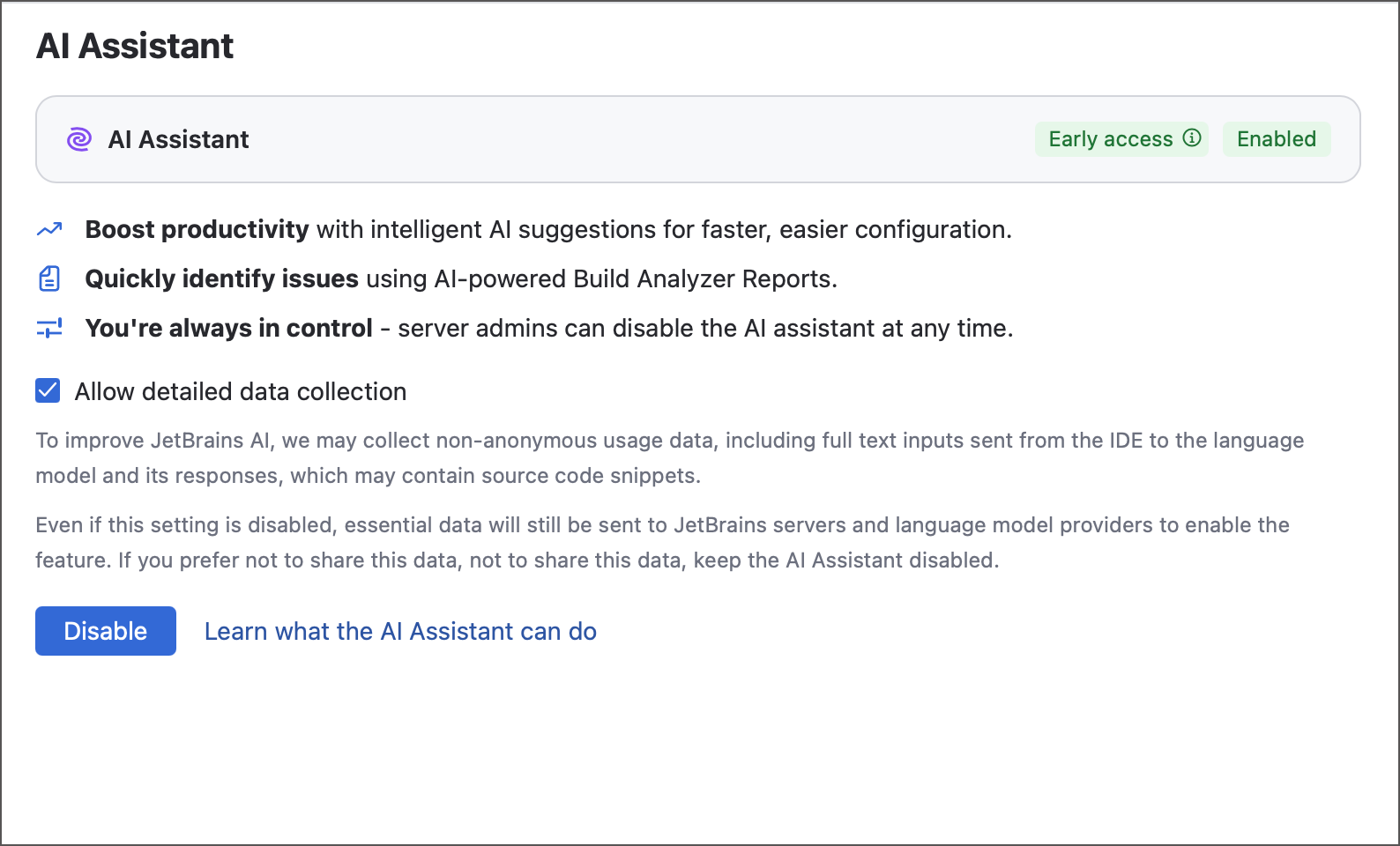
The Allow detailed data collection checkbox allows TeamCity to privately share AI Assistant chat history with JetBrains. We never share this data with anyone and use it solely to improve the quality of the Assistant's responses.
Providers
By default, AI Assistant uses JetBrains AI, a provider that works out of the box with no extra configuration — it is managed automatically through your JetBrains Account.
Starting with TeamCity 2026.2, AI Assistant also supports the "bring your own key" (BYOK) concept that allows you to connect it to a third-party AI provider instead. If your organization provides centralized access to a specific AI provider, choose it under the Provider selector and enter your API key. The exact model depends on internal TeamCity settings and is displayed at the bottom of the Assistant panel.
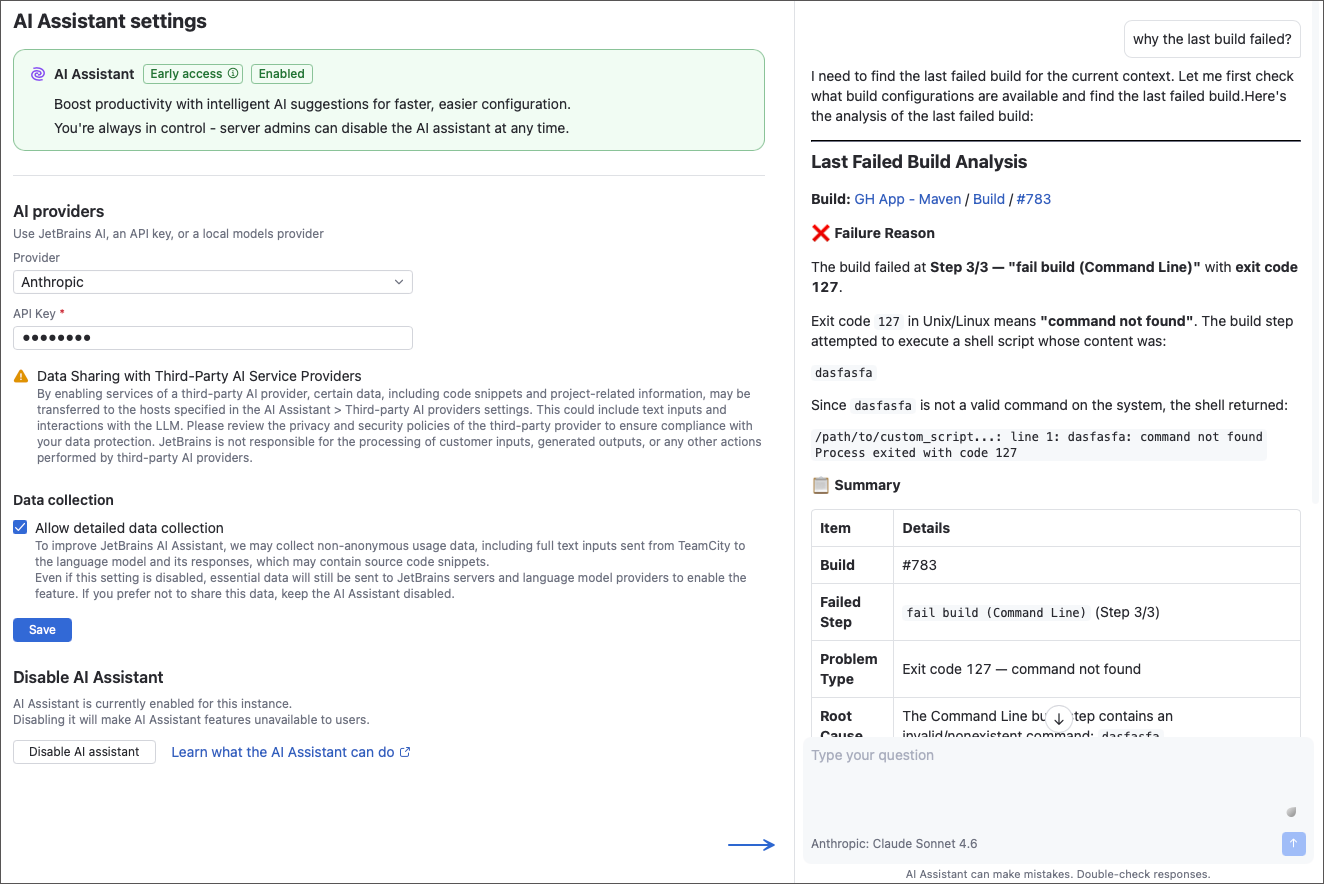
Using Anthropic, Google, and OpenAI models requires only the API key. The OpenAI-compatible option additionally requires the provider base URL and model ID — use it for OpenAI-compatible APIs (for example, DeepSeek) as well as self-hosted models.
This setting is server-wide: your TeamCity server administrator configures the same provider for everybody, and there is currently no way for individual users to choose their own provider. Let us know if this or any other feature is something you're missing in the TeamCity Assistant.
'Analyze it' Button
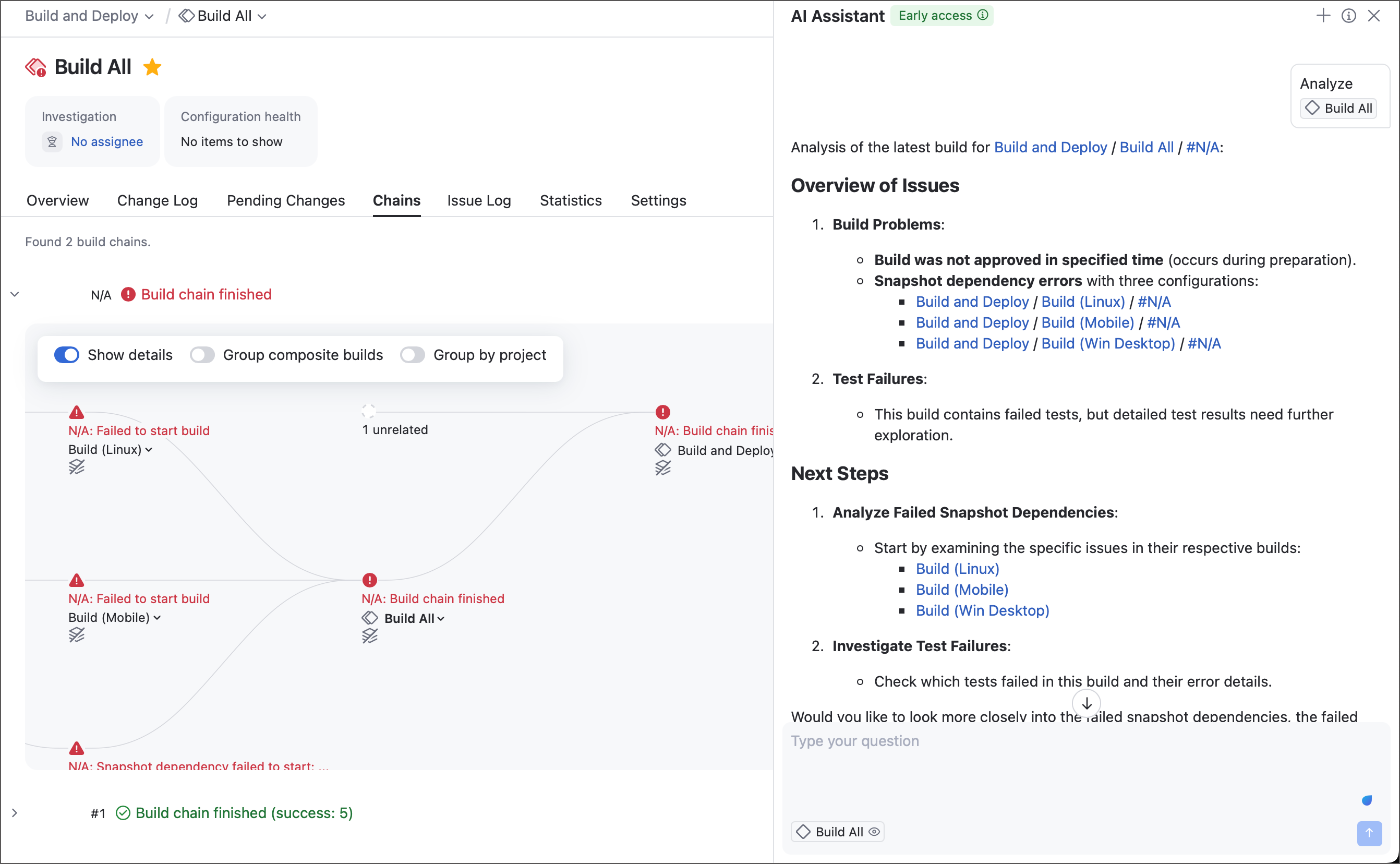
For AI queries to deliver relevant results, you need to provide context. A question like “Why did this build fail?” may be unclear without specifying which build you mean.
To save you from typing long queries with project and configuration details, TeamCity adds the Analyze it button in the top-right corner of build configuration and failed build pages. Clicking it automatically supplies the necessary context, allowing the AI Assistant to analyze failing or misbehaving workflows immediately.
Limitations and Special Notes
We continually work to improve the AI Assistant’s response quality and provide the most accurate context for its underlying model. Still, the inherent limitations of today’s generative AI models mean that occasional inaccuracies or information hallucinations are possible. If a response seems uncertain or inconsistent, consider rephrasing your question or checking it against a reliable source. Please treat the AI Assistant as a helpful aid, not a sole source of truth, and verify its suggestions when handling mission-critical tasks.
Past conversations with the AI Assistant are not saved. When you start a new chat (via the " + " button in the chat window's top-right corner), you will lose access to the previous one.
The AI Assistant chat history is stored locally in your browser. Conversations are not restored when you access TeamCity from a different browser or after you log out.
The AI Assistant is disabled in the following cases:
You are running a TeamCity Professional server (including those that have active additional agent licenses).
The maintenance period for your Enterprise license has expired.
Your server runs on a Java version older than Java 17.
You are using the classic TeamCity UI instead of Sakura UI.
Your server is deployed in a location that does not permit the usage of JetBrains AI services. See the complete list of supported locations here: JetBrains AI Service Territory Limitations. We expect to enable AI Assistant for China-based servers in future releases.
The AI Assistant currently incorrectly processes questions about queued and virtual (spawned by Parallel Tests and Matrix Build features) builds.
The Assistant is designed to provide guidance on existing TeamCity entities. It cannot create new ones, add dependencies, modify server settings, start and stop builds, and so on. In addition, it cannot perform actions that violate current user permissions (for example, analyze builds that belong to projects a user has no permissions to access).
Privacy Policy
TeamCity AI Assistant shares user prompts and code snippets with 3rd-party LLM providers to process questions and generate helpful responses.
We may also collect non-anonymous usage data and system information to help us improve the feature. This data is used solely by the TeamCity team and is not shared with any external party.
Data collection complies with general JetBrains Privacy Notice and JetBrains AI Data Collection and Usage Notice.