Debugger
Use this page to configure the behavior of the Debugger and customize its view.
Common options
Item | Description |
|---|---|
Show debug window on breakpoint | If this checkbox is selected, RubyMine activates the Debug tool window on hitting a breakpoint. |
Focus application on breakpoint | If this checkbox is selected, on hitting a breakpoint, RubyMine will show the location of this breakpoint in the editor and will attempt to bring its frame to the front. |
Hide debug window on process termination | Automatically hide the Debug tool window when the debugged program terminates. |
Scroll execution point to center | If this checkbox is selected, the line with the current execution point will be kept in the middle of the screen. |
Click line number to perform run to cursor | If this checkbox is selected, you can click a line number in the editor to run program execution to this line. |
Remove breakpoint | Select how you want to remove breakpoints:
You can also choose whether you want a confirmation dialog to be displayed when you are about to remove a conditional or a logging breakpoint |
Ruby
Item | Description |
|---|---|
Debug connection timeout (s) | Specify here the debug connection timeout in seconds. |
Verbose debugger output | Select this checkbox to turn the verbose debugger output on. |
Key/Value presentation of Hash content | Enable this option to use the key/value presentation of hashes when examining variables. 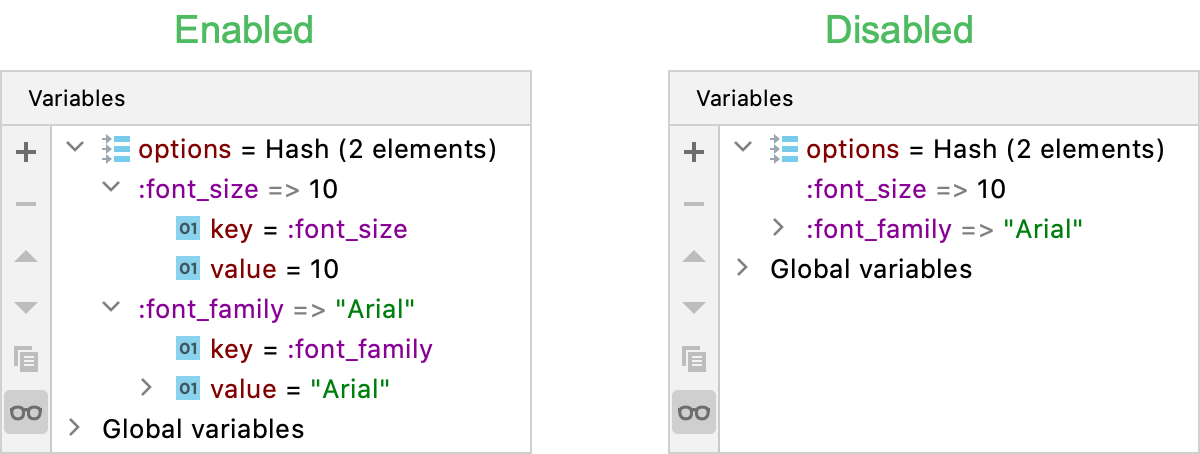 |
Trace | This option enables you to improve the debugging speed and to track time and memory limit during debugging. If this option is unselected, each object is traced. Compare:  |
Attach to sub-processes automatically while debugging | Select this checkbox to enable multi-process debugging. |
Read frames of non-suspended threads (not supported for Ruby 2.0) | Select this checkbox to be able to view frames of threads not paused by current breakpoint event. |
Disable Spring for debug | Use this option to disable Spring for debugging Rails applications. |