Find vulnerable NuGet packages and APIs
JetBrains Rider checks NuGet dependencies of your projects for known vulnerabilities. It highlights vulnerable package references and usages of methods that are known to be vulnerable. To determine vulnerabilities, JetBrains Rider uses the list of advisories at Mend.io, each of which applies to a specific package and a specific version of that package.
Review vulnerabilities in the NuGet window
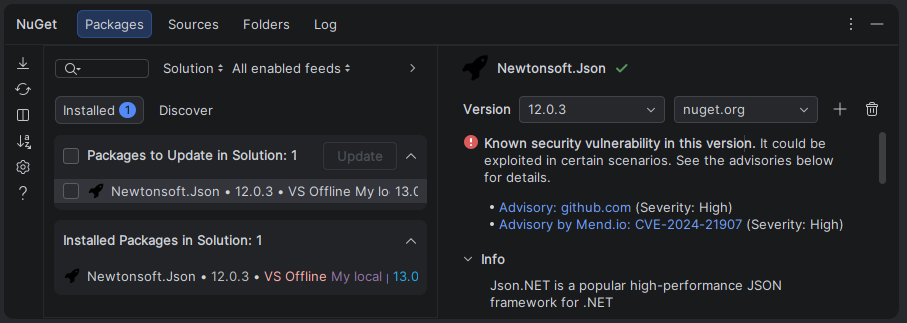
JetBrains Rider also shows vulnerability information in the NuGet tool window. This information does not depend on the Vulnerable API usage inspection in your C# code.
Check a package for vulnerabilities
Open the NuGet tool window.
Select a package and a version.
Review the vulnerability warning in the package details. The warning lists the available advisories and their severity: Low, Moderate, High, or Critical.
To learn more about a vulnerability, click the advisory link.
Review solution vulnerabilities in the Problems tool window
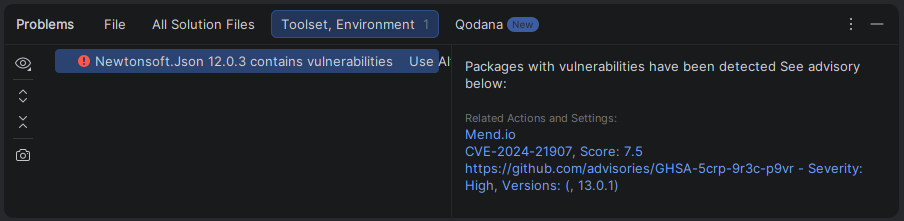
JetBrains Rider reports vulnerabilities of installed packages, including transitive dependencies, in the Problems tool window. It combines reports from Mend.io with reports from the configured NuGet package sources.
When JetBrains Rider detects vulnerable installed packages, it can show a notification. Click Show in Problems view in the notification to open the reports.
Select a package problem to review the following information:
The affected package and version.
Vulnerability identifiers, scores, descriptions, and advisory links.
Reports from the configured package sources, including severity and affected versions.