Code inspection: Namespace does not correspond to file location
JetBrains Rider assumes that the namespace each class appears in matches its location in the project. The 'root' namespace for the project is defined in the project properties:

As a result of the above, all code elements at the project level are expected to appear in the ShareX namespace, and a warning will be issued otherwise.
Namespaces are made deeper with the introduction of folders. In the example below, a folder called StartupManagers will require all items it contains to appear in the ShareX.StartupManagers namespace. However, there are cases where you do not need the folder to append an extra namespace element. There are two ways to configure whether the folder name should be used as a namespace postfix:
To configure globally, use the Enable folder namespace provider checkbox on the page of JetBrains Rider settings Ctrl+Alt+S.
To configure for a specific folder, select the folder and open its properties. Then, clear the Namespace Provider checkbox.
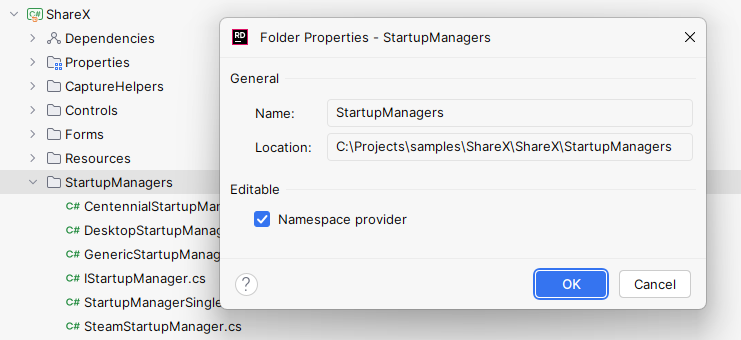
A folder which is not a Namespace Provider will not influence the namespace of elements it contains, and JetBrains Rider will analyze and refactor the related code accordingly.