Code Inspections
A central feature of ReSharper and Rider is to show Code Inspections for potential quality issues, common practices and improvements, code redundancies, and other inspection categories. Such code inspections are further classified by severity levels, which determine how the code is underlined in the editor.
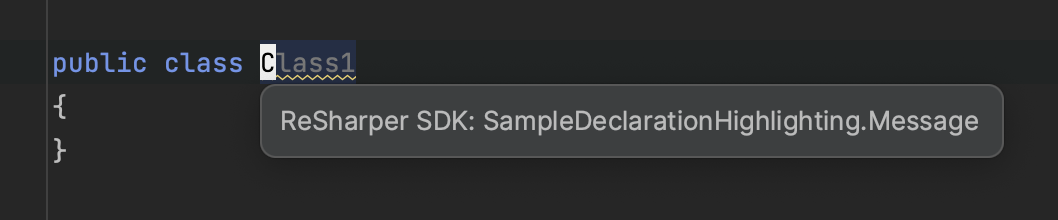
You can provide new code inspections by implementing:
IHighlighting– an interface containing all the necessary data to show code inspections (and to enable quick-fixes)ElementProblemAnalyzer– a component that gets called by the SDK to analyze syntax trees and find highlightings
IHighlighting
The IHighlighting interface requires to implement 4 members, which return data specific to an individual occurrence of an inspection in code:
ToolTipandErrorStripeToolTipare the strings that are shown while hovering the inspection in the editor or the stripes on the right-hand side of the editorIsValid()determines whether the data connected with the inspection are still valid (usually PSI elements or text ranges)CalculateRange()returns the range in the document where the inspection should be shown
Static and Configurable Severities
Independent of an individual IHighlighting instance, the SDK requires general information about the inspection type, which is provided through the StaticSeverityHighlightingAttribute or ConfigurableSeverityHighlightingAttribute. As the names suggest, one is for highlightings with static severities and the other to let users change them:
ConfigurableSeverityIdis a unique inspection identifier used for severity configuration and suppression through commentsLanguagesdefines the languages (C#, ...) for which the inspection is intendedOverlapResolvedefines the policy when two inspections overlapOverloadResolvePrioritydefines the priority when two inspections with the same overlap policy and range collide
If you've applied the ConfigurableSeverityHighlightingAttribute, you also need to add the RegisterConfigurableSeverity with the following information:
Groupshould reference a well-known identifier fromHighlightingGroupIds(but you can also define your own group)DefaultSeverityis the pre-configured severity level of the inspectionTitle*represents the searchable title and is shown in the list of all inspectionsDescription*is shown in the bottom field when the inspection is selected
ElementProblemAnalyzer
The ElementProblemAnalyzer<T> component is responsible to examine all syntax trees in the solution and to create highlightings accordingly. The generic parameter T is used to constrain the elements on which the analyzer should run, e.g., with ICSharpDeclaration, it is only called for types and members. The Run is invoked by the SDK with the following parameters:
T elementis the start element from where the syntax tree is analyzedElementProblemAnalyzerDataprovides additional context about the analysisSolutionandFilefor the analyzed elementSettingsStorefor checking settings that influence the highlighting (except severity)ThrowIfInterrupted()should be called in more complex analyzers
IHighlightingConsumeris used to pass created highlightings out of the analyzer, usuallyAddHighlighting
To allow the SDK working with the analyzer, it must be marked with the ElementProblemAnalyzerAttribute and include the following information:
ElementTypesare theITreeNodeabstractions on which the analyzer is called; usually this is the same asT, but an analyzer can also implement the non-genericIElementProblemAnalyzerHighlightingTypesenumerates all highlighting types that are generated by the analyzer