Create a Quick-Fix
What you should know beforehand:
Examples (?):
The main difference between a context action and a quick-fix is that the latter appears only in response to a highlighting. Thus, quick-fixes are used to fix a problem that was found and highlighted by a particular code analyzer.
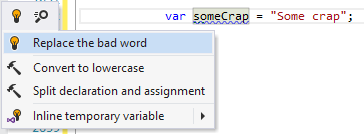
For example, let's create a simple quick-fix that reacts to the warning provided by the analyzer from Analyze Code on the Fly and suggests to replace the "Crap" word occurrence with "BadWord".
Notes
The easiest way to create a quick-fix is to inherit from the
QuickFixBaseclass.The quick-fix class must be marked with the
QuickFixattribute.The
BadWordNamingWarningwarning highlighting object passed to the constructor is used to obtain a particular code element that should be fixed (the code element that is highlighted by a particular highlighting).The
Textproperty defines the text that will be shown in the actions list.IsAvailableis used to check whether the quick-fix action is available for the current caret position.ExecutePsiTransactionreturns the action that is executed when the quick-fix is selected.Note that we use
RenameRefactoringServiceto change variable's name. The service performs seamless renaming of a variable everywhere in the code.