Add a Navigation Action to the 'Navigate to' Menu
What you should know beforehand:
Examples (?):
If you want your navigation to appear in ReSharper's Navigate To menu (context navigation), you should create an action that implements the INavigateFromHereProvider interface.
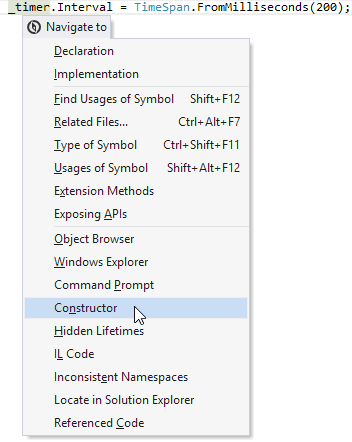
For example, let's create a context-dependent navigation that navigates to a class constructor. The initial caret position can be anywhere inside that class.
Notes
The class must implement the
INavigateFromHereProviderinterface and be marked with theContextNavigationProviderattribute.GetSelectedTreeNode<ITreeNode>()method ofIDataContextreturn the tree node under the current caret position.We use the
GetParentOfTypemethod from Use Manual Navigation to obtain theIClassDeclarationnode.The
IClassDeclarationclass provides theConstructorDeclarationsproperty that returns an enumerable with class constructors.A created instance of the
ContextNavigationclass describes the navigation feature:"Constructor": the name of the item that appears in the Navigate to context menu.null: action ID.NavigationGroup.Other: defines the location in the Navigate to menu where the action should be placed.The last one argument is the action that is run once the Constructor item is selected in the Navigate to menu.
Note that ReSharper automatically decides whether to display the item in the menu or not.