Transform Parameters refactoring
This refactoring helps you quickly change method signature by transforming parameters — for example, get rid of out parameters, wrap parameters in a tuple or in a new class, and so on. — and automatically update all usages of the method in your solution.
The refactoring lets you perform the following transformations:
Encapsulate input parameters into a parameter object. The refactoring will create a new class with public fields or auto-properties corresponding to the selected input parameters.
Encapsulate return values and
outparameters into a return object. The refactoring will create a tuple or a new class with public fields or auto-properties corresponding to the selected return components and output parameters.Transform some of the return tuple components to
outparameters and vice versa. The refactoring will extend the return tuple with the selected output values and createoutparameters from unselected ones.Encapsulate the input part of a
refparameter into a parameter object. The refactoring will replace the modifier withoutfor the unselected output values that correspond torefparameters.Encapsulate the output part of a
refparameter into a return tuple or object. The refactoring will remove the modifier for the unselected input values that correspond torefparameters.Encapsulate parameters and return values into a single parameter object. The refactoring will create additional writable fields or properties for return values that correspond to the selected return components and
outparameters.
The example below demonstrates a mix of transformations — we replace out parameter with method return, and we wrap two other parameters with a new class:
Transform method parameters
Place the caret at the declaration or a usage of method in the editor, or select the method in the File Structure window window. Or, alternatively, place the caret at any of method parameters.
Do one of the following:
Press Alt+Enter and choose Transform Parameters.
Press Control+Shift+R and then choose Transform Parameters.
Right-click and choose Refactor | Transform Parameters from the context menu.
Choose from the main menu.
The Transform Parameters dialog will open.
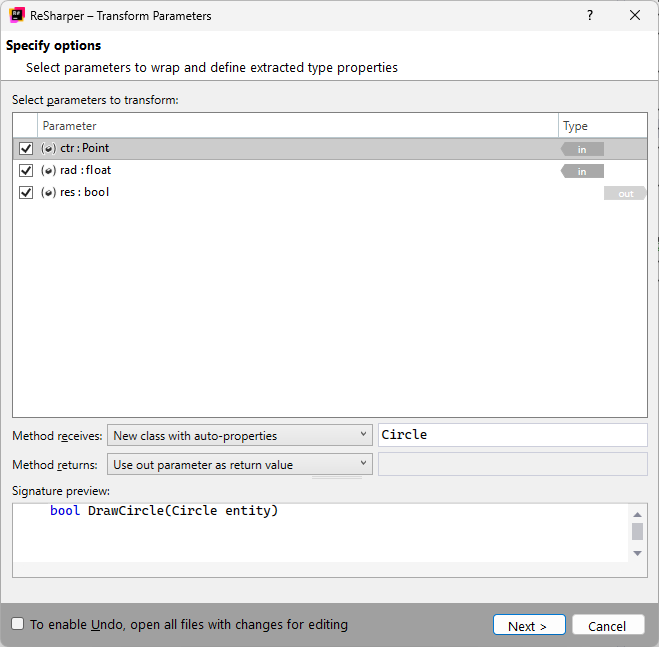
Select parameters you want to transform.
Depending on selected in/
outparameters, ReSharper enables Method receives and/or Method returns selectors. Use these selectors to choose how in/outparameters should be transformed. If you choose to create a new class for parameters, you will be able to specify its name in a field to the right of it.To apply the refactoring, click Next.
If no conflicts are found, ReSharper performs the refactoring immediately. Otherwise, it prompts you to resolve conflicts.
This feature is supported in the following languages and technologies:
|
|
|
|
|
|
|
|
|
|---|---|---|---|---|---|---|---|---|
|
| | | | | | | |


The instructions and examples given here address the use of the feature in C#. For more information about other languages, refer to corresponding topics in the Languages and frameworks section.