Consume NuGet packages
You can install, update, and remove NuGet packages using the context menu of the Solution Explorer .
Browse installed NuGet packages
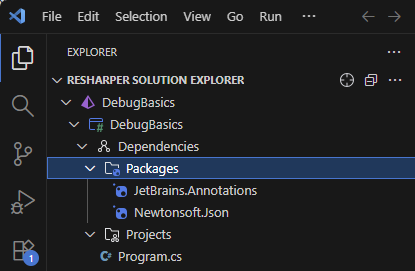
ReSharper displays installed NuGet packages in the Solution Explorer, under Dependencies | Packages:
Install NuGet packages
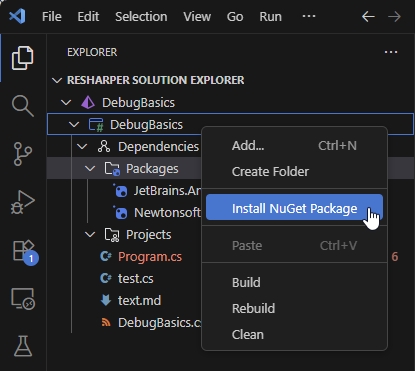
Right-click a project in the Solution Explorer (or alternatively, Dependencies or Packages node inside that project), and choose Install NuGet Package:
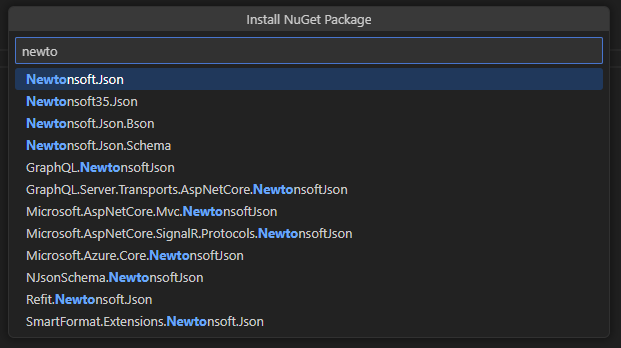
In the popup that opens, type the name of the package you want to install and press Enter. ReSharper will display the list of packages that match the search term. After that, you can type in the popup to narrow down the list:
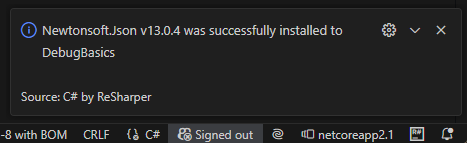
Double-click the desired package. It will be installed in the project and you will see the confirmation message:
Manage installed packages
Remove NuGet package
In the Solution Explorer, select one or more installed packages under [project] | Dependencies | Packages.
Press Delete or right-click the selection and choose Uninstall Package, then confirm your action in a dialog that opens.
Update NuGet package
In the Solution Explorer, find the package you want to update under [project] | Dependencies | Packages.
Right-click it and choose Update Package.
In the popup that opens, click the desired package version.
Manage package sources
You can add or remove package sources by editing the packageSources section of the NuGet.config configuration file. For example:
On Linux and macOS, use a POSIX path instead, for example /home/user/NuGetPackages/.