Work with C# source generators
C# source generators run during compilation and produce additional C# files that are compiled into your project. With ReSharper, you can inspect generated sources in the editor and the solution explorer.
Inspect source generator output
When a generator runs, it produces C# sources (for example, files ending with .g.cs). ReSharper lets you navigate to these sources so you can verify what was generated and how it is used by the consuming project.
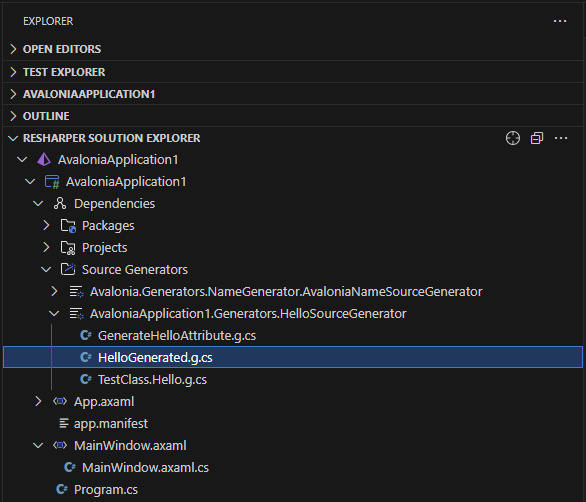
In the Solution Explorer, expand the node to see the generated files:
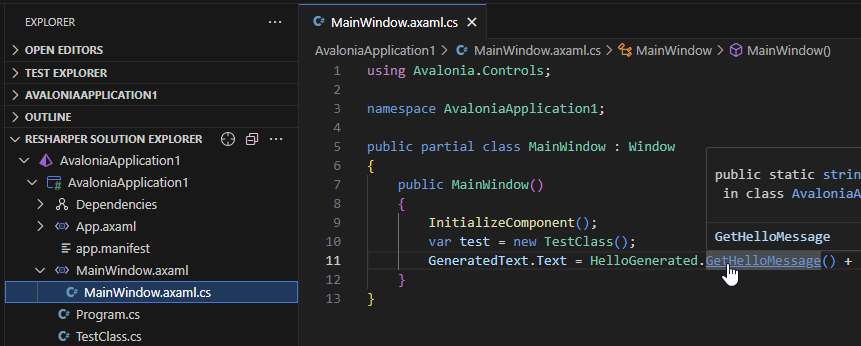
Use Go to Definition (F12 or Ctrl/Cmd-click) from a symbol in your code to reach the generated declaration.
Open the generated file in the editor and inspect the emitted types, members, and attributes.
You can study where the generated symbols are used in the solution by invoking Go to References Alt+Shift+F12 on generated types and members.
To locate the generated file in the Solution Explorer, invoke the command palette F1, and pick Reveal Active File in Solution Explorer.
Generated files will be automatically updated as soon as the generator updates the file on disk.