Getting started with Air Context
Most problem-solving and feature development tasks require agents to perform extensive code exploration to understand the current state or get a reference for the planned changes. In practice this means running searches, spinning up exploration subagents, and reading files – activities that often consume a lot of time and tokens.
Air Context uses semantic search to solve the problem of code search and code exploration for agentic tasks. It indexes your codebases and lets agents query them semantically instead of performing ad-hoc searches and file reads. Both Git repositories and non-Git folders can be indexed. Air Context is a cloud service: it builds and stores the index on the Air Context server by default rather than on your machine, so an internet connection is required to index and search.
Specifically, Air Context provides the following functionalities:
Indexes code using an embedding backend, incrementally and at scale.
Preserves code privacy by storing vector representations of your code rather than the raw source.
Exposes semantic search tools and skills that agents call to “ask” for relevant files, APIs, tests, patterns, or examples instead of manual grep-style exploration.
Lets agents understand and navigate large, complex codebases faster and cheaper, while maintaining or improving solution quality.
Provides its own Air Context CLI to manage agent integration, indexing, and to run searches. It also integrates seamlessly into Air and JetBrains IDEs.
Getting started
The Air Context service is available to all users who have a JetBrains license with AI (AI Free, AI Pro, AI Ultimate, or AI Enterprise), or an IDE subscription that includes the AI Free plan.
For members of an organization that manages AI centrally through JetBrains Central Console, an administrator must first enable AI for the organization and grant AI access to the entire organization or individual users before they can use Air Context.
Repository indexing and search through Air Context is available in multiple tools:
Air Context CLI
Air Context CLI (jbcontext) is a command-line tool that lets you index and search your codebases. It is available for Linux, macOS, and Windows. To start using Air Context CLI, follow the instructions below:
Install the CLI:
curl -fsSL https://download.jetbrains.com/jetbrains-context/release/download-jbcontext.sh | bashirm https://download.jetbrains.com/jetbrains-context/release/download-jbcontext.ps1 | iexRun
jbcontext loginand log in with your JetBrains Account. If you are already logged in, Air Context CLI will automatically detect it.Run
jbcontext setup-agentto set up Air Context in your AI agents.
Alternatively, you can install Air Context in your AI agent by pointing the agent to the following URL: https://jb.gg/context-install.
After the setup is complete, start one of the agents you configured. Each time the agent starts a session, it triggers indexing automatically. Indexing is incremental, so only content that has changed since the last indexing is processed rather than the whole repository.
Running indexing manually with the jbcontext index command is optional. Once indexing finishes, your agents can query the codebase through Air Context automatically. You can also run a search directly from the command line with jbcontext search.
AI Assistant in JetBrains IDEs
In JetBrains IDEs, AI Assistant reuses the agent configuration you already created with the Air Context CLI. If you have set up Air Context for your agents (see Air Context CLI), those agents also use it in AI Assistant, with no additional setup in the IDE. This applies to Claude Agent, Codex, and Junie CLI.
Air
Air Context is supported by Air, both the web version and the plugin for JetBrains IDEs. Background indexing through Air Context prepares semantic indexes for the connected repositories. Agents inside Air call Air Context instead of ad-hoc grep commands or file reads for most non-trivial exploration tasks, which improves quality and reduces token and time usage.
For information about connecting repositories in Air, see Connect repositories.
Data privacy
Air Context is a cloud-based service that indexes your code and stores vector representations of it in a vector database on the Air Context server by default.
The following list represents the exact data stored by Air Context:
Code chunks stored as vector embeddings. Chunks of source code are converted to embeddings and stored in a vector database. Raw source code is not stored.
File paths. Air Context stores file paths to trace back the location of code chunks to the corresponding files in the repositories they originated from.
Code chunk offsets. Air Context stores offsets that point to the exact location of the stored chunk in the source file.
Repository and revision identifiers. The identifiers of the repository and the specific Git revision that were used as the base for code indexing. For non-Git folders, Air Context instead stores an SHA-256 hash of the folder's canonical path joined with the host name of the machine where the folder is located.
Data retention
Air Context retains stored data for 14 days after it was last searched, while searching the index resets this period. There is currently no option to extend retention without searching or re-indexing. The stored data is never used for model training.
Storage locations
Repository data is stored within the JetBrains cloud infrastructure on Google Cloud. The geographical location of the primary storage is Ireland, with index replicas on Google Cloud in the United States. The replicated US-based storage is used only for faster retrieval, while data processing and storing into vector databases only take place in the primary location in Ireland.
Data sharing and access
Access to indexed repository data depends on whether the user belongs to an organization:
Organization members. Indexed repository data is available only within the same organization and is stored on the Air Context server by default.
Individual users. For users who are not organization members, indexed data is available only to the user who indexed it. Indexes of small repositories are stored locally on the user's machine rather than on the Air Context server.
Data removal
As of Air Context CLI version 0.9.5, you can delete indexed data using the jbcontext remove-index command. For more information on how to use the command, type jbcontext remove-index --help in the terminal.
Data flow
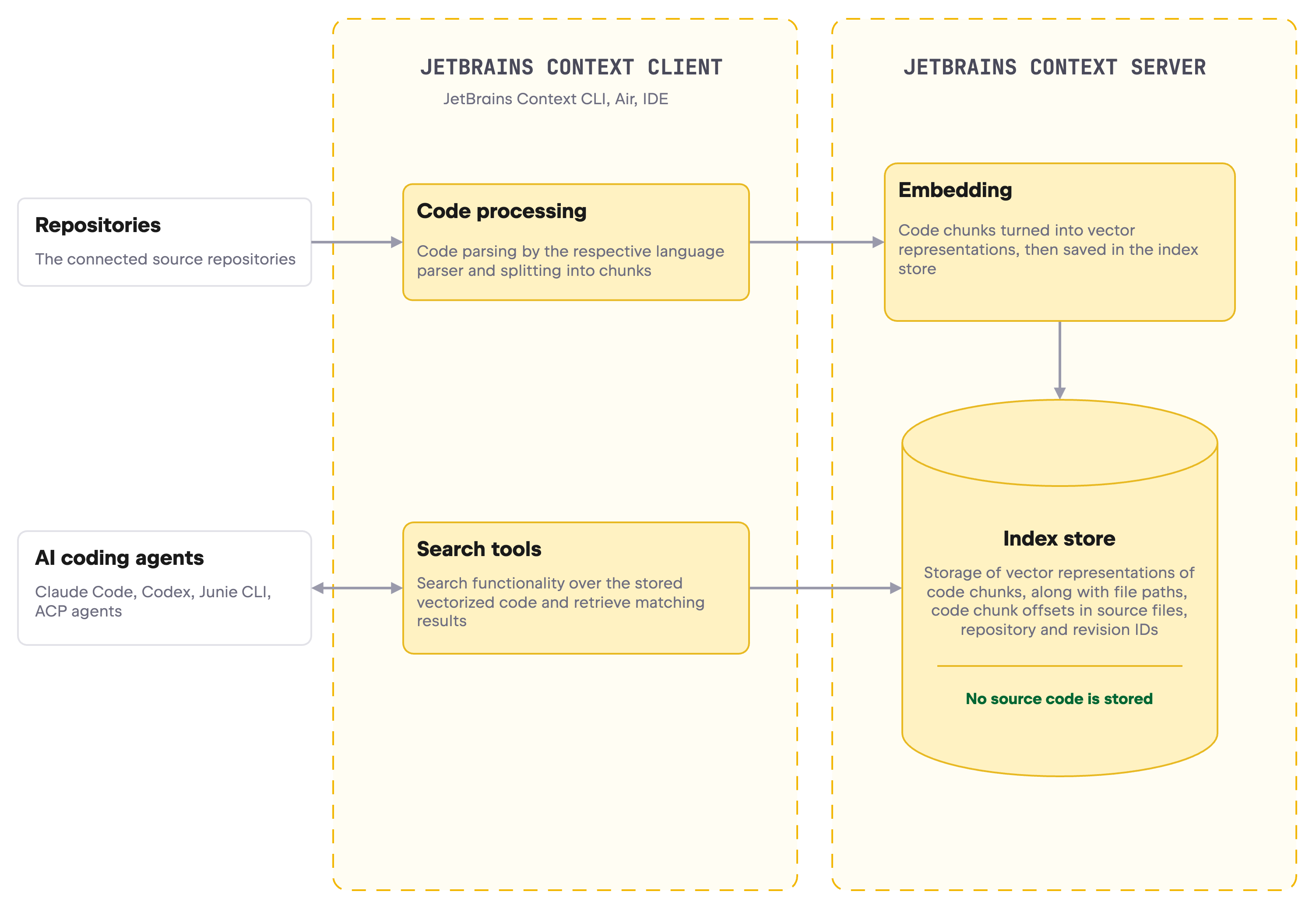
To understand what happens to your code during indexing, storage, and retrieval, here is a simplified explanation of the Air Context data flow.
Indexing is triggered. Indexing is triggered automatically when an agent set up to use Air Context starts a session, or manually from the Air Context CLI (
jbcontext index), an IDE, or Air. Indexing runs on a specific code snapshot, identified by a repository ID and a revision ID. Non-Git folders can also be indexed and they are identified by a hash derived from the folder path and the host name, as described in Data privacy.Code is processed. The client fetches and checks out the revision and groups files into a dataset of clusters for parallel, incremental indexing. Using dedicated language parsers, it splits files into code chunks (functions, classes, symbols, file-level docs) and attaches the file path and byte offsets to each chunk.
Chunks and accompanying data are sent to the server. Batches of code chunks are sent to the Air Context server, along with file paths and offsets.
The server indexes the chunks. The Air Context server computes embeddings, stores them, and builds an index once all vectors are in.
Search returns coordinates, not code. The server converts the query into a vector and matches it against the stored embedding vectors. Search results are chunk IDs with the file path and offsets, not code. The agent or IDE then opens the actual code from your own checkout or storage, not from Air Context storage.
The following diagram gives a simplified view of the Air Context data flow, showing how the indexing, storage, and retrieval processes work together.