Floating licenses
By default, prepaid licenses distributed by License Vault are non-floating. So when your team members close their JetBrains IDE ot .NET tools, the prepaid licenses they got from License Vault stay assigned to them and are released after three days.
To make the most of your licenses by quickly transferring them between users, you can enable Floating mode. With this feature, unused licenses are released after just 20 minutes, and you can manually revoke them without limitation.
- FAQ: Do I have to use Floating mode in my organization?
Floating mode is optional for prepaid licenses, meaning you can distribute your prepaid licenses via License Vault without it.
However, you should consider using Floating mode if:
Your team frequently shares licenses, and you need them to become available quickly after someone stops using their tool.
You want to optimize the use of prepaid licenses.
If your organization primarily uses prepaid licenses or has many users who need temporary access to licenses, Floating mode is a great choice for improving flexibility and efficiency.
Keep in mind that Floating mode for prepaid licenses comes with a 20% surcharge.
Non-floating prepaid | Floating prepaid | Postpaid | |
|---|---|---|---|
Floating mode availability | Optional, can be enabled by request | Optional, can be disabled by request | Always on |
Floating mode pricing | Not applicable With Floating mode disabled, you only pay your standard IDE subscription prices. License Vault distributes your licenses at no additional cost. | +20% to the license price With Floating mode enabled, there's an additional charge for license distribution. It's calculated per license and only applies to the licenses that were used during the billing period. | Free For postpaid licenses Floating mode is included for free, and License Vault distributes these licenses at no additional cost. |
License release period | 3 days | 20 minutes | 20 minutes |
Revocation limit | 5 revocations per month | Unlimited | Unlimited |
How it works
Scenario | License release time | Explanation |
|---|---|---|
User closes their IDE | Immediately | Right before closing, the IDE notifies License Vault that the license is no longer in use, and it's released immediately. |
User's machine is switched off or goes offline | Within 20 minutes | How does License Vault determine that the machine is offline? Each IDE connected to License Vault sends a license refresh request every 10 minutes, which is how we know that the license is still in use. If License Vault fails to receive the scheduled request, it assumes that the machine is offline or has been switched off and that the license is no longer in use. Given the interval between requests, it can take License Vault up to 10 minutes to register this. When is the license released? Every 10 minutes, License Vault checks each license to see when it was last refreshed. Licenses that have been refreshed within the last 20 minutes remain allocated. Licenses that have not been refreshed for 20 minutes or more are released. In total, it usually takes License Vault 20 to 30 minutes from the moment the user's machine goes offline to release the license. |
Floating mode pricing and availability
For postpaid licenses, Floating mode is enabled by default and comes at no additional cost. You only pay for the licenses, not for their distribution.
For prepaid licenses, Floating mode is optional. If you choose to enable it, you pay an additional 20% on top of the standard monthly subscription price for each of your prepaid licenses used in Floating mode.
Prepaid IDE licensing
With prepaid IDE licensing, there's a 20% surcharge for all licenses distributed in Floating mode. This charge is calculated monthly based on the peak number of IDE licenses that were simultaneously in use during the month. You pay an extra 20% on top of the standard monthly subscription price for each of your prepaid licenses that were used in Floating mode.
How the surcharge is calculated
To calculate the surcharge for a particular product for one month, we use this formula:
In the formula:
P is the full annual subscription price for this product.
0.2 is the 20% surcharge coefficient.
Note that (P / 12) * 0.2 is rounded to the nearest cent or its equivalent in other currencies.
N is the maximum number of licenses that were simultaneously in use during the month.
- Calculation example
For example, let's say your organization is billed on a quarterly basis, and it used 25 IntelliJ IDEA licenses in January, 35 in February, and 40 in March. Supposing that the full annual subscription price for IntelliJ IDEA is USD 719, we get the following calculation for the month of January:
Surcharge in January = = (USD 719 / 12) * 0.2 * 25 = USD 59.92 * 0.2 * 25 = USD 11.98 * 25 = USD 299.5Surcharges for other months are calculated the same way resulting in USD 419.3 in February and USD 479.2 in March.
So the total surcharge for the quarter is USD 299.5 + USD 419.3 + USD 479.2 = USD 1,198.
Which licenses are excluded from the surcharge?
The surcharge doesn't apply to:
Licenses for IDEs, .NET tools, and product packs that weren't in use.
Plugin licenses, regardless of usage.
Postpaid licenses.
Enabling Floating mode for prepaid IDE licenses
To enable Floating mode for your prepaid licenses, get in touch with our Sales team directly or send a request from your JetBrains Account.
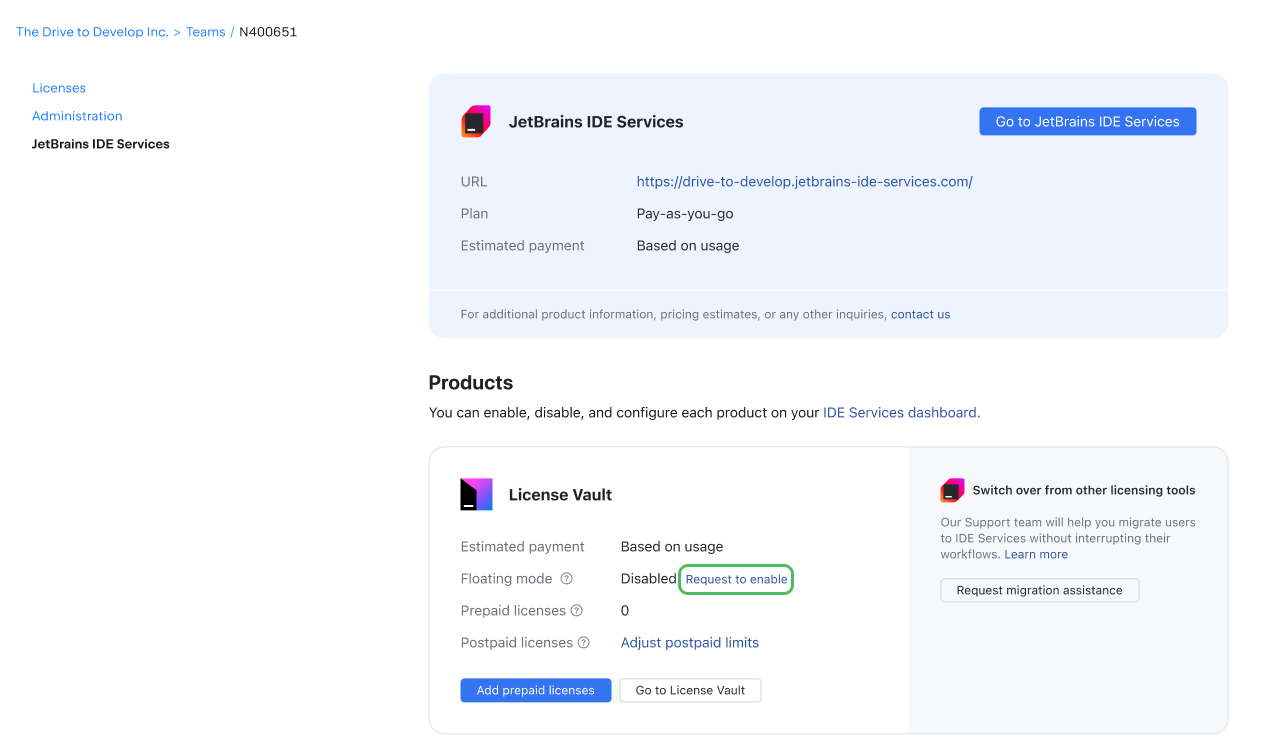
Requesting to enable Floating mode
Go to the IDE Services management page in your JetBrains Account.
In the License Vault section, click Request to enable.