Service Settings
The settings page for a service provides several options that you can use to manage the service. To access this page, select Services from the Server Settings section of the Administration menu, then click the name of a service in the list.
The following controls are visible in the header:
Control | Description |
|---|---|
Trust/Distrust service | Toggles the trust status for the service. |
Delete service | Removes the service from Hub. |
Authentication
The Authentication tab displays settings that let you define which OAuth flows are allowed for the selected service.
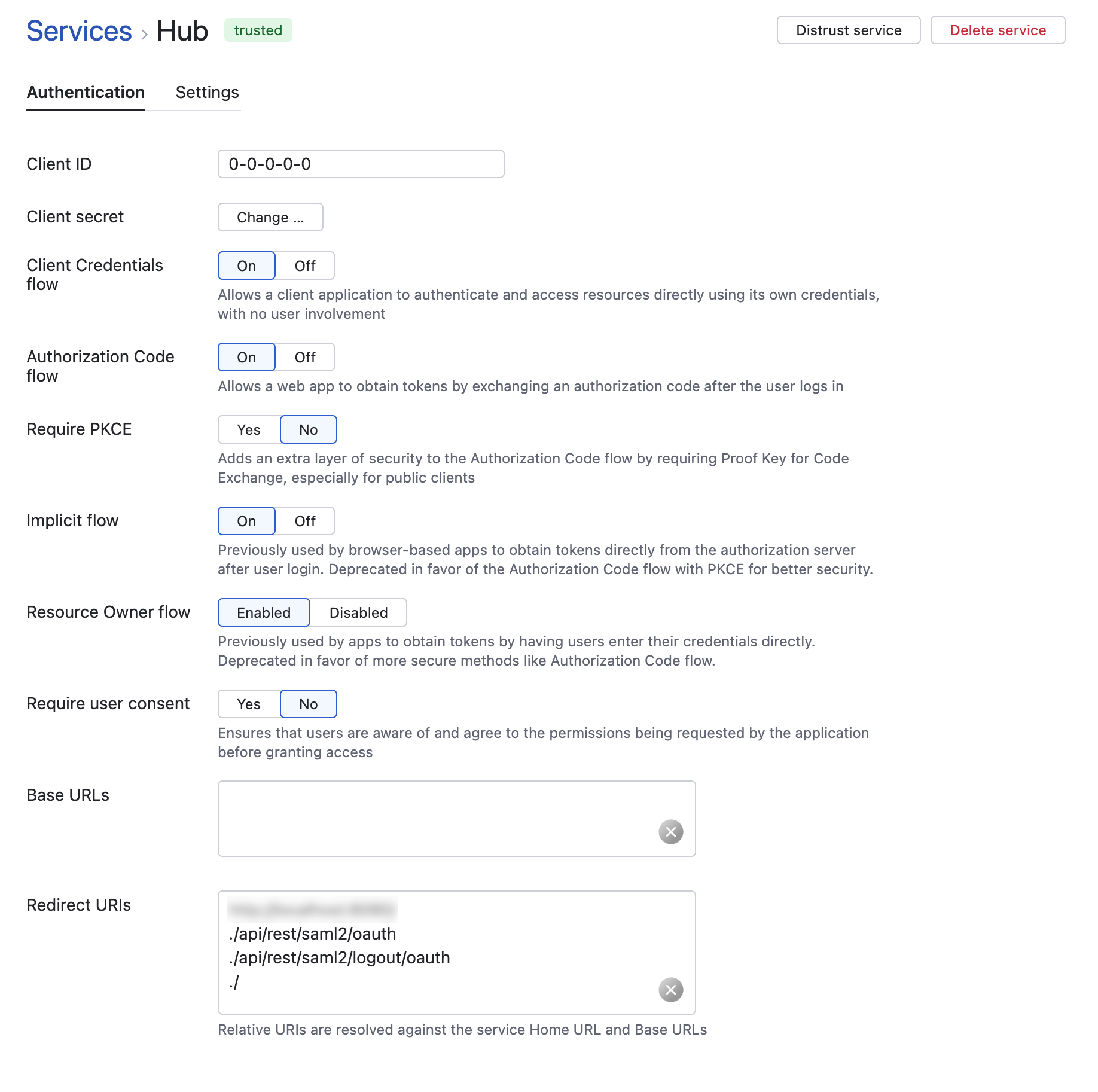
The following settings are available for each service:
Setting | Description |
|---|---|
Client ID | A unique identifier automatically assigned to the service during registration. Used by the service to identify itself to the authorization server when requesting tokens. |
Client secret | A confidential key used by the service to authenticate itself with the authorization server. Click the Change button to regenerate or key in a new secret. For more information, see Change the Service Secret. |
Client Credentials flow | Allows the service to obtain access tokens using only its client ID and client secret, without user involvement. Ideal for server-to-server or background processes that need to access APIs on behalf of the service itself. |
Authorization Code flow | Enables the service to obtain tokens by exchanging an authorization code after the user logs in and consents. Commonly used by web applications where the client can securely store a client secret. |
Require PKCE | Adds an extra layer of security to the Authorization Code flow by requiring Proof Key for Code Exchange (PKCE). Recommended for public clients such as single-page applications (SPAs) or mobile apps that cannot securely store secrets. |
Implicit flow | Allows browser-based applications to obtain tokens directly from the authorization endpoint after login, without using an authorization code. Deprecated in favor of the Authorization Code flow with PKCE, which provides better security. |
Resource Owner flow | Allows the service to obtain tokens by having users enter their credentials (username and password) directly into the client application. Deprecated in favor of more secure flows (for example, Authorization Code flow). |
Require user consent | Ensures that users are aware of and agree to the permissions requested by the application before granting access. |
Base URLs | Defines one or more base URLs that represent the root of the endpoints for the service. Used in addition to the Home URL as a reference for resolving relative redirect URIs and for token audience validation. |
Redirect URIs | Specifies the URIs to which the authorization server can send users after they complete the login and consent process. These URIs must exactly match one of the redirect paths registered for the service. To learn how Hub validates redirect URIs, see Manage Authentication Endpoints. |
Settings
The Settings tab displays the settings and parameters for the selected service.
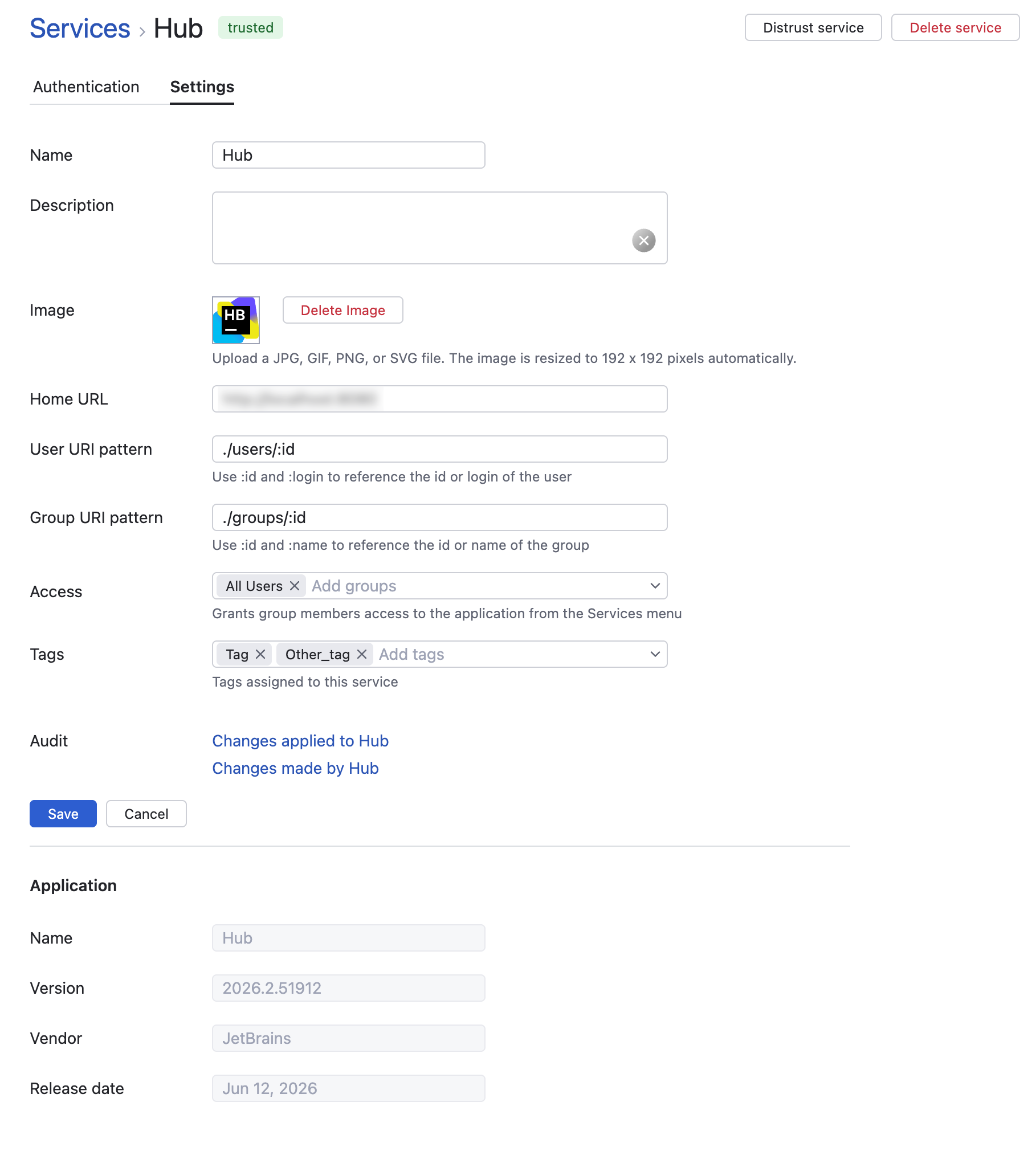
The following settings are available for each service:
Setting | Description |
|---|---|
Name | Sets the name of the service. Use this setting to distinguish this service from other services for the same application. |
Description | Displays a description that allows to track the purpose of each service in Hub. |
Image | Sets the image displayed in for the service in Hub. |
Home URL | Displays the absolute base URL for the service. Click the Open URL button to navigate to the service home URL. |
User URI pattern | Displays the pattern that is used to recognize user accounts in the service. |
Group URI pattern | Displays the URI pattern that is used to recognize groups in the service. |
Access | Gives members of the selected groups access to the application. Members of these groups can access the application that is provided by the service from the Services menu in the header. For more information, see Add a Service to the Services Menu. |
Tags | Allows to assign tags to the service. |
Audit | Links to the Audit Events page in Hub. There, you can view a list of changes that were applied to this service or changes that were applied by this service. |
The Application section of the page displays the name, version number, vendor, and release date of the application, when available. These properties are imported from the connected service and cannot be changed.