Edit Basic Group Settings
The basic settings of a user group are displayed on the Settings tab. To access this page, click the Groups link in the main navigation menu, select a group from the list, then click the Settings tab.
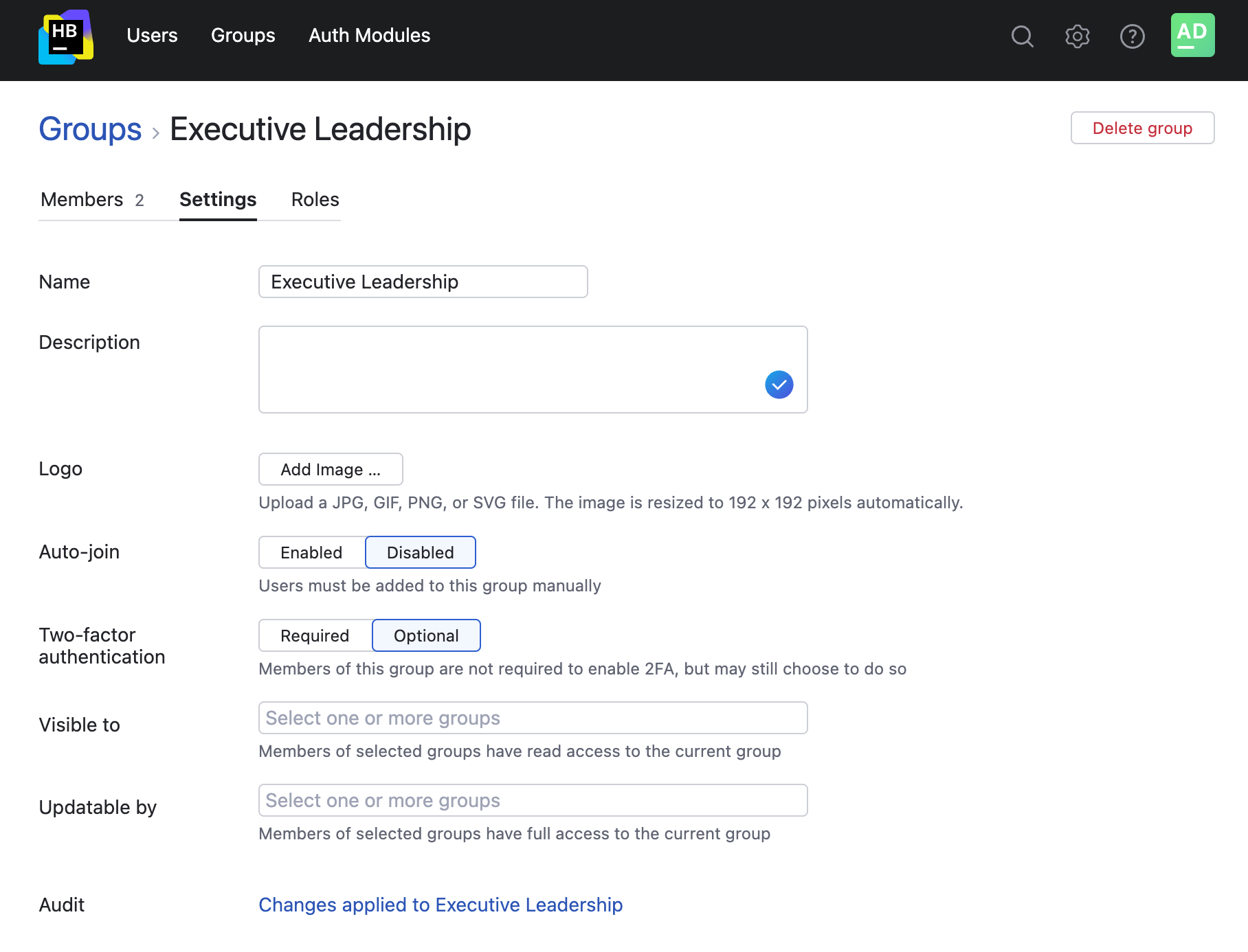
Here, you can access and edit the following settings:
Setting | Description |
|---|---|
Name | The name of the group. |
Description | The description of the group. |
Logo | The image that is used as the group logo. |
Auto-join | Determines whether new users are automatically added as members to the group.
|
Two-factor authentication | Determines whether members of the group are required to use two factors of authentication to log into their Hub accounts.
For more information, see Require Two-factor Authentication. |
Visible to | Determines which users can see this group in Hub and view its settings. Users who are granted the Read Group permission already have access to read all groups including this one, so they don't require this setting. Meanwhile, this setting provides more granular control for users without global access. |
Updatable by | Determines which users can see this group in Hub and edit its settings. Members of groups who are added here can update the settings for this group and also delete it from the system. Users who are granted the Update Group or Delete Group permission already have access to update all groups including this one, so they don't require this setting. Meanwhile, this setting provides more granular control for users without global access. |
Audit | Links to the Audit Events page in Hub. There, you can view a list of changes that were applied to this group. |