Use writing styles
Writing styles in Grazie contain different configurations of grammar, spelling, punctuation, and style checks specific to a context such as public or informal.
Writing styles in Grazie are configurable. For details, see Writing style settings.
Selecting writing style
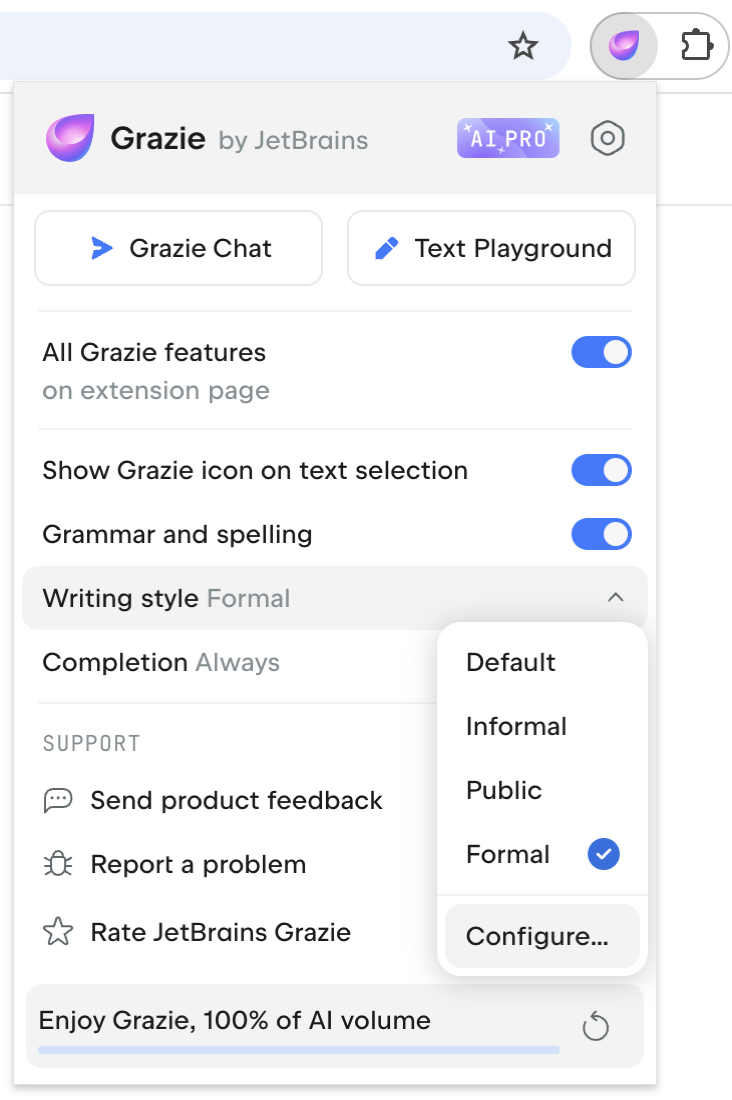
The following writing styles are available:
Default: a neutral style suitable for general use.
Informal: for informal communication via messengers and forums.
Public: for professional communication via blog posts and documentation.
Formal: for academic papers and official correspondence.
To choose a writing style:
Click the Grazie icon in the browser toolbar and select the Writing style option.
Select one of the available styles.

Configuring writing style
You can customize grammar, spelling, punctuation, and style checks for a specific writing style.
To configure a writing style:
Click the Grazie icon in the browser toolbar and select the Writing style option.
Select the Configure... option to edit the writing style.
Make the configuration changes on the Writing style page.
Alternatively, access the writing style settings right from your text:
Navigate to a suggestion in the text and click the
 Configure writing style icon in the upper right corner of the inline suggestion popup.
Click the problem counter in the lower right corner of the input area, then click the
 More icon next to the suggestion and select the corresponding option.
For more information on customizing your writing style, see Writing style settings.