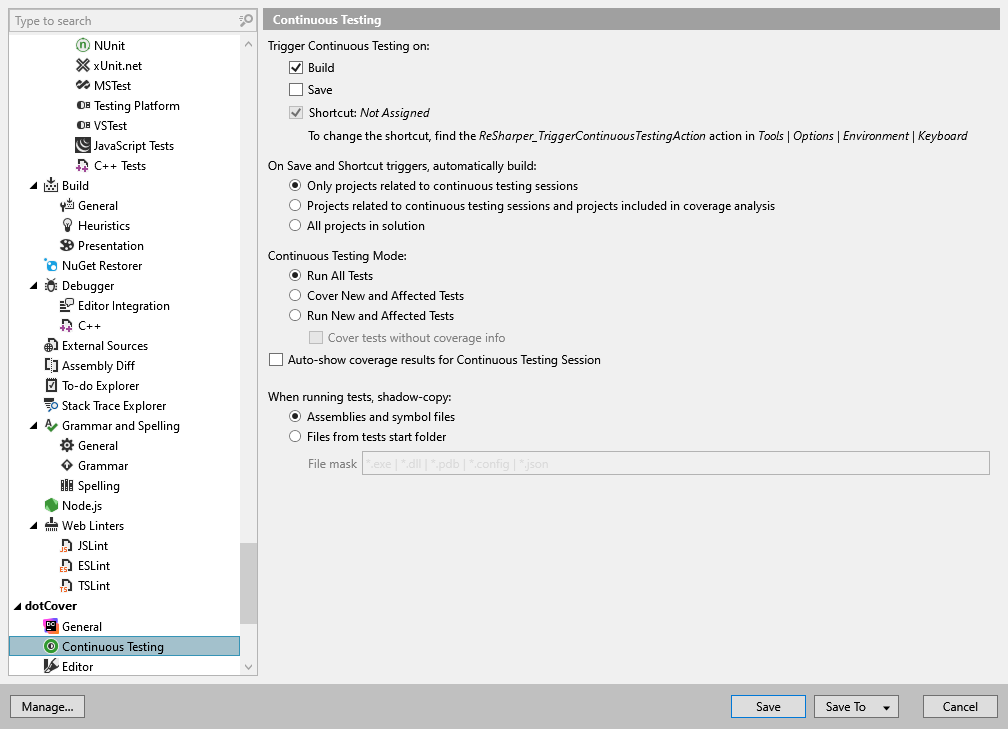
Build: tests will be automatically started after you explicitly build your solution.
Save: tests will be automatically started after you explicitly save your solution. In this case, dotCover has to build the related projects on its own.
Shortcut: tests will be automatically started after you apply a shortcut (by default, unassigned). To assign the shortcut, find the ReSharper_TriggerContinuousTestingAction action in the Tools | Options | Environment | Keyboard menu.
To help you find the balance between the build time and the relevance of the coverage data, dotCover offers you three build options for Save and Shortcut triggers:
Only projects related to continuous testing sessions: dotCover will build only unit test projects and projects referenced by these unit test projects.
Projects related to continuous testing sessions and projects included in coverage analysis: dotCover will build projects that fall into the Only projects related to continuous testing sessions category and also projects with code that is not excluded from the coverage analysis.
All projects in solution: dotCover will always build the entire solution.
When running tests, shadow-copy
This preference allows you to configure shadow-copying for NUnit tests when you use . You may need to change this preference if you reference files from your tests with a relative path. You can choose one of the following options:
Assemblies and symbol files - dotCover will explicitly copy symbol files to a temporary folder before running tests and will use standard .NET shadow-copying mechanism in order to shadow-copy assemblies being tested.
Files by filter from test start folder - dotCover will explicitly copy all files matching the filter from the tests start folder to a temporary folder before running tests.
Tests start folder is a folder from which an assembly with tests is loaded. It can be either the assembly's build output folder or a custom folder if it is specified in the Run tests from preference on the ReSharper | Options | Tools | Unit Testing page of dotCover options.
Note that this preference only works for NUnit tests. For other unit testing frameworks, dotCover does not change their original shadow-copying behavior.
If necessary, you can use a number of properties to get the base path and build relative paths from the code of your tests:
Assembly.GetExecutingAssembly().Location - will always lead to the temporary folder where the files are shadow-copied.
The following properties will lead to the original test start folder if Shadow-copy assemblies and symbol files option is selected, and to the temporary folder otherwise:
Run All Tests: dotCover runs all tests without coverage analysis.
Cover New and Affected Tests: dotCover runs new and affected tests with enabled coverage analysis. This is the most resource-consuming but the most reliable mode. dotCover always keeps coverage information up to date.
Run New and Affected Tests: dotCover runs only new and affected tests without coverage analysis. This is the most resource-saving mode.
If you select Cover tests without coverage info, dotCover will analyze coverage for tests that have no coverage information. If the coverage information exists for a specific test (even if it is outdated), dotCover will run this test without coverage analysis. We recommend using this mode as a compromise between the resource consumption and the relevance of the coverage data.