File management
To run your statements and keep track of your code ideas, use DataGrip's special file types. You can also work with the files that you store on your machine, and edit the DDL of database objects in the DataGrip internal files.
Query files are SQL and JS files that you can create for a data source in the IDE and store them in an IDE project. In query files, you can write, run, and store your SQL statements. A query file is included in the project context if you choose to store it in the current project directory.
For more information about query files, refer to Query files.
Query consoles are SQL and JS files are created for a data source automatically, always attached to it, and stored outside an IDE project. You can write and execute SQL statements in query consoles the same way as you do it in terminal. Query consoles are not included in the project context. Query consoles are located in the Scratches and Consoles | Database Consoles internal directory .
For more information about query consoles, refer to Query consoles.
Scratch files are similar to query consoles, but they are not attached to a data source. We refer to scratch files as temporary notes or drafts for code ideas. Usually, scratch files are outside of the project context. But you can associate an SQL scratch file with a data source and use it as an SQL editor.
For more information about scratch files, refer to Scratch files.
User files are SQL scripts that you store on your computer or on a server.
For more information about working with directories and user files, refer to User files.
Object editors are internal files where you edit the DDL of a procedure, a view, a function, or other objects.
Context | Functionality | |
|---|---|---|
Query files | Files that can be attached to a data source and detached from it. |
|
Query consoles | SQL files that are attached to a specific data source. |
|
Scratches | Files that are not attached to a specific data source. |
|
User files | Files that are stored on your machine. |
|
Locate SQL files
Find your query files, query consoles, user files, and scratches in the Files tool window () .
The current project directory is displayed as the first node in the file tree.
The attached directories are displayed below the current project one.
Query files can be located in the current project directory or in the attached ones.
For query consoles, navigate to .
Find scratch files under .
Consider the following figure that shows where files and directories are displayed.
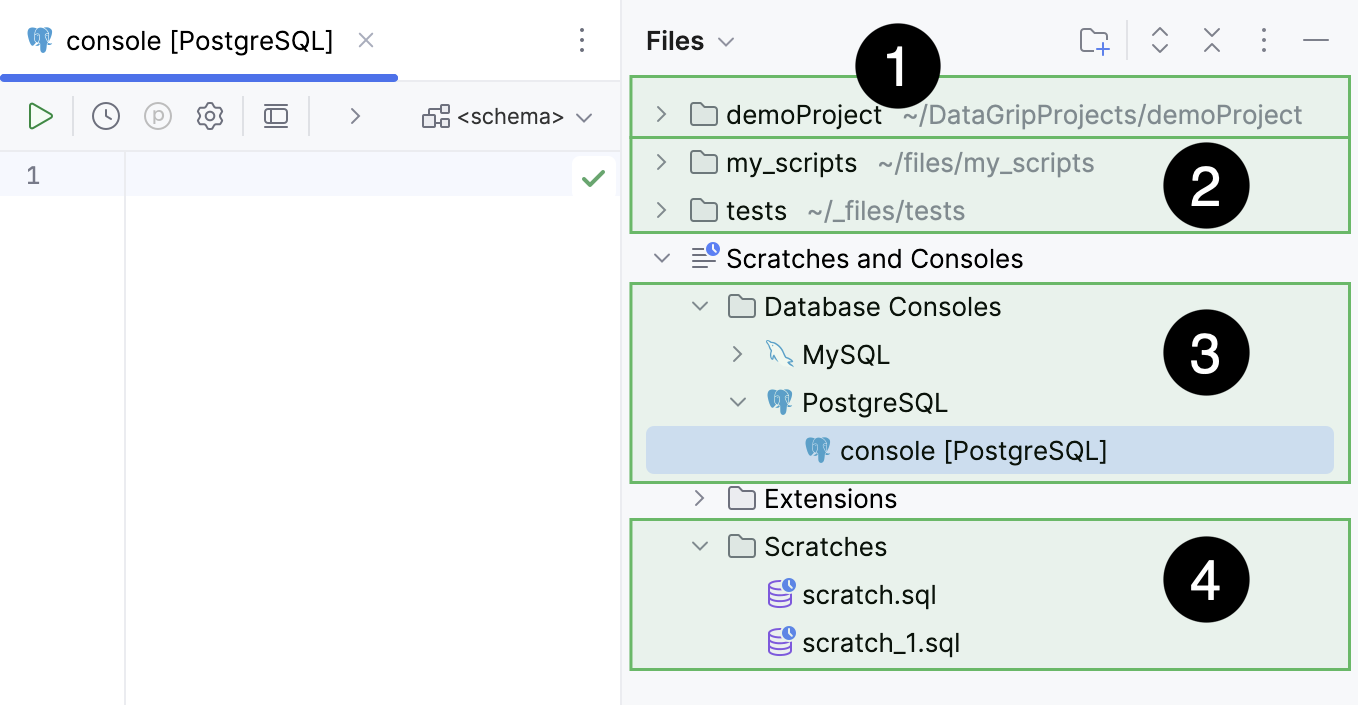
Current project directory.
Attached directories.
Query consoles.
Scratch files.